Hardware Implants, Part 2: Hiding in Plain Sight
by zero
Its Cybersecruity Awareness Month so lets keep the make you more aware of hacking implant type devices. How many hacking implant type devices can you see in this image?
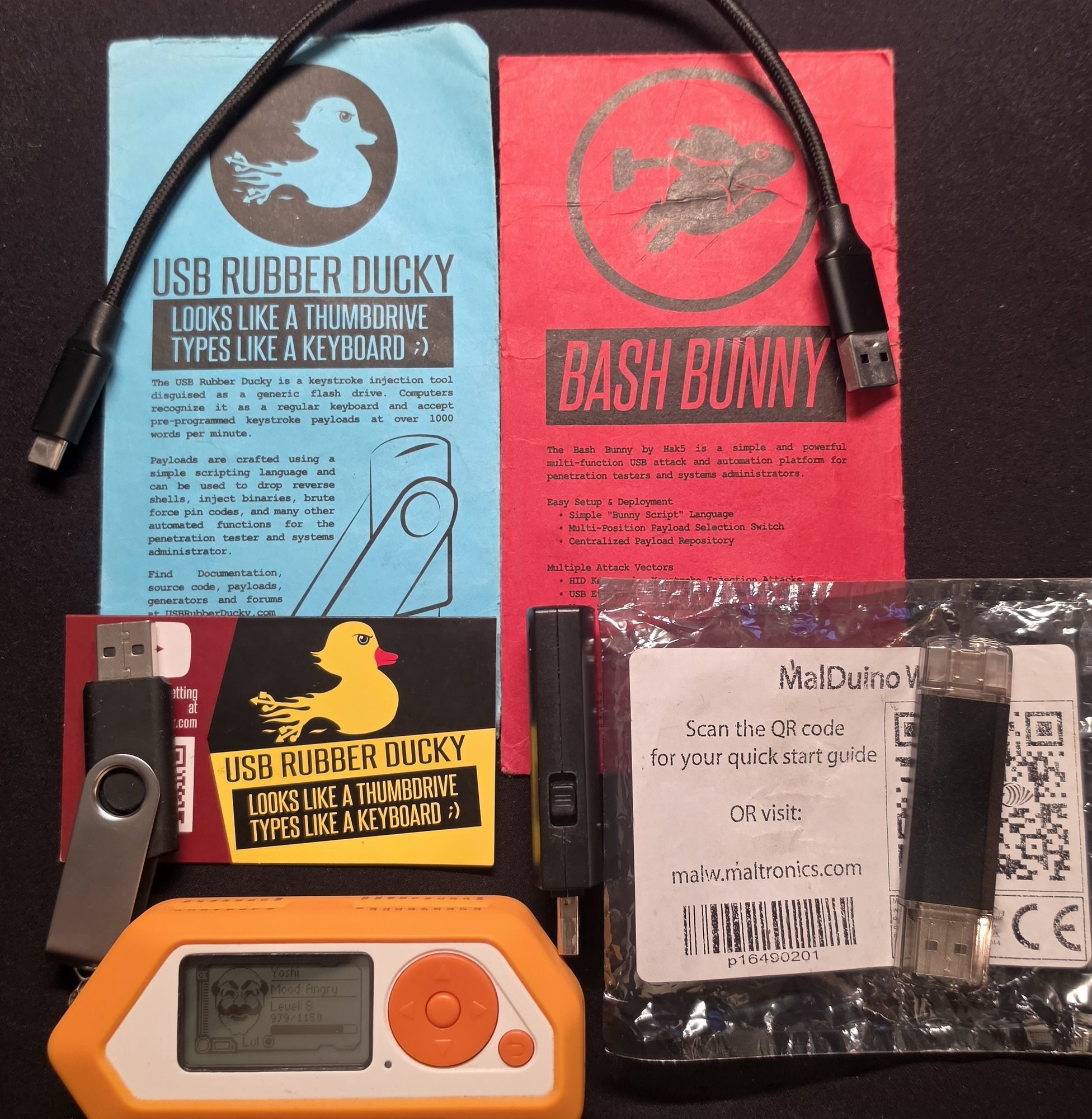
In Part 1 I covered network implants: the little boxes a red teamer plugs into your LAN. This time we’re going on a little smaller form factor tour of the gadgets that don’t look like computers at all, from a humble USB stick all the way down to a chip baked into a motherboard. Then we’ll look at how some of these things actually phone home, and finish on a thought that should make you glance at your gadgets twice.
Every one of them exploits the same assumption: that the ordinary hardware around us is exactly what it appears to be. It usually is, but sometimes “usually” is doing a lot of work you didnt ask for.
The Implant Zoo by Form Factors
The USB stick
The classic. It looks like a flash drive; it isn’t.
- USB Rubber Ducky the original BadUSB stick and still the icon. It’s a keystroke-injection tool: the computer thinks it’s a keyboard, so it trusts it to type, and the Ducky hammers out a pre-written DuckyScript payload at machine speed to open a Command and Control (C2) backdoor before anyone can react.
- Bash Bunny the Ducky’s much bigger brother. It’s a full Debian Linux computer crammed into a USB-stick shell, and its party trick is impersonating several trusted devices at once keyboard, USB Ethernet adapter, storage, serial to pull off multi-vector attacks. It runs proper pentest tooling (nmap, responder, impacket) on the device itself, boots in about seven seconds, and can mass-exfiltrate gigabytes straight onto an onboard microSD no network required, nothing to catch at the firewall. The Mark II even adds Bluetooth LE for remote triggers geofencing and more features.
The wireless dongle
- MalDuino W (~£49) a “wireless BadUSB.” Same keyboard-impersonation trick, but it hosts its own Wi-Fi web interface so you can store thousands of scripts and fire them remotely, or have one run automatically the moment it’s plugged in. No tether, no reprogramming for each job. A warm shoutout to Sunny S for gifting me this wicked device. Currently its out of stock and Im not sure if Seytonic will make more, lets hope he does dont know whats happened to that legion of a hacker? Check his youtube videos out here https://www.youtube.com/@Seytonic/videos and his video specifically about the Original Wireles BadUSB MalDuino W Video
The multitool
- Flipper Zero the friendly orange Swiss-army knife that put a lot of this capability into one pocketable gadget. Among its many tricks, its BadUSB mode does exactly what the Ducky does. It’s dropped the barrier to entry through the floor this is no longer specialist-only kit.
- Flipper + a 2.4GHz add-on = wireless keystroke injection. Bolt a cheap external nRF24 (2.4GHz) module onto the Flipper and it can run a MouseJack-style attack no cable, no USB port, nothing plugged in. Back in 2016, Bastille Networks found that a huge range of wireless keyboards and mice the cheap 2.4GHz-dongle kind, not true Bluetooth devices have USB receivers that don’t properly verify what’s talking to them, and whose mouse traffic is sent unencrypted. The upshot: an attacker up to ~100 metres away can transmit spoofed radio packets that the dongle happily accepts as genuine keystrokes, injecting commands straight into the victim’s PC over the air, through their own wireless mouse or keyboard receiver. Logitech (Unifying), Dell, Lenovo, Microsoft and others were all affected. Vendors shipped dongle firmware fixes but the better part of a decade later, plenty of unpatched receivers are still in daily use. (Fix: update your receiver’s firmware, or move to a wired or genuine-Bluetooth setup.)
(I’ve got a fun clip of a Flipper BadUSB script popping open PowerShell and making a machine announce “Wake up, Neo…” harmless, but it lands the point in about three seconds. I’ll drop the video in here.)
Flipper Zero - MouseJack Attack - Injecting Keystroke Wirelessly PowerShell Matrix Code to Wake Up N
The everyday object
This is where it stops being a gadget you could spot and gets genuinely unsettling.
- O.MG Plug a full implant hidden inside a small USB plug, that is highly portable, small and is a Wi-Fi-controlled attack platform with full C2 for the elite edition.
- O.MG Cable the one to really sit with. It’s a normal-looking USB cable (USB-C, Lightning, micro your choice of colour and material) that behaves exactly like an ordinary cable until it’s triggered: it charges, it transfers data, it logs nothing. Then, on command, it becomes a Wi-Fi access point you drive from a browser, a keystroke injector firing at ~890 keys/second, a hardware keylogger storing hundreds of thousands of keystrokes, with geo-fencing (only fire in-scope) and self-destruct (go inert if carried off-site). Here’s the recalibrating part: a cable like this used to be nation-state kit the NSA’s COTTONMOUTH USB implant was reportedly budgeted around $20,000 a unit. The O.MG Cable does the modern equivalent for about $150. The capability didn’t just improve; it got cheap. FYI this is why some institutions tell you not to plug your phones into strange sockets and cables in Airports…
OMG Cable X-Ray of chip inside.
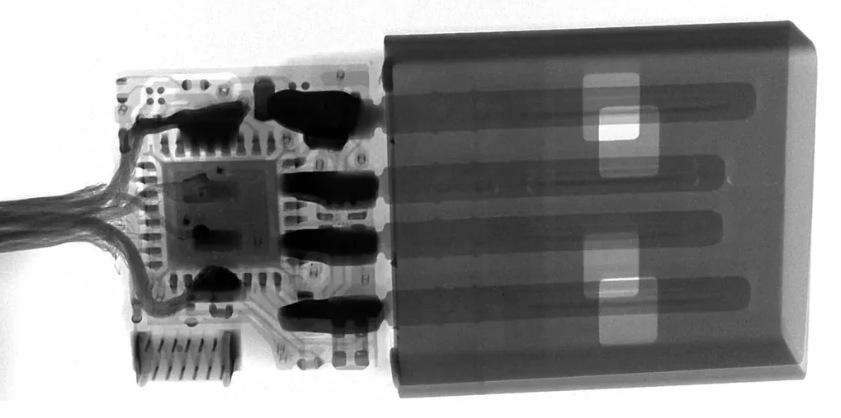
Image source: https://hak5.org/products/omg-cable
The invisible one
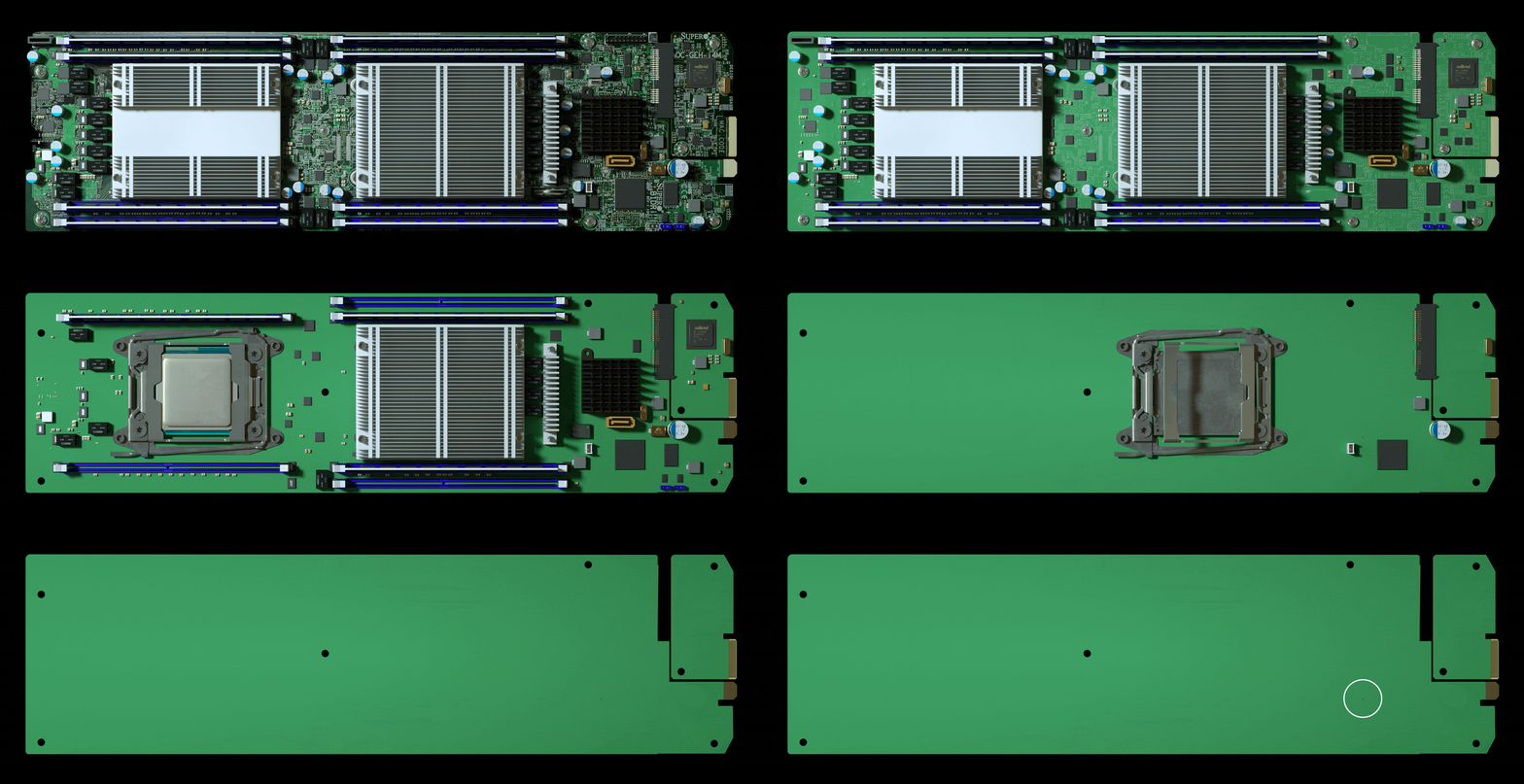
- Silicon / supply-chain implants the deep end. Instead of a device you plug in, the implant is part of the hardware a tiny extra component added to a circuit board during manufacturing, small enough to pass for a routine part. Nothing to confiscate at reception, nothing plugged into a port, nothing a user would ever notice. We’ll come back to how real this is shortly.
Here is a cool animation I found a long time ago of a chip implant on a server motherboard
How Do They Phone Home?
A dormant implant is just a gadget. The moment it needs to take commands or send loot back, it has to communicate and that’s usually the noisiest, most detectable thing it does, so it’s where the real design thought goes.
The clever trick most of them use is beaconing outbound. Firewalls and monitoring are built to block inbound connections, but outbound traffic is generally trusted and allowed. So the implant quietly reaches out to a command-and-control (C2) server it owns; once that channel is open, the operator sends commands and pulls data back down the same connection. Outbound to get inbound, in effect.
How it reaches out is the carrier trade-off range, bandwidth, power, and how easy it is to spot:
- Wi-Fi fast and simple to control from a nearby laptop or phone, but short range (tens of metres indoors). Great for close-access work; it means an operator or a bridge has to be in the area.
- Bluetooth / BLE even shorter range, but so ubiquitous it vanishes into the background. Perfect for triggers and geofencing rather than bulk data exactly how the Bash Bunny and O.MG kit use it.
- Cellular (LTE / 4G / 3G) the stealth option. Effectively unlimited range via the mobile network, and genuinely out-of-band: the traffic never touches the target’s network or monitoring, so there’s nothing for their defenders to see. The cost is a SIM, power draw and needing signal. (3G is being switched off across much of the world now, so modern kit leans on 4G/LTE.)
- LoRa the wildcard. Tiny bandwidth, but huge range (kilometres, line-of-sight). Useless for streaming, perfect for a low-and-slow beacon or trigger “I’m alive,” “activate,” or dribbling out a few credentials at a time from somewhere no Wi-Fi operator could ever sit.
- No radio at all the quietest option of the lot. The Bash Bunny’s mass-exfil-to-microSD approach needs no comms channel; the operator just retrieves the device later. Nothing to intercept because nothing was ever transmitted.
The pattern worth remembering: the stealthiest implants deliberately avoid the target’s own network and carry their traffic on a channel the defender can’t see.
How Far Up Does This Go?
Here’s the uncomfortable bit for Cyber Awareness Month.
Everything above is commercial, cheap, and buildable. A small consultancy with like minded people like me can order an O.MG cable, or build our own implants from off-the-shelf parts, for pocket change. That’s the whole point of this post: the barrier is on the floor.
Now follow that logic upward. It’s been widely reported though it remains speculation, and was flatly denied by everyone named that a government in Asia attempted to compromise companies and government systems in the West by implanting tiny chips into servers at the point of manufacture. That specific story was never proven and is firmly disputed, so treat it as exactly that: unconfirmed.
But the category is not in doubt. Chip and hardware-level implants are 100% real, some leaked government tooling has been documented to have purpose-built hardware implants for years. And the reasoning is simple: if a small consultancy with a modest budget can hide a working implant inside a USB cable, then a nation-state with effectively unlimited money, access to the manufacturing supply chain, and years of patience can absolutely hide one inside a chip. The only real question is whether anyone would ever detect it. Do you check all you devices and cables before plugging into critical systems? Sorry for making your paranoid now potentially…
Here is a punchline, If you were a well-resourced attacker and wanted the perfect implant, you wouldn’t need to smuggle anything into a building at all. You’d want a device that’s always powered, always connected to an out-of-band cellular network, packed with a microphone, camera, GPS and motion sensors, implicitly trusted, and voluntarily carried into every meeting, bedroom and secure area on earth.
That device already exists. It’s the phone in your pocket. Commercial mobile spyware has repeatedly turned ordinary smartphones into exactly that a remote bug the target bought, charges nightly, and never lets out of their sight. Arguably the most powerful implant ever deployed isn’t something an attacker plants. It’s something we all queue up to buy a few times, do you trust your mobile phone manufacturers and their governments?
What This Means for Defenders
Cybersecurity Awareness Month is the perfect excuse to make this real for your people, because the defences are refreshingly human:
- Don’t plug in things you don’t trust. Found a USB stick in the car park? It’s bait. Borrowing a stranger’s cable or charger? Just don’t if you can avoid it. This one habit kills most of the attacks above.
- Use charge-only adapters / USB data blockers on untrusted power, and carry your own cables.
- Lock down USB on endpoints device control, HID allow-listing, and alerting when a new “keyboard” or “network adapter” suddenly appears goes a long way against BadUSB.
- Treat cables, chargers and peripherals as attack surface. They’re cheap to swap and nobody inspects them there are even purpose-built malicious cable detectors now.
- Demand provenance for hardware. Buy from trusted channels, and for sensitive estates, care where your kit came from and whether it’s been tampered with in transit.
- Mind the phones. No-device policies in genuinely sensitive spaces exist for a reason.
- Train the humans. The best control against a free cable, a helpful charger or a “lost” USB stick is a workforce taught to be a little suspicious of the ordinary.
The scariest implants aren’t the ones that look like hacking tools. They’re the ones that look like the cable you’ve used every day for a year or the phone you’re probably reading this on. Stay curious, stay a little paranoid, and maybe have a proper look at what’s plugged in under your desk.
Everything here describes commercially available security-testing gear and publicly reported events, for awareness and authorised testing only. Only test against systems and hardware you own or are explicitly permitted to assess.